

XML technologies / XSLT / Java and XSLT / Further techniques / Internationalization with XSLT
(Excerpt from “Java und XSLT” by Eric M. Burke)
This section covers the main techniques for internationalization (i18n) with XSLT. (i18n stands for internationalization: i + 18 letters + n.) Although Java and XSLT provide excellent i18n support, integrating them into a working application is challenging. This section helps avoid the most common problems.
Designing XSLT stylesheets
The simplest i18n approach provides a separate XSLT stylesheet for each supported language. This requires considerably more effort, however, since stylesheets contain programming logic as well as presentation information. To illustrate this, consider directory.xml in the following example: a simple XML file transformed with a German or an English XSLT stylesheet.
Example: directory.xml
<?xml version="1.0" encoding="ISO-8859-1"?>
<verzeichnis>
    <angestellter kategorie="manager">
        <name>Hans Böhme</name>
        <telefon>45623-21</telefon>
    </angestellter>
    <angestellter kategorie="programmierer">
        <name>Klaus Debes</name>
        <telefon>45623-31</telefon>
    </angestellter>
    <angestellter kategorie="programmierer">
        <name>Volker Stephan</name>
        <telefon>45623-32</telefon>
    </angestellter>
</verzeichnis>
The following figure shows these XML data transformed into HTML using an XSLT stylesheet.
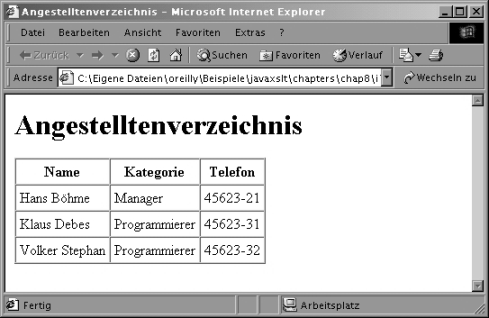
Figure: XSLT output in German
The following example shows the XSLT stylesheet producing this output.
Example: directory_basic.xslt
<?xml version="1.0" encoding="ISO-8859-1"?>
<xsl:stylesheet version="1.0" xmlns:xsl="http://www.w3.org/1999/XSL/Transform">
    <xsl:output method="html" encoding="ISO-8859-1"/>
    <xsl:template match="/">
        <html>
            <head>
                <title>Angestelltenverzeichnis</title>
            </head>
            <body>
                <h1>Angestelltenverzeichnis</h1>
                <table cellpadding="4" cellspacing="0" border="1">
                    <tr>
                        <th>Name</th>
                        <th>Kategorie</th>
                        <th>Telefon</th>
                    </tr>
                    <xsl:for-each select="verzeichnis/angestellter">
                        <tr>
                            <td>
                                <xsl:value-of select="name"/>
                            </td>
                            <td>
                                <xsl:choose>
                                    <xsl:when test="@kategorie='manager'">
                                        <xsl:text>Manager</xsl:text>
                                    </xsl:when>
                                    <xsl:when test="@kategorie='programmierer'">
                                        <xsl:text>Programmierer</xsl:text>
                                    </xsl:when>
                                    <xsl:otherwise>
                                        <xsl:text>Sonstiges</xsl:text>
                                    </xsl:otherwise>
                                </xsl:choose>
                            </td>
                            <td>
                                <xsl:value-of select="telefon"/>
                            </td>
                        </tr>
                    </xsl:for-each>
                </table>
            </body>
        </html>
    </xsl:template>
</xsl:stylesheet>
As you can see, only a tiny part of the XSLT code embedded in the stylesheet’s logic is language-specific. Nevertheless, supporting another language would require an entirely new stylesheet.
Fortunately, there is a solution. XSLT stylesheets can import others, with templates and variables in the importing stylesheet taking precedence over their counterparts in the imported stylesheet. By isolating language-specific content, we can use <xsl:import> to support different languages while reusing all stylesheet logic. The following example shows a revised stylesheet.
Example: directory_de.xslt
<?xml version="1.0" encoding="ISO-8859-1"?>
<xsl:stylesheet version="1.0" xmlns:xsl="http://www.w3.org/1999/XSL/Transform">
    <xsl:output method="html" encoding="ISO-8859-1"/>
    <!-- sprachspezifische Inhalte -->
    <xsl:variable name="sprache.SeitenTitel" select="'Angestelltenverzeichnis'"/>
    <xsl:variable name="sprache.SpalteName" select="'Name'"/>
    <xsl:variable name="sprache.SpalteKategorie" select="'Kategorie'"/>
    <xsl:variable name="sprache.SpalteTelefon" select="'Telefon'"/>
    <xsl:variable name="sprache.Manager" select="'Manager'"/>
    <xsl:variable name="sprache.Programmierer" select="'Programmierer'"/>
    <xsl:variable name="sprache.Sonstiges" select="'Sonstiges'"/>
    <xsl:template match="/">
        <html>
            <head>
                <title><xsl:value-of select="$sprache.SeitenTitel"/></title>
            </head>
            <body>
                <h1><xsl:value-of select="$sprache.SeitenTitel"/></h1>
                <table cellpadding="4" cellspacing="0" border="1">
                    <tr>
                        <th><xsl:value-of select="$sprache.SpalteName"/></th>
                        <th><xsl:value-of select="$sprache.SpalteKategorie"/></th>
                        <th><xsl:value-of select="$sprache.SpalteTelefon"/></th>
                    </tr>
                    <xsl:for-each select="verzeichnis/angestellter">
                        <tr>
                            <td>
                                <xsl:value-of select="name"/>
                            </td>
                            <td>
                                <xsl:choose>
                                    <xsl:when test="@kategorie='manager'">
                                        <xsl:value-of select="$sprache.Manager"/>
                                    </xsl:when>
                                    <xsl:when test="@kategorie='programmierer'">
                                        <xsl:value-of select="$sprache.Programmierer"/>
                                    </xsl:when>
                                    <xsl:otherwise>
                                        <xsl:value-of select="$sprache.Sonstiges"/>
                                    </xsl:otherwise>
                                </xsl:choose>
                            </td>
                            <td>
                                <xsl:value-of select="telefon"/>
                            </td>
                        </tr>
                    </xsl:for-each>
                </table>
            </body>
        </html>
    </xsl:template>
</xsl:stylesheet>
This stylesheet supports internationalization much better. All language-specific content is declared as variables that importing stylesheets can override. The naming convention sprache. makes the stylesheet clearer but is not part of the XSLT specification. Apart from this change, the stylesheet is identical to the previous one.
The following example shows the English version of the stylesheet.
Example: directory_en.xslt
<?xml version="1.0" encoding="ISO-8859-1"?>
<xsl:stylesheet version="1.0" xmlns:xsl="http://www.w3.org/1999/XSL/Transform">
    <xsl:import href="directory_de.xslt"/>
    <xsl:output method="html" encoding="ISO-8859-1"/>
    <!-- sprachspezifischer Inhalt -->
    <xsl:variable name="sprache.SeitenTitel" select="'Employee Directory'"/>
    <xsl:variable name="sprache.SpalteName" select="'Name'"/>
    <xsl:variable name="sprache.SpalteKategorie" select="'Category'"/>
    <xsl:variable name="sprache.SpalteTelefon" select="'Phone'"/>
    <xsl:variable name="sprache.Manager" select="'Manager'"/>
    <xsl:variable name="sprache.Programmierer" select="'Programmer'"/>
    <xsl:variable name="sprache.Sonstiges" select="'Other'"/>
</xsl:stylesheet>
The English stylesheet is much shorter, since it overrides only the language-specific variables. The key is the element <xsl:import>:
<xsl:import href="directory_de.xslt"/>Under XSLT’s conflict resolution rules, variables defined in directory_en.xslt override those from directory_de.xslt. The same rules apply to templates. This matters when the importing stylesheet must change behavior as well as translate text.
The following line is optional:
<xsl:output method="html" encoding="ISO-8859-1"/>Here the output method and encoding match the German stylesheet, so this line has no effect. An importing stylesheet could use another output method or encoding if desired.
Use this command with Xalan to perform the English transformation:
$ java org.apache.xalan.xslt.Process -IN directory.xml -XSL directory_en.xsltThe following figure shows the transformation’s result in a web browser.
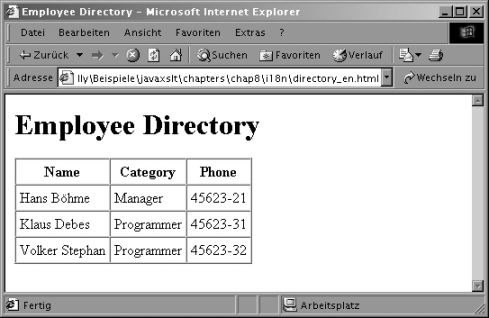
Figure: Output in English
Note:
This chapter’s i18n stylesheets put common functionality in one stylesheet; importing stylesheets replace the language-specific text. The same technique applies to any stylesheet and is especially useful for tailoring XSLT code to specific browsers. Most code works across browsers and belongs in a reusable stylesheet. Variable parts go in browser-specific stylesheets, each importing the common stylesheet.
Encodings
A character encoding is a numeric representation of a particular character. (For detailed information on character encodings, see Java Internationalization by Andy Deitsch and David Czarnecki, O’Reilly.) The US-ASCII encoding of the letter A is 65, for example. Reading or writing a US-ASCII file represents each character with exactly one byte. Only seven bits actually encode the character: the first, most significant bit must always be 0. Thus US-ASCII represents only 128 characters, a problem for languages needing more. Such languages require another encoding.
The most comprehensive character encoding is called ISO/IEC 10646 or Universal Character Set (UCS) and uses 32 bits for each character. Although it identifies every character in every language, most programs do not understand it. Always using 32 bits per character also consumes substantial storage.
Unicode is the official implementation of ISO/IEC 10646 but currently works only with 16-bit characters. UCS Transformation Formats (UTFs) were designed to support UCS encodings while remaining compatible with existing software and other encodings. UTF-8 and UTF-16 are the most common transformation formats; all XML parsers and XSLT processors must support both.
UTF-8 is the most efficient, easiest encoding for English text. Its first 128 characters match US-ASCII, so many applications can use UTF-8 files without difficulty. When additional characters are needed, UTF-8 uses up to three bytes per character.
UTF-16 is more efficient than UTF-8 for Chinese, Japanese and Korean. Each UTF-16 character takes two bytes, while many take three in UTF-8. Either should work, but test transformations with both to find which yields the smallest files for your data. Many applications and operating systems, especially some Unix and Linux variants, support UTF-8 better.
As in almost every XSLT example in this book, the element <xsl:output> determines the encoding of the XSLT result tree:
<xsl:output method="html" encoding="UTF-16"/>If it is absent, the XSLT processor defaults to UTF-8 or UTF-16. (The XSLT specification does not define how the processor chooses between them.)
Producing XML and XSLT
The XML input, XSLT stylesheet and transformation result need not share an encoding or language. For example, an XSLT stylesheet can be encoded in UTF-16 but use UTF-8 for output:
<?xml version="1.0" encoding="UTF-16"?>
<xsl:stylesheet version="1.0" xmlns:xsl="http://www.w3.org/1999/XSL/Transform">
  <xsl:output method="html" encoding="UTF-8"/>
  ...
Although the first line specifies UTF-16, the editor used to write and save the stylesheet must actually use UTF-16. Otherwise, tools such as XMLSpy report errors like the one in the following figure.
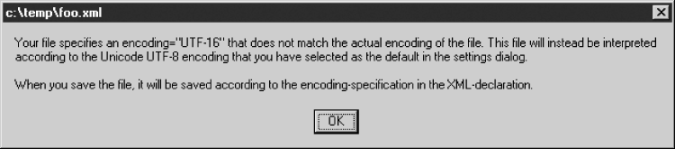
Figure: Error dialog
UTF-16 has several variants, complicating matters further. In UTF-16 Little-Endian (UTF-16LE), a two-byte character’s low-order byte precedes its high-order byte; UTF-16 Big-Endian (UTF-16BE) reverses that. Fortunately, XML parsers detect encoding from a byte-order mark. A UTF-16LE file’s first double byte is 0xFFFE; in UTF-16BE files it is 0xFEFF.
The following Chinese example used the word processor NJStar Chinese to enter Chinese characters. This editor supports entering ideograms and saving them in various encodings. Windows NT’s Notepad can save files in the Unicode format UTF-16LE; Windows 2000’s version also supports UTF-8 and UTF-16BE.
If all else fails, encoded text files can be created with Java class java.io.OutputStreamWriter:
FileOutputStream fos = new FileOutputStream("myFile.xml");
// der OutputStreamWriter spezifiziert die Kodierung der Datei
PrintWriter pw = new PrintWriter(new OutputStreamWriter(fos, "UTF-16"));
...auf pw wird wie auf jeden anderen PrintWriter geschrieben
pw.close( );
Putting it all together
Coordinating the components is often the hardest part of internationalization. We demonstrate this with XML files, stylesheets and a servlet supporting every combination of German, English and Chinese. A simple HTML form lets users choose the XML file and stylesheet for transformation. The following figure shows the page.
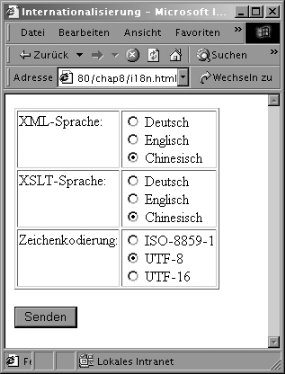
Figure: Choosing XML and XSLT languages
There are three XML versions, one per language, otherwise identical. There are also three stylesheet versions, and users can choose any XML/XSLT language combination. Output encoding is configurable too. UTF-8 and UTF-16 are Unicode-compatible and represent English and Chinese directly. ISO-8859-1, however, represents extended character sets using character references such as 文.
Here users specify language preferences directly. A servlet could instead use the HTTP header Accept-Language, which can list preferred languages:
de, en, zhAn application can choose a suitable language and encoding from this list without asking the user. Chapter 13 of Java Servlet-Programmierung by Jason Hunter (O’Reilly) discusses this technique in detail and presents class LocaleNegotiator, mapping over 30 languages to suitable encodings.
The next figure shows three transformations. The first window applies the Chinese stylesheet to Chinese XML; the second applies German XSLT to English XML; the third applies English XSLT to Chinese XML.
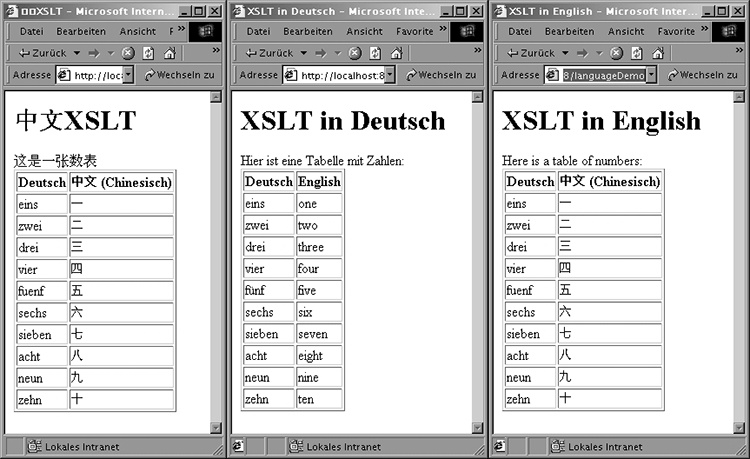
Figure: Different language combinations
Encoding is generally transparent to users. Changing it does not alter the display above, but the difference becomes visible in the page source. With UTF-8, Chinese characters appear in the HTML source. With ISO-8859-1, it looks roughly like this:
<html>
<head>
<META http-equiv="Content-Type" content="text/html; charset=ISO-8859-1">
<title>中文XSLT</title>
</head>
<body>
<h1>中文XSLT</h1>
...der Rest der Seite wurde weggelassenChinese characters are replaced with character references such as 中. The XSLT processor generates these automatically when the output encoding cannot represent the characters directly.
Browser character sets
Current versions of major browsers display UTF-8 and UTF-16 characters without difficulty. Font configuration is the main problem. In Internet Explorer enable the menu option View → Encoding → Auto-Select. Netscape 6’s equivalent is View → Character Coding → Auto-Detect. Question marks or garbled text when testing indicate that the necessary fonts are not installed.
The Chinese examples require Windows 2000’s SimHei and SimSun fonts. These and other fonts are supplied with Windows 2000 but installed only after selecting the corresponding languages in Regional Options, in the Control Panel.
On Unix or Linux, Netscape 6’s Help menu is a good starting point. The option International Users links to a page with font information for the various Unix and Linux versions running Netscape.
XML data
Each of this example’s three XML files follows the format below. The XML data simply translate German into another language. All three filenames follow the same convention: zahlen_deutsch.xml, zahlen_englisch.xml and zahlen_chinesisch.xml.
Example: zahlen_englisch.xml
<?xml version="1.0" encoding="ISO-8859-1"?>
<zahlen>
    <sprache>Englisch</sprache>
    <zahl deutsch="eins">one</zahl>
    <zahl deutsch="zwei">two</zahl>
    <zahl deutsch="drei">three</zahl>
    <zahl deutsch="vier">four</zahl>
    <zahl deutsch="fünf">five</zahl>
    <zahl deutsch="sechs">six</zahl>
    <zahl deutsch="sieben">seven</zahl>
    <zahl deutsch="acht">eight</zahl>
    <zahl deutsch="neun">nine</zahl>
    <zahl deutsch="zehn">ten</zahl>
</zahlen>
XSLT stylesheets
The stylesheet zahlen_deutsch.xslt appears below. It follows the pattern introduced earlier, isolating language-specific data as a collection of variables.
Example: zahlen_deutsch.xslt
<?xml version="1.0" encoding="ISO-8859-1"?>
<xsl:stylesheet version="1.0" xmlns:xsl="http://www.w3.org/1999/XSL/Transform">
    <xsl:output method="html" encoding="ISO-8859-1"/>
    <xsl:variable name="sprache.SeitenTitel">XSLT in Deutsch</xsl:variable>
    <xsl:variable name="sprache.TabellenCaption">Hier ist eine Tabelle mit Zahlen:</xsl:variable>
    <xsl:variable name="sprache.Heading">Deutsch</xsl:variable>
    <xsl:template match="/">
        <html>
            <head>
                <title><xsl:value-of select="$sprache.SeitenTitel"/></title>
            </head>
            <body>
                <xsl:apply-templates select="zahlen"/>
            </body>
        </html>
    </xsl:template>
    <xsl:template match="zahlen">
        <h1><xsl:value-of select="$sprache.SeitenTitel"/></h1>
        <xsl:value-of select="$sprache.TabellenCaption"/>
        <table border="1">
            <tr>
                <th><xsl:value-of select="$sprache.Heading"/></th>
                <th><xsl:value-of select="sprache"/></th>
            </tr>
            <xsl:apply-templates select="zahl"/>
        </table>
    </xsl:template>
    <xsl:template match="zahl">
        <tr>
            <td><xsl:value-of select="@deutsch"/></td>
            <td><xsl:value-of select="."/></td>
        </tr>
    </xsl:template>
</xsl:stylesheet>
This stylesheet’s output encoding is ISO-8859-1, but the servlet can and will override it. The English stylesheet zahlen_englisch.xslt appears in the following example.
Example: zahlen_englisch.xslt
<?xml version="1.0" encoding="UTF-8"?>
<xsl:stylesheet version="1.0" xmlns:xsl="http://www.w3.org/1999/XSL/Transform">
    <xsl:import href="zahlen_deutsch.xslt"/>
    <xsl:variable name="sprache.SeitenTitel">XSLT in English</xsl:variable>
    <xsl:variable name="sprache.TabellenCaption">Here is a table of numbers:</xsl:variable>
    <xsl:variable name="sprache.Heading">Englisch</xsl:variable>
</xsl:stylesheet>
The Chinese stylesheet zahlen_chinese.xslt is omitted because it has the same structure as the English one. Both import zahlen_deutsch.xslt and override the three variables with their respective translations.
Web page and servlet
Users start at the page in figure Choosing XML and XSLT languages. Its HTML appears below. Language and encoding selections are sent to the servlet when the user clicks “Submit”.
Example: i18n.html
<html>
    <head>
        <title>Internationalisierung</title>
    </head>
    <body>
        <form method="post" action="/chap8/languageDemo">
            <table border="1">
                <tr valign="top">
                    <td>XML-Sprache:</td>
                    <td>
                        <input type="radio" name="xmlLanguage" checked="checked" value="deutsch"> Deutsch<br />
                        <input type="radio" name="xmlLanguage" value="englisch"> Englisch<br />
                        <input type="radio" name="xmlLanguage" value="chinesisch"> Chinesisch
                    </td>
                </tr>
                <tr valign="top">
                    <td>XSLT-Sprache:</td>
                    <td>
                        <input type="radio" name="xsltLanguage" checked="checked" value="deutsch"> Deutsch<br />
                        <input type="radio" name="xsltLanguage" value="englisch"> Englisch<br />
                        <input type="radio" name="xsltLanguage" value="chinesisch"> Chinesisch
                    </td>
                </tr>
                <tr valign="top">
                    <td>Zeichenkodierung:</td>
                    <td>
                        <input type="radio" name="charEnc" value="ISO-8859-1"> ISO-8859-1<br />
                        <input type="radio" name="charEnc" value="UTF-8" checked="checked"> UTF-8<br />
                        <input type="radio" name="charEnc" value="UTF-16"> UTF-16<br />
                    </td>
                </tr>
            </table>
            <p><input type="submit" name="submitBtn" value="Senden"></p>
        </form>
    </body>
</html>
The following example shows servlet LanguageDemo.java. It accepts form data from the page i18n.html and performs the XSLT transformation.
Example: LanguageDemo.java servlet
package chap8;

import java.io.*;
import javax.servlet.*;
import javax.servlet.http.*;
import javax.xml.transform.*;
import javax.xml.transform.stream.*;

/**
 * Erlaubt eine Kombination von deutschem, englischem und chinesischem XML
 * und XSLT.
 */
public class LanguageDemo extends HttpServlet {

  public void doPost(HttpServletRequest req, HttpServletResponse res)
      throws ServletException, IOException {
    ServletContext ctx = getServletContext( );

    // das sind die benötigten Parameter des HTML-Formulars
    String xmlLang = req.getParameter("xmlLanguage");
    String xsltLang = req.getParameter("xsltLanguage");
    String charEnc = req.getParameter("charEnc");

    // erzeuge systemabhängige Pfadnamen
    String xmlFileName = ctx.getRealPath(
      "/WEB-INF/xml/zahlen_" + xmlLang + ".xml");
    String xsltFileName = ctx.getRealPath(
      "/WEB-INF/xslt/zahlen_" + xsltLang + ".xslt");

    // vor dem Aufruf von HttpServletResponse.getWriter( ) ausführen
    res.setContentType("text/html; charset=" + charEnc);

    try {
      Source xmlSource = new StreamSource(new File(xmlFileName));
      Source xsltSource = new StreamSource(new File(xsltFileName));

      TransformerFactory transFact = TransformerFactory.newInstance( );
      Transformer trans = transFact.newTransformer(xsltSource);

      trans.setOutputProperty(OutputKeys.ENCODING, charEnc);

      // Bemerkung: res.getWriter( ) benutzt die Kodierung,
      // die mit res.setContentType( ) eingestellt wurde
      trans.transform(xmlSource, new StreamResult(res.getWriter( )));

    } catch (TransformerConfigurationException tce) {
      throw new ServletException(tce);
    } catch (TransformerException te) {
      throw new ServletException(te);
    }
  }
}
After retrieving the XML, XSLT and encoding request parameters, the servlet converts the XML and XSLT names into actual filenames:
String xmlFileName = ctx.getRealPath("/WEB-INF/xml/zahlen_" + xmlLang + ".xml");
String xsltFileName = ctx.getRealPath("/WEB-INF/xslt/zahlen_" + xsltLang + ".xslt");
Consistent naming makes these filenames easy to determine. Next, the response’s content type is set:
// vor dem Aufruf von HttpServletResponse.getWriter( ) ausführen
res.setContentType("text/html; charset=" + charEnc);
This tells the servlet container which encoding to use for the response to the client. It is recorded as Content-Type in the HTTP response header so the browser can determine the expected encoding. Here the three available encodings correspond to these content types:
Content-Type: text/html; charset=ISO-8869-1
Content-Type: text/html; charset=UTF-8
Content-Type: text/html; charset=UTF-16
Next, the servlet uses the interface javax.xml.transform.Source and the class javax.xml.transform.stream.StreamSource to read the XML and XSLT files:
Source xmlSource = new StreamSource(new File(xmlFileName));
Source xsltSource = new StreamSource(new File(xsltFileName));
Using java.io.File lets StreamSource correctly detect XML and XSLT encodings by evaluating each file’s XML declaration. The constructor StreamSource also accepts parameters InputStream and Reader. Be particularly careful with the Reader constructors: implementations of Reader use Java’s default encoding, set when the VM starts. With InputStreamReader, an encoding can be specified as follows:
Source xmlSource = new StreamSource(new InputStreamReader(new FileInputStream(xmlFileName), "UTF-8"));For more on Java character encodings, see the JavaDoc for package java.lang.
Our servlet then overrides the stylesheet’s encoding:
trans.setOutputProperty(OutputKeys.ENCODING, charEnc);This takes precedence over the encoding set in the element <xsl:output>; see example zahlen_deutsch.xslt.
Finally, the servlet performs the transformation, obtains from HttpServletResponse a Writer and sends the result to it:
// Bemerkung: res.getWriter( ) benutzt die Kodierung,
// die mit res.setContentType( ) eingestellt wurde
trans.transform(xmlSource, new StreamResult(res.getWriter( )));
As the comment says, the servlet container should configure the Writer for the encoding specified in the HTTP header’s Content-Type.
Troubleshooting internationalization
Check the following when problems occur. Eliminate obvious errors:
Visit a site in the language you want to produce. For example, the China Daily website offers a Chinese display option. This ensures the browser loads the right fonts.
Test your application with German XML data and stylesheets to ensure transformations run correctly.
Run the XSLT transformation from the command line. Save the result to a file and view it in a Unicode-compatible editor. If that fails, inspect it with a binary editor to see how characters are encoded.
Check that your XML parser supports these encodings. (Apache Xerces’ supported encodings are documented in the General FAQs.)
If these checks do not reveal the problem, try the following:
Keep using UTF-8 until the problems are resolved. It is the most universal encoding.
Check that the servlet sets the right
Content-Typein the file header:
Content-Type: text/html; charset=UTF-8Check that the stylesheet sets the right encoding in the element
<xsl:output>and override it if necessary:
transformer.setOutputProperty(OutputKeys.ENCODING, "UTF-8");Add servlet code that writes the transformation result to a file rather than to a
WriterfromHttpServletResponse. Inspect that file in a Unicode-compatible editor.Use
java.io.Fileorjava.io.InputStreaminstead ofjava.io.Readerwhen reading XML and XSLT files.
Copyright © 2002 O'Reilly Verlag GmbH & Co. KG
You may print the online version for your private use.
Otherwise, this chapter from “Java und XSLT” is subject to the same conditions as the bound edition. The work, including all its parts, is protected by copyright. All rights reserved, including reproduction, translation, microfilming, and storage and processing in electronic systems.
O’Reilly Verlag GmbH & Co. KG, Balthasarstraße 81, 50670 Köln, kommentar(at)oreilly.de