

XML technologies / XSLT / Java and XSLT / Further techniques / Browser detection
(Excerpt from “Java und XSLT” by Eric M. Burke)
XSLT separates data from presentation. Supporting different transformations requires only different stylesheets; the remaining task is choosing one. In a web application, HTTP header User-Agent provides the answer.
HTTP requests contain headers and a body. Headers are name-value pairs exchanging additional client-server information. This example is a complete Netscape 6.0 request on Windows 2000.
Example: Netscape 6 HTTP request
GET / HTTP/1.1
Host: localhost:80
User-Agent: Mozilla/5.0 (Windows; U; Windows NT 5.0; en-US; m18) Gecko/20001108 Netscape6/6.0
Accept: */*
Accept-Language: en
Accept-Encoding: gzip,deflate,compress,identity
Keep-Alive: 300
Connection: keep-alive
To identify the browser, parse and evaluate the User-Agent. The servlet can then choose a stylesheet accounting for that browser’s strengths and weaknesses.
Unfortunately, hundreds of User-Agent variations exist without a standard vendor format. Common browsers can nevertheless be identified fairly easily. This table shows User-Agents for common browsers.
Table: Common User-Agent values
User-Agent | Browser |
|---|---|
Lynx/2.8rel.3 libwww-FM/2.14 | Lynx 2.8rel3 |
Mozilla/4.0 (compatible; MSIE 4.0; Windows NT) | Internet Explorer 4.0 |
Mozilla/4.0 (compatible; MSIE 5.5; Windows NT 5.0) | Internet Explorer 5.5 |
Mozilla/4.08 [en] (WinNT; U ;Nav) | Netscape 4.08 |
Mozilla/5.0 (Windows; U; Windows NT 5.0; en-US; m18) | Netscape 6 |
Mozilla/3.0 (compatible; Opera/3.0; Windows 95/NT4) v3.1 | Opera 3.0 |
Lynx is the commonest text-only browser. If the User-Agent starts with Lynx, use a stylesheet omitting all graphics.
The three most popular browsers are Microsoft Internet Explorer, Netscape Navigator and Opera. Navigator came first; its User-Agent always starts with Mozilla. Early websites often offered sophisticated versions only to Netscape.
When Internet Explorer arrived, its User-Agent also had to start with Mozilla for compatibility with existing sites. So testing for Mozilla alone does not identify the browser. Microsoft browsers include text MSIE followed by a version number, making detection easy.
Newer Opera also starts with Mozilla. However, the User-Agent always contains Opera/[version];, where [version] is, for example, 2.0 or 3.0. These rules suggest this detection algorithm:
if (beginnt-mit "Lynx") {
  Browser kann nur Text darstellen
}
else if (enthält "MSIE") {
  es handelt sich um den Internet Explorer
}
else if (enthält "Opera") {
  es handelt sich um den Opera-Browser
}
else if (beginnt-mit "Mozilla") {
  der Browser ist Netscape-kompatibel
}
else {
  unbekannter Browser
}
In a servlet, get the User-Agent value with this code:
protected void doGet(HttpServletRequest req, HttpServletResponse res)
    throws IOException, ServletException {
  String userAgent = req.getHeader("User-Agent");
  String xslt = null;
  if (userAgent.startsWith("Lynx")) {
    xslt = "textHomePage.xslt";
  } else {
    xslt = "htmlHomePage.xslt";
  }
  ...
A complex application might use a utility class determining browser, version and, if possible, platform. You could write one using class java.lang.String, but an existing API is easier. This figure shows a servlet reporting browser information.
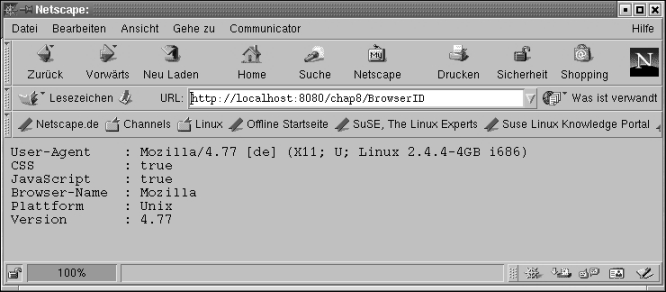
Figure: Browser detection
This servlet uses class org.apache.turbine.util.BrowserDetector from Apache’s Turbine Web Application Framework, here version 2.1 of Turbine. The class depends on only one other Turbine component, so remove its reference to class RunData or add the Turbine JAR to CLASSPATH. Read and follow Apache’s license before extracting and using the class. The next example contains the servlet code.
Example: BrowserID.java
import java.io.*;
import javax.servlet.*;
import javax.servlet.http.*;

import org.apache.turbine.util.BrowserDetector;

public class BrowserID extends HttpServlet {

   protected void doGet(HttpServletRequest req, HttpServletResponse res)
           throws IOException, ServletException {
        BrowserDetector bd = new BrowserDetector(req.getHeader(
                 "User-Agent"));

        res.setContentType("text/plain");

        PrintWriter pw = res.getWriter( );
        pw.println("User-Agent : " + bd.getUserAgentString( ));
        pw.println("Unterstütze CSS : " + bd.isCssOK( ));
        pw.println("JavaScript : " + bd.isJavascriptOK( ));
        pw.println("Browser-Name : " + bd.getBrowserName( ));
        pw.println("Plattform : " + bd.getBrowserPlatform( ));
        pw.println("Version : " + bd.getBrowserVersion( ));
   }
}
Copyright © 2002 O'Reilly Verlag GmbH & Co. KG
You may print the online version for your private use.
Otherwise, this chapter from “Java und XSLT” is subject to the same conditions as the bound edition. The work, including all its parts, is protected by copyright. All rights reserved, including reproduction, translation, microfilming, and storage and processing in electronic systems.
O’Reilly Verlag GmbH & Co. KG, Balthasarstraße 81, 50670 Köln, kommentar(at)oreilly.de
back to top