

XML technologies / XSLT / Java and XSLT / Further techniques / XSLT templates for page layout
(Excerpt from “Java und XSLT” by Eric M. Burke)
Dynamic, interactive applications are often excessive. Small businesses need static pages for vacancies, products and basic information. Intranets commonly have many departments and project groups maintaining sites, often without programmers. Their authors can create simple XHTML pages but lack XML, XSLT and servlet training. A consistent look and feel is essential.
XSLT effectively ensures consistent layout. Authors create XHTML with their preferred tools, omitting frames and navigation. A stylesheet adds navigation bars along the top and left, as illustrated. Individual pages must therefore have no navigation bars of their own.
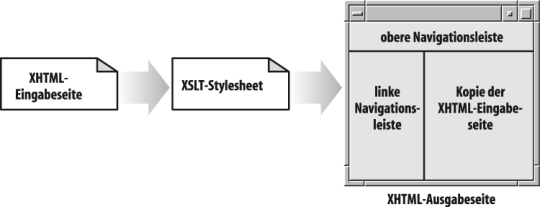
Figure: XSLT template layout
Since top navigation is dynamic, each published XHTML page must include a <meta> tag:
<meta name="navigationsKategorie" content="home"/>This identifies the current category so the stylesheet can highlight it. Add a second <meta> tag for subcategories if needed. The figure shows category hyperlinks, but graphical navigation can use the same approach.
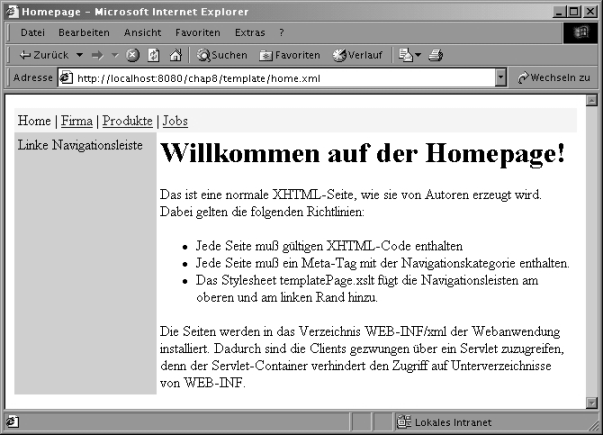
Figure: XHTML output with navigation bars
One stylesheet controls page layout, so edits affect the whole site. The home page follows.
Example: home.xml
<?xml version="1.0" encoding="ISO-8859-1"?>
<html>
   <head>
      <title>Homepage</title>
      <meta name="navigationsKategorie" content="home"/>
   </head>
   <body>
      <h1>Willkommen auf unserer Homepage!</h1>
      <div>Das ist eine normale XHTML-Seite, wie sie von Autoren erzeugt wird. Dabei gelten die folgenden Richtlinien:
         <ul>
            <li>Jede Seite muß gültigen XHTML-Code enthalten</li>
            <li>Jede Seite muß ein Meta-Tag mit der Navigationskategorie enthalten.</li>
            <li>Das Stylesheet templatePage.xslt fügt die Navigationsleisten am oberen und am linken Rand hinzu.</li>
         </ul>
         Die Seiten werden in das Verzeichnis WEB-INF/xml der Webanwendung installiert. Dadurch sind die Clients gezwungen, über ein Servlet zuzugreifen, denn der Servlet-Container verhindert den Zugriff auf Unterverzeichnisse von WEB-INF.
      </div>
   </body>
</html>
All pages must be well-formed XML for XSLT. This is good practice and straightforward for HTML authors converting to XHTML. (HTML TIDY is a free HTML-to-XHTML converter.)
Programmers can supply scripts validating against an XHTML DTD to catch errors before publication.
Note:
Strict XHTML conformance makes site-management software easier to write because content is consistently structured and easily parsed.
The stylesheet searches for tag <meta>, requiring elements <html>, <head> and <meta>. Without tag <meta>, the category is unknown and no link is highlighted. Sections <head> and <body> are copied into the result. This example shows the stylesheet adding navigation.
Example: templatePage.xslt
<?xml version="1.0" encoding="ISO-8859-1"?>
<!--
   *********************************************************************
   ** Dieses Stylesheet wird von allen Webseiten verwendet. Es definiert
   ** die Position des Seitenkopfes und der Navigationsleiste.
   ****************************************************************** -->
<xsl:stylesheet version="1.0" xmlns:xsl="http://www.w3.org/1999/XSL/Transform">
   <!--
      *******************************************************************
      ** Der Ergebnisbaum in XHTML
      **************************************************************** -->
   <xsl:output method="xml" doctype-public="-//W3C//DTD XHTML 1.0 Transitional//EN" doctype-system="http://www.w3.org/TR/xhtml1/DTD/xhtml1-transitional.dtd" encoding="ISO-8859-1"/>
   <!--
      *******************************************************************
      ** Die Navigationskategorie wird durch das <meta>-Tag im XHTML-Quelldokument
      ** bestimmt. Die obere Navigationsleiste benutzt diese Variable.
      **************************************************************** -->
   <xsl:variable name="global.nav.kategorie">
      <xsl:choose>
         <xsl:when test="/html/head/meta[@name='navigationsKategorie']">
            <xsl:value-of select="/html/head/meta[@name='navigationsKategorie']/@content"/>
         </xsl:when>
         <xsl:otherwise>
            <xsl:text>unbekannt</xsl:text>
         </xsl:otherwise>
      </xsl:choose>
   </xsl:variable>
   <!--
      *******************************************************************
      ** Dieses Template erzeugt das XHTML-Dokument.
      **************************************************************** -->
   <xsl:template match="/">
      <html>
         <!-- kopiere das Element <head> aus dem Quelldokument -->
         <xsl:copy-of select="html/head"/>
         <body>
            <!-- diese Tabelle bestimmt das Layout der Seite -->
            <table width="100%" cellpadding="4" cellspacing="0" border="0">
               <tr bgcolor="#f0f0f0">
                  <td colspan="2">
                     <xsl:call-template name="createTopNavbar"/>
                  </td>
               </tr>
               <tr valign="top">
                  <td bgcolor="#cccccc" width="150px">
                     <xsl:call-template name="createLeftNavbar"/>
                  </td>
                  <td bgcolor="white">
                     <!--
                        *******************************************************
                        ** Kopiere den Inhalt des Abschnitts <body> aus dem XHTML-
                        ** Quelldokument in das XHTML-Ergebnisdokument.
                        **************************************************** -->
                     <xsl:copy-of select="html/body/* | html/body/text( )"/>
                  </td>
               </tr>
            </table>
         </body>
      </html>
   </xsl:template>
   <!--
      *******************************************************************
      ** Dieses Template erzeugt die obere Navigationsleiste.
      **************************************************************** -->
   <xsl:template name="createTopNavbar">
      <xsl:call-template name="navButton">
         <xsl:with-param name="kategorie" select="'home'"/>
         <xsl:with-param name="displayName" select="'Home'"/>
         <xsl:with-param name="url" select="'home.xml'"/>
      </xsl:call-template>
      |
      <xsl:call-template name="navButton">
         <xsl:with-param name="kategorie" select="'company'"/>
         <xsl:with-param name="displayName" select="'Firma'"/>
         <xsl:with-param name="url" select="'company.xml'"/>
      </xsl:call-template>
      |
      <xsl:call-template name="navButton">
         <xsl:with-param name="kategorie" select="'products'"/>
         <xsl:with-param name="displayName" select="'Produkte'"/>
         <xsl:with-param name="url" select="'products.xml'"/>
      </xsl:call-template>
      |
      <xsl:call-template name="navButton">
         <xsl:with-param name="kategorie" select="'jobs'"/>
         <xsl:with-param name="displayName" select="'Jobs'"/>
         <xsl:with-param name="url" select="'jobs.xml'"/>
      </xsl:call-template>
   </xsl:template>
   <!--
      *******************************************************************
      ** Dieses Template erzeugt einen Button in der oberen Navigationsleiste.
      **************************************************************** -->
   <xsl:template name="navButton">
      <xsl:param name="kategorie"/>
      <xsl:param name="displayName"/>
      <xsl:param name="url"/>
      <xsl:choose>
         <!-- Die aktuelle Kategorie wird als Text dargestellt -->
         <xsl:when test="$kategorie = $global.nav.kategorie">
            <xsl:value-of select="$displayName"/>
         </xsl:when>
         <!-- Alle anderen Kategorien werden als Hyperlinks dargestellt -->
         <xsl:otherwise>
            <a href="{$url}">
               <xsl:value-of select="$displayName"/>
            </a>
         </xsl:otherwise>
      </xsl:choose>
   </xsl:template>
   <!--
      *******************************************************************
      ** Dieses Template erzeugt die linke Navigationsleiste.
      **************************************************************** -->
   <xsl:template name="createLeftNavbar">Linke Navigationsleiste</xsl:template>
</xsl:stylesheet>
The stylesheet first initializes variable global.nav.kategorie. It uses XPath to find a <meta> tag with attribute navigationsKategorie:
<xsl:variable name="global.nav.kategorie">
   <xsl:choose>
      <xsl:when test="/html/head/meta[@name='navigationsKategorie']">
         <xsl:value-of select="/html/head/meta[@name='navigationsKategorie']/@content"/>
      </xsl:when>
      <xsl:otherwise>
         <xsl:text>unbekannt</xsl:text>
      </xsl:otherwise>
   </xsl:choose>
</xsl:variable>
The expression’s first part in <xsl:when> locates all <meta> tags:
/html/head/metaA predicate then selects the <meta> tag with attribute navigationsKategorie:
[@name='navigationsKategorie']If found, attribute content is assigned to variable global.nav.kategorie; otherwise its value is unknown.
A template matches pattern / and defines XHTML layout by creating a <table>. Section <head> is simply copied from the source:
<xsl:copy-of select="html/head"/>This preserves the authors’ styles and scripts. Their CSS styles may alter navigation fonts and colors. To prevent this, design a stylesheet ignoring all <style> tags and style attributes from the original XHTML.
After copying section <head>, the stylesheet creates the result <body>. An XHTML <table> controls layout; additional templates create navigation:
<xsl:call-template name="createTopNavbar"/>
...
<xsl:call-template name="createLeftNavbar"/>
Template createTopNavbar highlights the current category, while template createLeftNavbar merely copies static content. Finally, the source <body> content is copied into the result:
<xsl:copy-of select="html/body/* | html/body/text( )"/>Unlike section <head>, section <body> itself is not copied. Instead, all elements and text inside section <body> are copied, avoiding this invalid XHTML:
<tr><td><body>...</body></td></tr>
Template createTopNavbar creates a top navigation row, calling template navButton for each category:
<xsl:call-template name="navButton">
   <xsl:with-param name="kategorie" select="'home'"/>
   <xsl:with-param name="displayName" select="'Home'"/>
   <xsl:with-param name="url" select="'home.xml'"/>
</xsl:call-template>
Parameter kategorie allows template navButton to decide whether parameter displayName is rendered as a link or text. Its code appears in template navButton in example templatePage.xslt and is not repeated here.
A servlet must coordinate this process. All original XHTML pages without navigation are stored under the application’s WEB-INF directory using extension .xml. Clients cannot directly access pages under WEB-INF but must retrieve them through servlet TemplateServlet. It finds XML, applies stylesheet templatePage.xslt and returns the result. Clients see only the transformation output.
The table shows the complete WAR structure.
Table: WAR contents
File | Constant |
|---|---|
WEB-INF/web.xml | Deployment descriptor (see example Deployment descriptor) |
WEB-INF/classes/chap8/TemplateServlet.class | Servlet controlling XSLT (see example TemplateServlet.java) |
WEB-INF/lib/javaxslt.jar | Contains class |
WEB-INF/xml/company.xml | A sample page |
WEB-INF/xml/home.xml | A sample page (see example home.xml ) |
WEB-INF/xml/jobs.xml | A sample page |
WEB-INF/xml/products.xml | A sample page |
WEB-INF/xslt/templatePage.xslt | XSLT stylesheet (see example templatePage.xslt) |
Deployment descriptor web.xml follows in this example.
Example: Deployment descriptor
<?xml version="1.0" encoding="ISO-8859-1"?>
<!DOCTYPE web-app PUBLIC "-//Sun Microsystems, Inc.//DTD Web Application 2.2//EN" "http://java.sun.com/j2ee/dtds/web-app_2.2.dtd">
<web-app>
   <servlet>
      <servlet-name>template</servlet-name>
      <servlet-class>chap8.TemplateServlet</servlet-class>
   </servlet>
   <servlet-mapping>
      <servlet-name>template</servlet-name>
      <url-pattern>/template/*</url-pattern>
   </servlet-mapping>
</web-app>
With all files hidden in WEB-INF, clients must use the descriptor’s URL pattern /template/*. On a local server, use "http://localhost:8080/chap8/template/home.xml".
This displays the page in figure XHTML output with navigation bars. URL word template maps to the servlet, while /home.xml is the path information, obtained through servlet method getPathInfo( ) from the HttpServletRequest. Source for TemplateServlet follows.
Example: TemplateServlet.java
package chap8;

import com.oreilly.javaxslt.util.StylesheetCache;
import java.io.*;
import java.net.*;
import javax.servlet.*;
import javax.servlet.http.*;
import javax.xml.transform.*;
import javax.xml.transform.stream.*;

/**
 * Wendet ein Standard-Stylesheet auf alle XML-Seiten an.
 */
public class TemplateServlet extends HttpServlet {
  private String xsltFileName;

  /**
   * Lokalisiere das Template-Stylesheet während der Initialisierung des Servlets.
   */
  public void init( ) throws UnavailableException {
    ServletContext ctx = getServletContext( );
    this.xsltFileName = ctx.getRealPath(
      "/WEB-INF/xslt/templatePage.xslt");
    File f = new File(this.xsltFileName);
    if (!f.exists( )) {
      throw new UnavailableException(
        "XSLT-Stylesheet nicht gefunden: "
        + this.xsltFileName, 30);
    }
  }

  public void doGet(HttpServletRequest req, HttpServletResponse res)
      throws ServletException, IOException {
    try {
      // benutze den ServletContext, um die XML-Datei zu finden
      ServletContext ctx = getServletContext( );
      String xmlFileName = ctx.getRealPath("/WEB-INF/xml"
        + req.getPathInfo( ));

      // prüfe, ob die Datei existiert
      if (!new File(xmlFileName).exists( )) {
        res.sendError(HttpServletResponse.SC_NOT_FOUND, xmlFileName);
      } else {
        res.setContentType("text/html");

        // lade die XML-Datei
        Source xmlSource = new StreamSource(new BufferedReader(
          new FileReader(xmlFileName)));

        // benutze eine zwischengespeicherte Version des XSLT-Stylesheets
        Transformer trans =
          StylesheetCache.newTransformer(xsltFileName);
        trans.transform(xmlSource, new StreamResult(res.getWriter( )));
      }
    } catch (TransformerConfigurationException tce) {
      throw new ServletException(tce);
    } catch (TransformerException te) {
      throw new ServletException(te);
    }
  }
}
This simple servlet transforms XML. In method init( ) it finds stylesheet templatePage.xslt in directory WEB-INF/xslt:
ServletContext ctx = getServletContext( );
this.xsltFileName = ctx.getRealPath(
         "/WEB-INF/xslt/templatePage.xslt");
As explained earlier, method getRealPath( ) converts a path to system-specific form so class StylesheetCache can find the stylesheet. Servlet method doGet( ) uses the same technique for the requested XML:
ServletContext ctx = getServletContext( );
String xmlFileName = ctx.getRealPath("/WEB-INF/xml"
       + req.getPathInfo( ));
Code in TemplateServlet checks that the file exists and sends an error if needed. Otherwise JAXP performs the transform and adds navigation.
More about caching
Class TemplateServlet caches stylesheets with class com.oreilly.javaxslt.util.StylesheetCache. Here both XML and stylesheet are static. Thus result can also be cached for faster responses. The next chapter introduces class ResultCache for this.
Layout templates spare authors from repeating headers, footers and navigation. Centralizing layout in a few stylesheets lets a few edits change the whole site’s look and feel.
Copyright © 2002 O'Reilly Verlag GmbH & Co. KG
You may print the online version for your private use.
Otherwise, this chapter from “Java und XSLT” is subject to the same conditions as the bound edition. The work, including all its parts, is protected by copyright. All rights reserved, including reproduction, translation, microfilming, and storage and processing in electronic systems.
O’Reilly Verlag GmbH & Co. KG, Balthasarstraße 81, 50670 Köln, kommentar(at)oreilly.de
back to top