

XML technologies / XSLT / XSLT development environments / Oxygen XML Editor 9.0
(Excerpt from “XSLT 2.0 & XPath 2.0” by Frank Bongers)
SyncroSoft’s <oXygen/> XML Editor, currently version 9.0 (now 16.0, as of July 2014), is a compact environment focused on schema-based XML. New tagless WYSIWYG editing, called Author mode, puts this inexpensive editor alongside much costlier competitors.
An XSLT debugger supports stylesheet development. Alongside XML Schema and DTD, it supports NRL (Namespace Routing Language), NVDL schema diagrams and RELAX NG in XML and compact syntax. Besides the Apache FOP processor, transformations use bundled Saxon-B 8.9 and Xalan. Saxon-SA 8.9 requires a separate purchase but integrates easily.
A trial license allows 30 days of testing <oXygen/> 9.0. Equivalent versions for several operating systems download at about 37 MB. The program requires a Java runtime, JRE 1.5 or later, installed separately. Only Windows has a bundled-JRE download, about 50 MB. <oXygen/> also has an Eclipse 3.3 plug-in, about 39 MB.
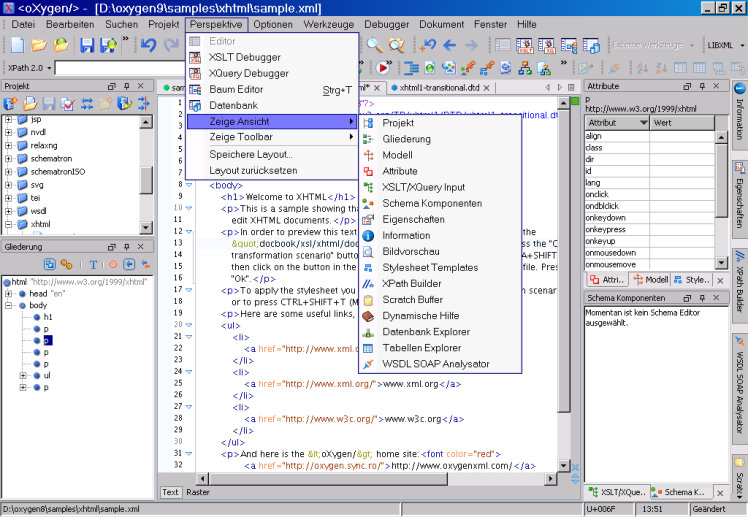
Figure: <oXygen/> 9.0 – editor view
Features
Although aimed at XML, DTDs, schemas and XSLT, <oXygen/> also highlights C++, C, PHP, Perl and many other formats. Type-aware dropdown hints simplify editing and can be disabled.
Standard structures have templates (Templates), including a broad range for DocBook and TEI, plus RDF, SMIL, FO and SVG. Any existing document can become a custom template, for example adding an XSLT 2.0 stylesheet template.
Associate a DTD or schema when creating XML to obtain appropriate tag suggestions (Tag Insight). A parallel structure view (Outline) eases navigation in large documents, as illustrated above.
The XSLT debugger greatly simplifies testing, though it works only with built-in processors, not the JAXP environment. It provides breakpoints, Step In and Step Out, with XML, stylesheet and result in three side-by-side windows. Debugging shows active template rules, the processing stack and tracing information.
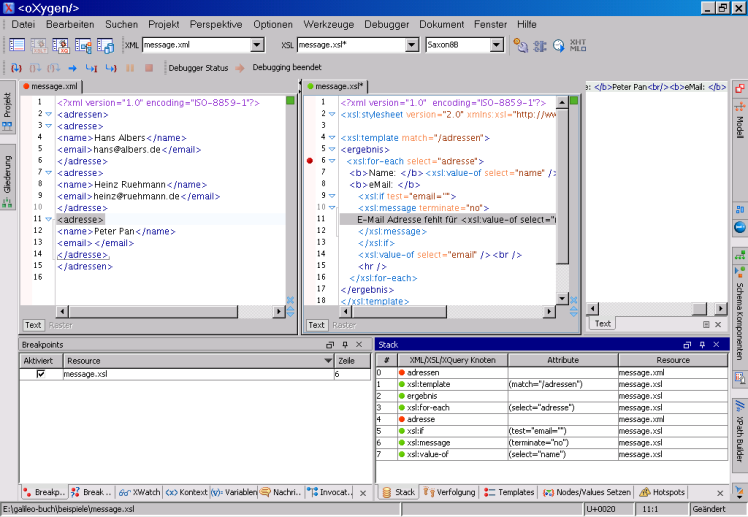
Figure: The <oXygen/> 9.0 XSLT debugger
Project organization
<oXygen/> uses projects flexibly. Files can belong to multiple projects, reside anywhere or come through HTTP/FTP. Exactly one project must be open, though it may be empty.
Files can also be opened, validated and edited independently. Any number of differing document types can be open in tabs.
Transformation scenarios
Oxygen stores transformation settings across projects as scenarios. Each binds a static XML source or stylesheet, distinguishing XML and XSL scenarios. It also sets the XSLT processor and parameters.
Transformations start from the active document. The scenario’s fixed document need not be open or in the project. XML, XML Schema and XML-form RELAX NG therefore use scenarios bound to stylesheets, and conversely. Name scenarios after their fixed files. To transform a stylesheet, edit an XSL scenario to use a stylesheet as its XML source.
Scenarios select Saxon 6.5.3, Saxon 8.9 or Xalan. JAXP allows alternatives such as the Altova processor. If the result is an XSL-FO document, integrated FOP can generate PDF in the scenario.
Scenarios cannot be saved individually or freely transferred without duplication and editing. All can be exported together, retaining file bindings, and imported into another installation.
Tree editing
The tree editor, introduced in version 3 (Tree Editor), opens separately and offers convenient visual editing. Click to add any node type. Collapse, expand or rearrange branches, showing or hiding attributes and whitespace text nodes. A document open in both editors stays synchronized automatically.
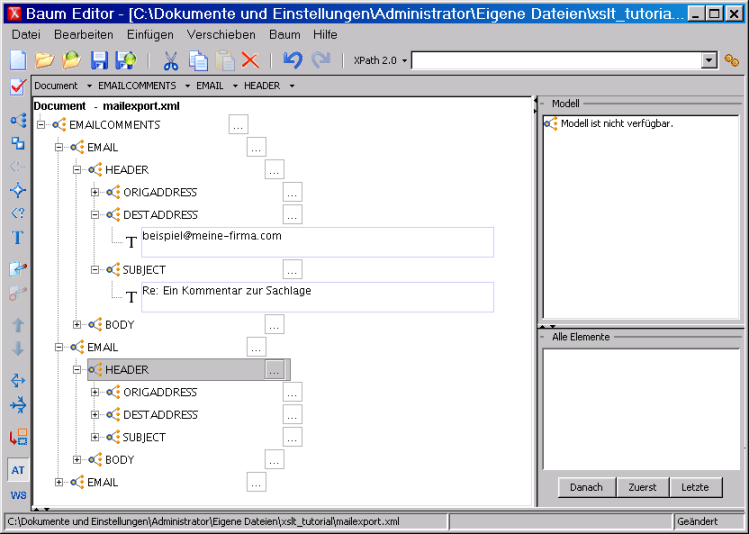
Figure: <oXygen/> 9.0 – tree editor
Assessment
Among tested editors, <oXygen/> uniquely offers German interface selection, also French, Italian, Romanian and Japanese. German translation remains incomplete: tips titled “Wussten Sie schon?” and help are still English. Imperfect translations still assist users, unlike costlier competitors.
Operation is clear and features sufficient, though not exhaustive, for XML, XSLT and schemas. The simple but flexible schema converter (Trang Converter) is notable. DocBook authors get all relevant DTDs and templates.
<oXygen/> fully supports XSLT 2.0. Initially, its debugger works only with Xalan, Saxon 6.5 and Saxon 8-B. Schema-aware Saxon-SA is not bundled but installs easily: place the jar file and valid license key in <oXygen/> directory lib. Saxon-SA then works with the debugger, unlike other added external processors.
The already inexpensive product has a cheaper educational Academic License, which prohibits commercial use.
Product information
Download/manufacturer contact: www.oxygenxml.com
Developer: SyncroSoft, Ltd.
Platforms: Microsoft Windows, Mac OS X, Linux, Solaris
XSLT processors: Xalan 2.7.0, Saxon 6.5.3, Saxon 8.9 B
External processors: through JAXP
Languages: English, French, German, Italian, Romanian, Japanese, selectable in preferences
Manual/help: extensive English help; separate English/French PDF manual, about 134 pages
Status: commercial; 30-day trial available
Copyright © Galileo Press, Bonn 2008
You may print the online version for your private use.
Otherwise, this chapter from “XSLT 2.0 & XPath 2.0 ― Das umfassende Handbuch” is subject to the same conditions as the bound edition. The work, including all its parts, is protected by copyright. All rights reserved, including reproduction, translation, microfilming, and storage and processing in electronic systems.
Galileo Press, Rheinwerkallee 4, 53227 Bonn