

XML technologies / XSLT / XSLT development environments / Stylus Studio 2008
(Excerpt from “XSLT 2.0 & XPath 2.0” by Frank Bongers)
Stylus Studio is a long-established integrated XML/XSLT development environment for Windows. A seven-day evaluation version is available for download (about 65 MB); an additional 15 days can readily be requested. Originally developed by eXcelon, it was subsequently maintained by Sonic Software and is now part of DataDirect Technologies’ product range. The current version is Stylus Studio 2008 (now Stylus Studio X15 Release 2, as of July 2014).
Stylus Studio 2008 comes in three editions: the inexpensive Home Suite, omitting features such as Grid View and XQuery; Professional Suite; and the comprehensive Enterprise Suite, the only edition including an integrated, licensed Saxon-SA processor.
Features
Stylus Studio offers several ways to develop and debug XSLT stylesheets. Editors and visual tools support debugging XSLT, Java, JavaServerPages and XQuery applications. Version 2008 supports XQuery editing and debugging according to the May 2003 W3C specification, and web service development.
Stylus Studio includes these modules:
XSLT stylesheet editor
WYSIWYG HTML editor
XML-to-XML mapper
XSLT stylesheet and Java debugger
DTD editor
XML Schema editor
The XML editor
Creating and editing XML documents is straightforward. A new document initially contains a rudimentary XML declaration but nothing else. The editor opens in source mode, allowing conventional text editing with syntax highlighting. Intelligent completion automatically closes open tags. Nested elements can also be indented at the press of a button.
The editor offers further display and editing modes, selected using tabs at the bottom of the window. Besides the source view , an XML document can be shown in a tree view (Tree view) or a spreadsheet view (Grid view). All views allow editing the document and adding content, elements and attributes. Each view has its own specialties. For example, tree view can insert arbitrary node types using a button; grid view provides similar functionality through form fields.
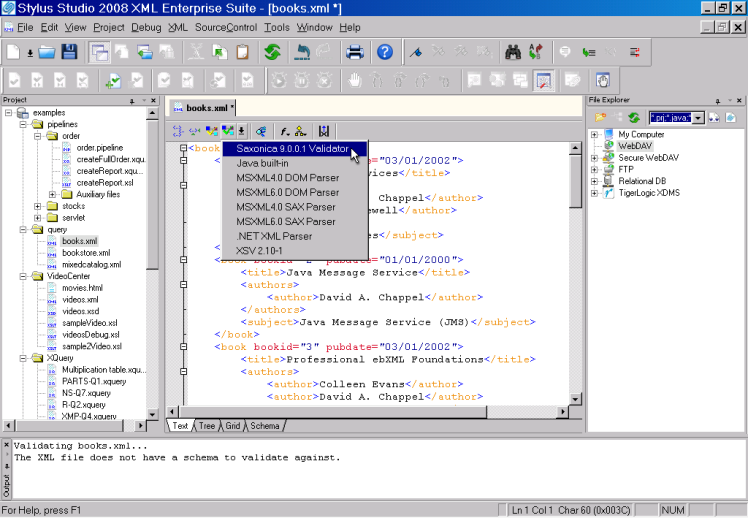
Figure: Stylus Studio 2008 – workspace
The final view opens a schema associated with the document. If neither a schema nor a DTD exists, the editor offers to create a schema or an internal or external DTD. An external DTD or schema file is generated from the XML structure under the chosen filename and associated with the document. Schema view displays a tree diagram of the associated schema, which cannot be edited here.
XML can be validated against an associated schema. Successful validation produces a simple alert; errors open an output window with detailed descriptions. This window can also be opened from the View menu.
The XSLT editor
Three options for new stylesheets differ in their intended output:
unspecified
XML to HTML
XML to XML
A new stylesheet must be assigned to a scenario specifying the XML source, desired target and stylesheet properties. Each scenario previews the stylesheet’s effect. Runtime parameter values can be set to simulate a production environment that passes values. The same stylesheet can belong to any number of scenarios, varying source documents and parameter values without modifying the stylesheet itself.
Each scenario also lets you choose the XSLT processor responsible for the preview. Choices are the built-in Stylus XSLT processor, Xalan, Saxon or MSXML. The last is also available in a .NET version if the framework is installed. Scenarios can be named and saved for reuse or as starting points for new scenarios.
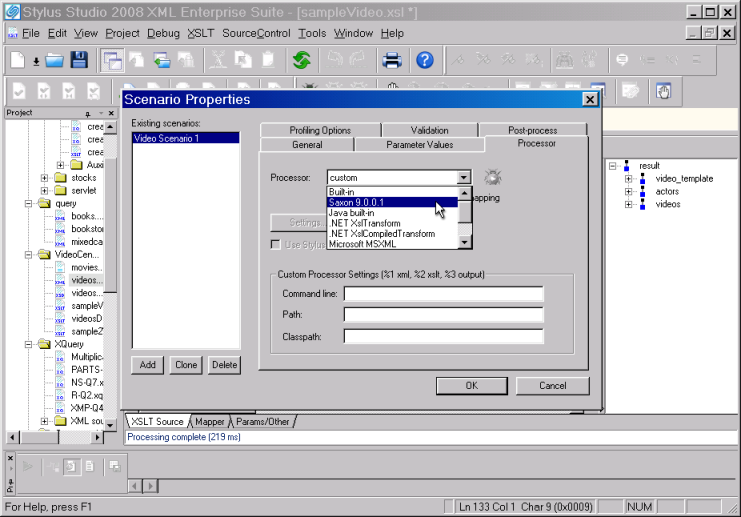
Figure: Stylus Studio 2008 – choosing a scenario’s XSLT processor
Double-clicking the desired target node in the source tree creates templates with a corresponding match attribute. Drag and drop similarly inserts XSLT instructions or XPath expressions targeting selected nodes.
XML-to-HTML mode offers a WYSIWYG editor called a mapper to design the HTML presentation. Dragging node content from the source tree into the stylesheet editor generates the corresponding XSLT. The stylesheet remains editable as source, and the transformation result can always be displayed in the result window.
Stylus Studio fully implements XSLT 2.0 support, including debugging for built-in processors. External processors can also be added to scenarios, but debugging and Stylus’s own feature of backmapping are then unavailable.
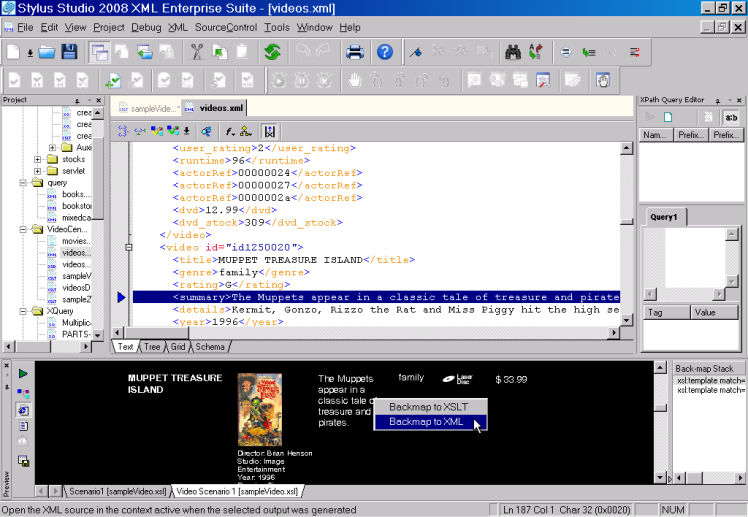
Figure: Stylus Studio 2008 – backmapping from transformation results
Assessment
Stylus Studio is a comprehensive modern environment covering XML, XML Schema and XSLT. XPath 2.0 support and visual drag-and-drop stylesheet development through the mapper are particularly interesting. It can also query a relational database directly and display and process the result as XML.
Product information
Download/manufacturer contact: www.stylusstudio.com
Platform: Windows
XSLT processors: Stylus XSLT processor, Xalan, Saxon 6, Saxon 9, MSXML
External processors: optional, without debugging
Interface language: English
Manual/help: English, very detailed
Status: commercial; evaluation version available
Copyright © Galileo Press, Bonn 2008
You may print the online version for your private use.
Otherwise, this chapter from “XSLT 2.0 & XPath 2.0 ― Das umfassende Handbuch” is subject to the same conditions as the bound edition. The work, including all its parts, is protected by copyright. All rights reserved, including reproduction, translation, microfilming, and storage and processing in electronic systems.
Galileo Press, Rheinwerkallee 4, 53227 Bonn