

XML technologies / ePUB / Open Publication Structure / Tables / Tables in DTBook
(Excerpt from “E-Books mit ePUB ─ Von Word zum E-Book mit XML” by Dr. Victor Wang)
Although DTBook and XHTML share a table model, display can differ because the DTBook table belongs to another namespace. Identical-looking element names are therefore not truly identical. Stylesheets must teach readers their semantics, using the CSS property display and corresponding table values. Here is an excerpt from the default DTBook stylesheet:
table {
 display: table;
 font-size: 0.8em;
 border-spacing: 0px;
 border-collapse: collapse;
 margin-top: 0;
 margin-bottom: 0;
 text-indent: 0;
 empty-cells: show;
}
table > caption {
 display: table-caption;
 text-align: center;
}
tr {
 display: table-row;
 vertical-align: inherit;
}
col {
 display: table-column;
}
colgroup {
 display: table-column-group;
}
tbody {
 display: table-row-group;
 vertical-align: middle;
}
thead {
 display: table-header-group;
 vertical-align: middle;
}
tfoot {
 display: table-footer-group;
 vertical-align: middle;
}
td {
 display: table-cell;
 border: 1px solid gray;
 vertical-align: inherit;
 text-align: inherit;
 padding: 0.3em;
}
Code example: CSS formatting of DTBook tables (excerpt)
Tables then display correctly. The figure compares the simple table.
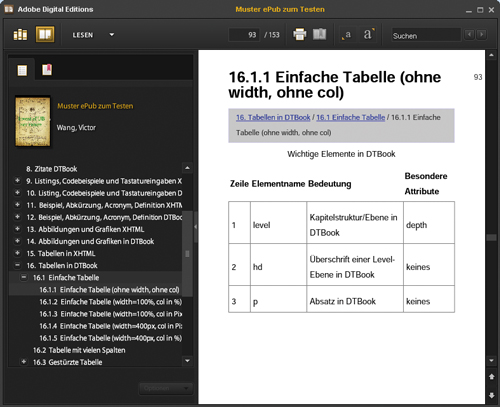
Figure: Simple DTBook table (with CSS display table properties)
Copyright © mitp 2011
You may print the online version for your private use.
Otherwise, this chapter from “E-Books mit ePUB” is subject to the same terms as the printed edition: the work and all its parts are protected by copyright. All rights reserved, including reproduction, translation, microfilming, and storage and processing in electronic systems.
Verlagsgruppe Hüthig Jehle Rehm GmbH, Im Weiher 10, 69121 Heidelberg, kundenbetreuung(at)hjr-verlag.de
back to top