

XML technologies / ePUB / Open Publication Structure / Tables / Display problems
(Excerpt from “E-Books mit ePUB ─ Von Word zum E-Book mit XML” by Dr. Victor Wang)
Technically, the described table model can structure any conceivable table. Large tables with many columns or rows produce extensive XML structures, affecting editing speed in an XML editor and processing during subsequent conversions. However, a limit is currently reached in readers and devices, which often still lack usable scrolling and zooming:
Columns are cut off on the right.
Table headers and footers are not repeated.
Oversized tables are no longer displayed completely.
Excessive cell content produces ugly table layouts.
This is probably temporary, and future reader and device generations can be expected to improve display. Nevertheless, consider conceptual ways to optimize such tables for e-books.
One such approach is transposing table content row by row. Consider the following 13-column table:
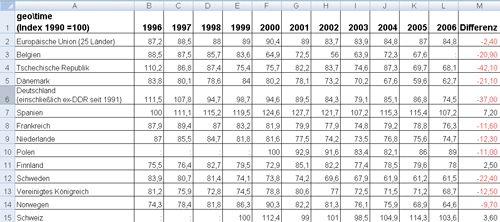
Figure: Multi-column table, farmland bird index (excerpt from Eurostat).
The table converts directly into the table model, but many readers struggle with its many columns. At normal or medium font sizes, columns are cut off on the right.
With the smallest font and possibly a larger window, this table remains manageable in software readers. A device with a fixed display size, however, reaches a definite limit.
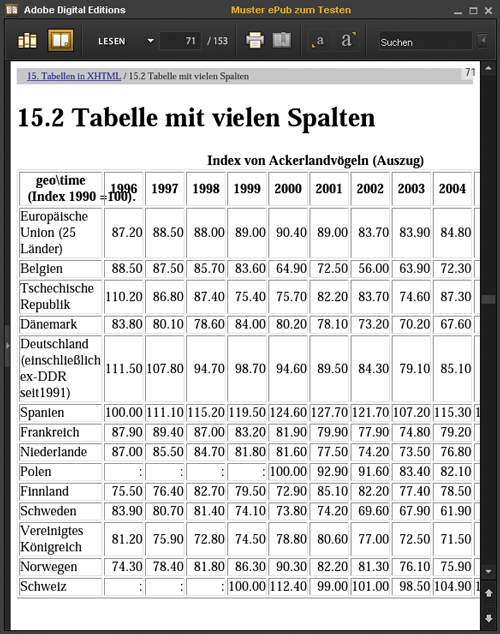
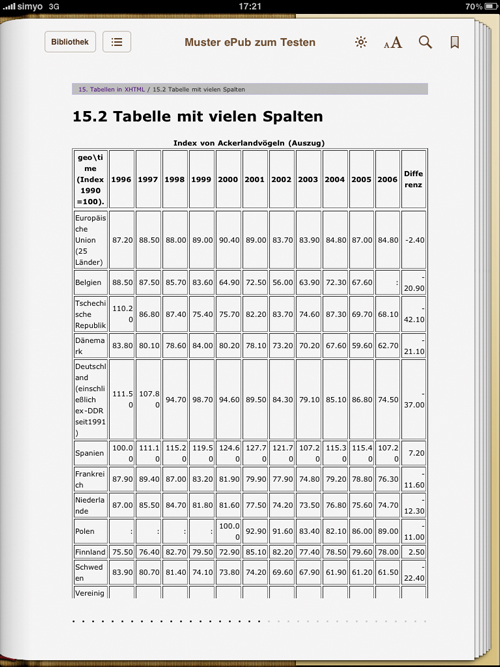
Figures: Multi-column table with moderately reduced text (Adobe Digital Editions and iBooks).
Now to the actual optimization approach: process table entries row by row:
Introduce one structural level per row, also visible in navigation. Its natural heading is the first column’s content, which acts as a row heading.
Transpose the row’s individual cell values and assign their corresponding column headings. Original column headings become a new column 1, cell values a new column 2.
Consider the result for the first actual data row, row 2 of the original table, in the figures below.
We have thereby achieved:
Replacing numerous columns with a simple transposed table
Significantly smaller individual table files
Additional structure in navigation
With a clean source table structure, transposition can be fully automated.
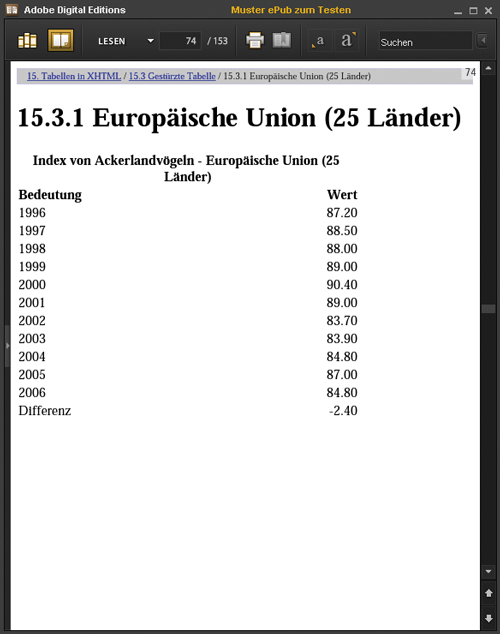
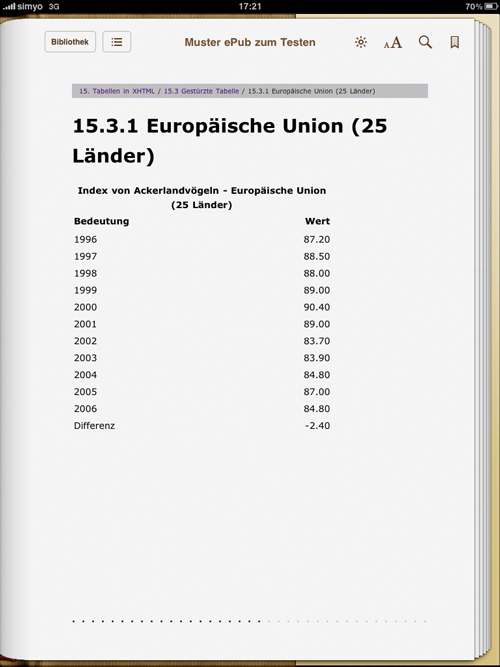
Figures: Transposed table result (Adobe Digital Editions and iBooks).
Finally, an overview of possible table treatments:
Table | First column | Column count | Cell content | Suggestion |
|---|---|---|---|---|
Regular or with spanning cells | Any | < 6–8 | Little content, no graphics | Ordinary HTML table |
Regular or with spanning cells and graphics | Any | < 6–8 | Little content, with graphics | Table as an image |
Regular, without spanning cells | Semantic row heading | > 6–8 | any | Transpose table automatically |
With spanning cells | Any | > 6–8 | any | Transpose partly manually; alternatively, table as an image |
These rules are only guidelines: assess and handle each table individually.
Copyright © mitp 2011
You may print the online version for your private use.
Otherwise, this chapter from “E-Books mit ePUB” is subject to the same terms as the printed edition: the work and all its parts are protected by copyright. All rights reserved, including reproduction, translation, microfilming, and storage and processing in electronic systems.
Verlagsgruppe Hüthig Jehle Rehm GmbH, Im Weiher 10, 69121 Heidelberg, kundenbetreuung(at)hjr-verlag.de
back to top