

XML technologies / CSS / Advanced websites with CSS / Putting CSS in perspective / What is CSS for? / Fonts and CSS
(Excerpt from “CSS − Advanced websites with Cascading Stylesheets” by Rachel Andrew & Dan Shafer)
In Parts of a CSS rule we examined some examples of font style rules. You are therefore already familiar with defining fonts for entire paragraphs and headings of different levels.
You can also define the appearance of fonts for smaller amounts of text. Mark up a selected passage with tags <span> (for details, see The span element), then define the properties in the tag <span>. This method can, for example, emphasize a sentence in a passage of text (see the following figure).
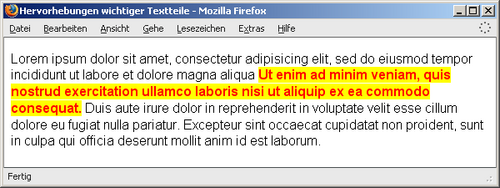
Figure: Emphasizing important text.
To emphasize this sentence with color, we enclose it in tags <span> and define a style rule for this new element span. Note that elements span should be used sparingly and that several points must be considered before applying such techniques. For details, see Using fonts with CSS and Text effects and cascading. Here is the HTML that produces the effect shown above.
<p>Lorem ipsum dolor sit amet, consectetur adipisicing elit, sed do eiusmod tempor incididunt ut labore et dolore magna aliqua <span class="important">Ut enim ad minim veniam, quis nostrud exercitation ullamco laboris nisi ut aliquip ex ea commodo consequat.</span> Duis aute irure dolor in reprehenderit in voluptate velit esse cillum dolore eu fugiat nulla pariatur. Excepteur sint occaecat cupidatat non proident, sunt in culpa qui officia deserunt mollit anim id est laborum.</p>
You can also select a particular element span using an attribute id or class (we will examine this in detail in Behind the scenes ), then assign that identifier or class to the selector, as follows:
.important {
font-weight: bold;
background-color: yellow;
color: red;
}
Lists are another type of HTML element that often benefits from font rules. Lists normally draw particular attention to related content. The following figure shows an example in which an HTML list is further emphasized with a striking font style. Its different color, alternative typeface and heavier weight distinguish it from the rest of the page’s text. It stands out clearly and attracts attention.
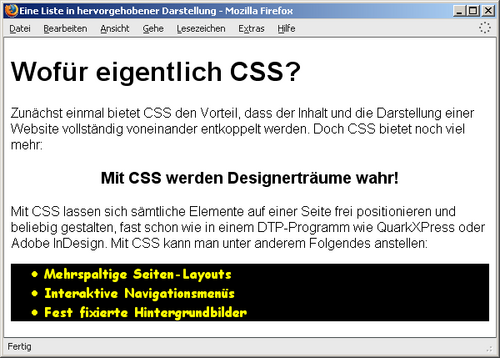
Figure: A list is given special emphasis.
After naming the list in the HTML with an attribute id, we can style it by adding a style rule to our CSS file.
<ul id="liste">
<li>Mehrspaltige Seiten-Layouts</li>
<li>Interaktive Navigationsmenüs</li>
<li>Fest fixierte Hintergrundbilder</li>
</ul>The style rule looks like this:
#liste {
font-family: 'Comic Sans MS', Arial, Helvetica, sans-serif;
font-weight: bold;
color: yellow;
background-color: black;
}
Copyright © 2006 of the German translation, dpunkt.verlag GmbH
You may print the online version for your private use.
Otherwise, this chapter from “CSS − Anspruchsvolle Websites mit Cascading Stylesheets” is subject to the same conditions as the bound edition: the work, including all its parts, is protected by copyright. All rights reserved, including reproduction, translation, microfilming, and storage and processing in electronic systems.
dpunkt.verlag GmbH, Ringstraße 19, 69115 Heidelberg
back to top