

AI & XML / RAG study series / Part 3: Automated chunks and XML—from PDF to flexible RAG
Introduction
The preceding study, “Structured data and intelligent chunking strategies for RAG systems”, focused on chunking: dividing large texts into manageable units for RAG. We examined numerous strategies and identified central problems: PDF, Word and HTML produce very inconsistent source data; structure-relevant information is often lost; many approaches couple data too closely to one language model or application.
This study goes further, focusing on developing a solution for systematic, model-independent data structuring. We show how content can be stored independently of subsequent chunking and why this requires a whole ecosystem of specialized formats and format layers.
The central aim is structured, chunk-neutral data from which any chunking can be generated flexibly using rules, such as tokens for LLMs, paragraphs for teaching or semantics for specialist portals. This basis relies on two key concepts:
the exHTML pivot format, reconstructing semantic structure from unstructured formats such as PDF, and
ChunkML, built on it as a neutral container for subsequent chunking.
The PDF → exHTML → ChunkML example details how visually driven, structurally flat PDF becomes a fully reconstructable, media-neutral content structure, then any output from Markdown and JSON to fully annotated HTML for web RAG.
Our approach provides the technological basis for flexible, powerful RAG pipelines and ensures future-proof, interoperable, model-agnostic content management regardless of future LLMs or output systems.
Summary
Automated data preparation using PDF
This study shows automated preparation of unstructured PDFs for RAG. Fine-grained layout analysis first extracts each character’s position, font and format. The resulting detailed low-level format adds embedded XMP metadata such as author, title and keywords.
Next, PDFs become several outputs:
individual PDF pages for scholarly citation
SVG (paths and text) for visual, interactive applications
Octpmlx format for line-based full-text search with positions
Match format for exact location of text matches
These enable position-exact traceability and underpin precise semantic processing.
The aim is fully automated generation of a semantically structured exHTML pivot for further transformations, chunking, metadata enrichment and multimedia outputs.
Pivot format and hub
At the center of the RAG pipeline is a two-stage model: the semantic pivot exHTML and the derived ChunkML format. Together they underpin modular, media-neutral, future-proof processing independent of source, platform or LLM.
exHTML: the semantically enriched pivot
The exHTML format is the central exchange structure after layout and character analysis. PDF data become HTML5-compatible, logically organized content explicitly marking paragraphs, headings, tables, footnotes, references and even visual zones. Functional, machine-readable structure takes priority over styling.
It reconstructs interpretable content structure from visual PDF or InDesign for automated chunking, publishing, annotation and semantic search.
exHTML’s multiple roles are especially valuable:
Semantic intermediate for ChunkML generation
Basis for audience-specific PDF, EPUB, DOCX, HTML and H5P
Central structure for references, metadata and annotations
Bridge from raw layout to logical content
ChunkML: structured preparation for chunking
exHTML generates ChunkML, a simplified HTML/XML format for chunk-neutral storage. Unlike conventional XML outputs, it optimizes structured divisibility rather than presentation. It contains no fixed chunks, instead representing logical document content from which different strategies can be generated:
Token-based for LLMs such as GPT-4
Paragraph-centered for teaching
Heading-based for scholarly retrieval
Semantically dynamic through LLM annotation
Hub: control center and orchestration core
exHTML and ChunkML are stored in an XML-centered hub centralizing documents, metadata and settings. The whole deterministic processing path uses:
XSLT: transformation and chunk generation
XQuery: queries, semantic filtering and text search
XProc: workflow orchestration
Python: tokenization, preprocessing, files and model integration
The hub ensures complete transparency and reproducibility and high technological openness. It connects to different vector formats, LLMs, databases and targets. Strategies, outputs and semantic enrichment are configurable without changing the source document.
Future-proofing and flexibility
Modularity makes the hub robust against technological change:
New LLMs with different token limits? → Change only the chunking strategy
Switching JSON to YAML or Markdown? → Adapt only serialization
New target platforms? → Transform the same hub with XSLT
Separating content, structure, processing and models creates a scalable, controllable framework for AI content delivery in scholarly and commercial contexts.
Outlook
CDS as the next development stage
The next study examines implementing a CDS as an intelligent mediator between structured RAG formats such as ChunkML and RDF and downstream LLMs, embedding systems or chatbots.
CDS is intended to provide rule-based, granular, context-aware and format-neutral content tailored to applications, acting as access layer and semantic filter:
RDF metadata (e.g. dc:title, schema:about) select, combine and weight content.
SPARQL endpoints support complex semantic queries for topical answer contexts, sources or citation chains.
Content is packaged as needed in iiRDS or OCF containers, delivering metadata, originals and structured chunks together.
Architectural decoupling matters: CDS manages content independently of retrieval, prompting or web output. This enables scalable modular systems where multiple bots, interfaces or LLMs share consistent knowledge.
The next study examines CDS implementation, integration into existing XML hubs and practical use in specialist portals, publishing systems and multi-agent settings.
1 From PDF to ChunkML
1.1 PDF structure and layout model
PDF is among digital publishing’s most widespread formats. Its strength is layout-faithful display independent of platform, software or device. That strength also poses a challenge: visual presentation replaces logical structure, complicating machine processing, especially RAG.
Unlike HTML or XML, which explicitly mark semantic hierarchies such as headings, paragraphs and lists, PDF’s internal structure is flat and reduced to visual positioning. Analytical processing therefore requires lowest-level layout analysis extracting all display-relevant data: positions, flow, fonts, styles and character sequence.
1.1.1 Low-level layout format
A typical result is the “primary” or “low-level layout format”, produced by OCR or parsing engines such as Octopus. It forms the initial layer for all processing and chunking, illustrated by this original fragment:
<block bbox="70.944 76.489978 156.5 97.14498">
  <line bbox="70.944 76.489978 156.5 97.14498" wmode="0" dir="1 0">
    <font name="BundesSansOffice-Bold" size="15">
      <char quad="70.944 78.24498 78.444 78.24498 70.944 96.24498 78.444 96.24498"
            x="70.944" y="92.53998" color="#000000" c="2"/>
    </font>
    <font name="Arial-BoldMT" size="15">
      <char quad="78.504 76.489978 82.674 76.489978 78.504 97.14498 82.674 97.14498"
            x="78.504" y="92.53998" color="#000000" c=" "/>
    </font>
    <font name="BundesSansOffice-Bold" size="15">
      <char quad="92.544 78.24498 105.264 78.24498 92.544 96.24498 105.264 96.24498"
            x="92.544" y="92.53998" color="#000000" c="M"/>
      <char quad="105.264 78.24498 112.449 78.24498 105.264 96.24498 112.449 96.24498"
            x="105.264" y="92.53998" color="#000000" c="e"/>
      <char quad="112.449 78.24498 117.909 78.24498 112.449 96.24498 117.909 96.24498"
            x="112.449" y="92.53998" color="#000000" c="t"/>
      <char quad="117.969 78.24498 126.114 78.24498 117.969 96.24498 126.114 96.24498"
            x="117.969" y="92.53998" color="#000000" c="h"/>
      <char quad="126.114 78.24498 134.019 78.24498 126.114 96.24498 134.019 96.24498"
            x="126.114" y="92.53998" color="#000000" c="o"/>
      <char quad="134.019 78.24498 142.119 78.24498 134.019 96.24498 142.119 96.24498"
            x="134.019" y="92.53998" color="#000000" c="d"/>
      <char quad="142.119 78.24498 145.929 78.24498 142.119 96.24498 145.929 96.24498"
            x="142.119" y="92.53998" color="#000000" c="i"/>
      <char quad="145.929 78.24498 153.474 78.24498 145.929 96.24498 153.474 96.24498"
            x="145.929" y="92.53998" color="#000000" c="k"/>
      <char quad="153.38 78.24498 156.5 78.24498 153.38 96.24498 156.5 96.24498"
            x="153.38" y="92.53998" color="#000000" c=" "/>
    </font>
  </line>
</block>
Code excerpt from: PDF2ChunkML\02_PDF_Raw\EingangsBeispiel_char.xml.
This block comes from page 9. Its information means:
<block>: Represents a layout block with a bounding box (bbox), here a rectangular page region (coordinates x0, y0, x1, y1).
<line>: Describes a line within the block, with text direction (dir="1 0") and writing mode (wmode="0", horizontal).
<font>: Defines a font region by name and size. Characters (<char>) are grouped within the same font.
<char>: Each character has these properties:
quad: Four coordinate points for the character quadrilateral (polygon),
x, y: Character reference position, often baseline at bottom left,
color: Hexadecimal RGB color information,
c: Actual character code, such as "M" or "e".
This detailed sequence visually represents “2 Methodik”, not as a word or semantic unit but as an assembly of individual glyphs with precise positioning.
1.1.2 From layout to processing context: loss through plain-text extraction
For our work on Octopus, the layout model is merely a technical raw format: a low-level character/layout representation containing all potentially relevant data for reconstructing structure and context:
Page number and exact position (→ reconstruct reading order)
Font types and sizes (→ distinguish headings, body text, footnotes)
Text alignment and bounding boxes (→ layout analysis, e.g. columns and tables)
Character-level punctuation, spacing and strings (→ formulas and word/sentence separation)
Despite this richness, most AI-based systems drastically reduce it in practice through “plain-text” extraction.
Definition 1.1 |
|---|
Plain-text extraction: systematic information loss Plain text has no layout, style or structure. Common PDF parsers and OCR tools extract only the raw character string, ideally in correct reading order. All page context, visual organization, semantic blocks and typographic cues are completely lost. |
For example, from the preceding code block:
<font name="BundesSansOffice-Bold" size="15">
  <char ... c="2"/>
</font>
...
<char ... c="M"/>
<char ... c="e"/>
...
<char ... c="k"/>
only the string:
2 Methodikis extracted. Humans can read it easily, but machines lack all contextualization:
Where on the page was it?
Was it a heading, list item or paragraph start?
How does it relate to the previous or next page?
Do bold, indentation or highlighting give visual clues to semantic relationships?
This reduction is a serious RAG problem because structural cues are central to targeted contextual answers. Text alone often cannot reconstruct complex references, organization or lines of argument.
Despite emphasizing structure preservation, our Octopus framework also supports plain-text extraction as a supplement for simple previews or comparison with conventional structure-losing methods.
A concrete example is documented in PDF2ChunkML\02_PDF_Raw\EingangsBeispiel_char.xml.
1.2 Metadata as a structured PDF context layer
Beyond layout, PDFs normally contain metadata describing the document independently of visible content, including the XMP standard (eXtensible Metadata Platform), developed by Adobe and part of the ISO standard since PDF 1.4 (now ISO 16684-1).
XMP metadata are embedded directly in PDF, usually in the Metadata object in the header. They use RDF/XML and standardized namespaces. This pipeline example shows the file PDF2ChunkML\04_PDF_meta\EingangsBeispiel_metadata.xml:
<x:xmpmeta xmlns:x="adobe:ns:meta/" x:xmptk="Adobe XMP Core 9.1-c001">
  <rdf:RDF xmlns:rdf="http://www.w3.org/1999/02/22-rdf-syntax-ns#">
    <rdf:Description
        xmlns:xmp="http://ns.adobe.com/xap/1.0/"
        xmlns:xmpMM="http://ns.adobe.com/xap/1.0/mm/"
        xmlns:dc="http://purl.org/dc/elements/1.1/"
        xmlns:pdf="http://ns.adobe.com/pdf/1.3/">
      <xmp:CreateDate>2023-08-02T13:45:24+02:00</xmp:CreateDate>
      <xmp:ModifyDate>2023-08-03T13:38:53+02:00</xmp:ModifyDate>
      <dc:title>
        <rdf:Alt><rdf:li xml:lang="x-default">Digitalisierung und ökologische Nachhaltigkeit in Unternehmen</rdf:li></rdf:Alt>
      </dc:title>
      <dc:creator>
        <rdf:Bag><rdf:li>Bundesnetzagentur</rdf:li></rdf:Bag>
      </dc:creator>
      <pdf:Keywords>Digitalisierung … Großunternehmen Stand: August 2023</pdf:Keywords>
    </rdf:Description>
  </rdf:RDF>
</x:xmpmeta>
Main XMP information categories:
XMP metadata fall into semantically relevant classes:
Creation and editing dates,
e.g. xmp:CreateDate, xmp:ModifyDate, xmpMM:DocumentID, xmpMM:InstanceID—useful for versioning and change tracking.Document identification,
e.g. dc:title, dc:description, dc:format, dc:creator—uniquely describing content and creator.Content classification,
e.g. dc:subject, pdf:Keywords—for topics and keywords.
These highly structured data suit contextual enrichment of chunks. Our RAG pipeline converts them into RDF metadata objects linked to the relevant chunks.
1.3 Automated page extraction and multiformat generation
In our RAG-assisted document analysis, all PDFs are automatically split into pages and stored in several formats, meeting diverse needs from scholarly citation to visually precise browser text addressing.
Fig. 1.1: Page 9 of EingangsBeispiel_009.pdf
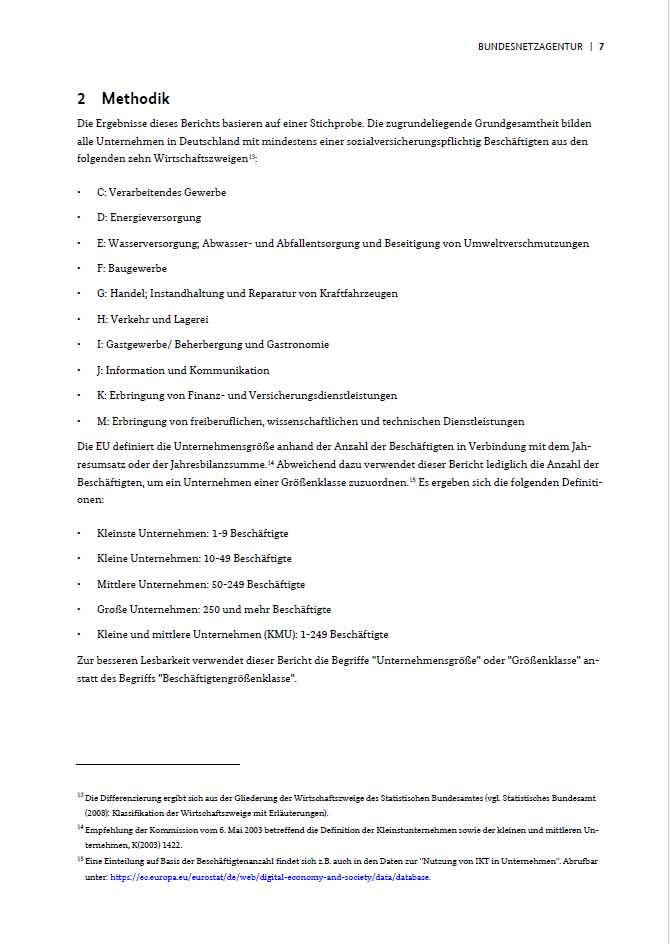
Page 9 illustrates the process. Resulting files are at:
Single-page PDF:
05_PDF_split\EingangsBeispiel_009.pdfSVG with paths (vectors):
05_PDF_SVG_path\EingangsBeispiel_path_009.svgSVG with embedded text objects:
05_PDF_SVG_text\EingangsBeispiel_text_009.svg
Processing steps:
Segmentation: split PDF into individual pages (page extraction).
Format conversion:
Retain the individual page in original PDF format.
Also convert to two SVG variants:a path-based representation (graphics without text elements),
a text-based representation (with <text> nodes per character/word).
1.3.1 Applying output formats in RAG
This multiformat strategy serves several RAG uses:
Format type | Function | Application |
PDF (single page) | Evidence document |
|
SVG with paths | Layout replication |
|
SVG with text | Interactive search |
|
Rule-based access within the pipeline references or delivers formats according to target: specialist portal, publisher system or chatbot with answer evidence.
Definition 1.2 | |||||||||||||||
|---|---|---|---|---|---|---|---|---|---|---|---|---|---|---|---|
SVG: paths versus text
Path-based SVG ensures visual authenticity for scholarly reproductions or print illustrations. Text SVG enables addressable interaction, such as highlighting RAG search hits. |
1.3.2 Importance for RAG
Each answer can then link to visually identifiable source pages, essential for transparency, auditability and scholarly usability. SVG also integrates precisely into web interfaces, semantically linking text segments with chunk IDs, retrieval hits or annotations.
1.4 Position-aware line extraction: the Octpmlx format
Reliable position-based PDF full-text search aggregates the original character format into a line-based search format. The Octpmlx format (Octopus PDF Markup Language X) represents content and exact positions across all pages without considering headings, paragraphs or logical sections.
Lines generated from layout are stored in structured XML. The example data from PDF2ChunkML\06_PDF_octpmlx\EingangsBeispiel_octpmlx.xml represent page 9. A typical excerpt follows:
<line _lnr="150" _icount="6" _xifLoc="18-23" _xifText=" |2| |Met|hodik| |" x="7094.4" y="80808"
      font-family="BundesSerifOffice" font-size="9">
  <inline _items="2-2" _xifLoc="19-19" font-family="BundesSansOffice-Bold"
          font-size="15" font-weight="bold">2</inline>
  <inline _items="4-6" _xifLoc="21-23" font-family="BundesSansOffice-Bold"
          font-size="15" font-weight="bold">Methodik </inline>
</line>
1.4.1 Octpmlx structure
Its main structural features are:
Element / attribute | Meaning |
<line> | A logical line-level text element with unique ID (_lnr). |
x, y | Absolute line position on the page in typographic units. |
_xifText | Original line reconstructed character by character; | marks raw-format subdivisions. |
<inline> | Child elements for individual inline text objects, such as a bold word. |
1.4.2 Octpmlx purpose: search and position
Octpmlx serves two core functions:
Full-text indexing
All document lines are stored sequentially and searchably regardless of page, column or paragraph breaks, reliably locating fragments in large PDF corpora.Position tracing
Coordinates (x, y) locate every match exactly on the original page or SVG, supporting browser highlighting and deep links to specific passages.
Example analysis: “Methodik”
The word “Methodik” is in the line above, lnr="150":
<inline ...>Methodik </inline>Inline representation also shows that it:
is bold and 15 pt,
is near the also-bold “2”, suggesting a heading or section marker,
is at x=7094.4, y=80808 on page 9.
1.4.3 Importance for RAG
Octpmlx forms the textual infrastructure for PDF-based RAG search, enabling:
precise word or phrase retrieval,
SVG match highlighting,
links from results to original positions for source pages or automated citations,
and meaningful chunk boundaries based on lines and positions.
This bridges content-driven search and visual anchoring, essential to transparent, evidence-supported AI.
1.5 Position-exact full-text search: Match format
To supplement layout data, position-aware full-text search uses a specialized XML format specifying exactly where a search term occurs on each page. It results from a regular search in PDF pages prepared by Octopus, linking text, visual SVG layout and semantic HTML/XML structure.
This example uses PDF2ChunkML\07_PDF_match\EingangsBeispiel_match.xml and contains a search for “wirtschaft” yielding 86 matches.
The following code excerpt is explained below:
<matches count="86" regex="wirtschaft" flags="si">
  <match start="1263" length="10" id="m1" tnr1="44" cpos1="60" tnr2="44" cpos2="69" lnrs1="45-47" lnrs2="45-47">
    <matchText>Wirtschaft</matchText>
    <matchPrecedingText>Die digitale und ökologisch nachhaltige Transformation von </matchPrecedingText>
    <matchFollowingText> und Gesellschaft ist eine der zentralen</matchFollowingText>
    <matchLocator id="m1">
      <matchBegin page="7" lineNr="45" itemNr="25"
                  itemTextPre="on " itemText="W" itemTextPost="irt"
                  y="11270" x="32950.56"
                  xpre="31607.952" xpost="33909.708"
                  xcorr="0"/>
      <matchEnd page="7" lineNr="45" itemNr="30"
                itemTextPre="f" itemText="t " itemTextPost="und G"
                y="11270" x="37110.852"
                xpre="36776.196" xpost="37673.592"
                xcorr="-281.37"/>
    </matchLocator>
  </match>
</matches>
1.5.1 Element structure and meaning
Element / attribute | Description |
<matches> | Container for all regular-query matches (count="86" for regex="wirtschaft"). |
<match> | Individual match with unique ID and start/end positions in text and document. |
start / length | Byte offset and length in the linear document text stream. |
tnr1, cpos1, tnr2, cpos2 | Token and character positions in the search index. |
lnrs1, lnrs2 | Match line span, here lines 45–47 on page 7. |
<matchText> | Exact matched text string. |
<matchPrecedingText> / <matchFollowingText> | Context text for semantic weighting, previews and snippets. |
<matchLocator> | Detailed match coordinates. |
page | Match page number. |
lineNr, itemNr | Position within line or character/token stream. |
itemTextPre, itemText, itemTextPost | Characters before, within and after the match, useful for OCR correction or semantic matching. |
x, y | Page coordinates (1/1000 point units). |
xpre, xpost | Token start/end coordinates with correction information. |
xcorr | Correction improving SVG display for nonlinear character flow. |
1.5.2 Practical RAG uses
Fine-grained positions enable the pipeline to:
generate SVGs with highlighted matches through coordinate references,
weight chunk scores according to occurrence in headings, tables or footnote,
generate links to original PDF passages, such as viewer deep links.
Programmatic comparison with HTML/XML structures from Octopus adds semantic location context. A match in an <h1> tag can receive higher weight or be marked “structurally important”.
1.5.3 Generation through a high-performance XML database
Search is generated directly from a native XML database rather than string scans or external indexes. Dynamically populated with line-based Octpmlx documents, it executes XQuery efficiently because:
every line of every document is structured,
operations run entirely inside the database without file access,
and match data are output directly in a precise Match XML format.
This enables real-time searches across very large corpora with exact links to original PDF, SVG or HTML positions. Cross-document full-text and semantically targeted subset searches are supported, such as headings, footnotes or tables only.
1.6 exHTML as the central chunking structure source (precursor to ChunkML)
After character, layout and match extraction, exHTML (exchange HTML) provides a structured intermediate between input and final chunks. exHTML is not the actual chunking format—that role belongs to ChunkML —but supplies its semantic content basis.
This section’s structured file is at PDF2ChunkML\08_PDF_XML-Strukturformate\EingangsBeispiel_match_exhtml.zip.
1.6.1 What is exHTML?
exHTML is a custom HTML5-compatible exchange format of the Octopus platform, serving as a semantically enriched processing source. It standardizes PDF, DOCX, EPUB, XLSX and HTML into uniform, logically organized, media-neutral content.
HTML5 proximity connects exHTML to web technologies and semantic XML standards, enabling:
the structural recognition of text regions such as headings, paragraphs and tables,
the semantic annotation through classes, IDs or data-* attributes,
the aggregation of complex content areas such as lists, references or layout zones.
1.6.2 exHTML for media-neutral output
Beyond structured input for chunking (→ ChunkML), exHTML has another key role in the Octopus framework: it generates numerous media-neutral outputs, especially PDF, DOCX, EPUB and HTML5 modules.
This dual preprocessing/output role makes exHTML a classical cross-media pivot: generate once, reuse many times and configure for each application.
Use case: chapter-based output
A typical scholarly publishing case:
A RAG system receives a publisher’s entire backlist. Researchers want chapter-level references, citations and further processing.
exHTML can produce these audience-specific outputs:
Output format | Aim | Feature |
DOCX (Microsoft Word) | Researcher-friendly further processing | Chapter export, fully structured and citable |
Uniform formatted view of originals | Platform/source-independent design, e.g. corporate layout | |
HTML / EPUB | Online reading, mobile output | Responsive, chunk-based, interactive links |
H5P | Interactive learning units | Direct transformation of structured exercises or definitions |
exHTML already contains logical and semantic structure elements such as <section>, <h1> and <table>, which can be selectively rendered or hidden in target media. Chapter markers, metadata and boundaries can be handled programmatically during output.
1.6.3 Architecture benefits
Using exHTML as output core offers:
Consistency: all outputs share a semantic origin regardless of PDF, DOCX or EPUB source.
Audience focus: role-based outputs, e.g. chapter DOCX for researchers and compact PDF for reviews.
Automation: rule-based, fully automated outputs for new publications or updates.
Design consistency: PDF output in particular can enforce a publisher-specific layout with shared templates, colors and fonts, independent of original design.
1.6.4 Why exHTML is central to chunking
Other raw PDF, Octpmlx and Match formats focus on layout, character sequence or position, while exHTML offers a semantically structured representation in which:
logical divisions such as <section>, <article>, <figure> and <table> are explicit,
hierarchical headings (<h1> to <h6>) enable semantic weighting,
and structural HTML elements such as <ul>, <div>, <blockquote> and <aside> support rule-based chunking.
They are anchors for transformation into ChunkML, the format expressly designed for later chunking.
2 ChunkML: chunk-neutral RAG structuring
Structure is familiar in automated publishing: providing content for print, ePub, PDF, web, InDesign or apps requires media-neutral, format-independent structure for flexible, consistent reuse.
RAG follows the same principle with a new aim: content must support flexible chunking as well as output. This is where ChunkML comes in.
2.1 What is ChunkML?
ChunkML is a purpose-built, highly simplified and fault-tolerant HTML-based XML format serving as a structured, chunk-neutral pivot. A deliberately reduced HTML element set minimizes complexity while supporting semantic differentiation and modular content.
ChunkML is not an end format but the structured hub format from which any chunking strategy can be derived.
ChunkML contains no concrete chunks: it provides content for contextual, rule-based or dynamic generation, for example:
Token-based for GPT,
Sentence- or paragraph-based for BERT,
With configurable overlap for semantic retrieval.
2.1.1 Groups of permitted ChunkML elements
The reduced element catalog suffices for typed content. Functional groups are:
1. Structural containers
<html>, <head>, <body>, <section>, <div>, <page>
2. Text organization
Headings: <h1>, <h2>, <h3>, <h4>, <h5>, <h6>
Paragraph organization: <p>, <br>
3. Text styling
<b> (bold), <i> (italic), <u> (underlined), <span>, <a>
4. List elements
Unordered: <ul>, <li>
Ordered: <ol>, <li>
5. Table structure
<table>, <thead>, <tbody>, <tr>, <td>, <th>, <colgroup>, <col>
6. Media elements
<img>
7. Metadata
<meta>
This selection aims for readable, structured, rule-transformable documents processed by XML and HTML engines without conversion errors.
2.1.2 Why ChunkML is not a chunk format but the origin of those chunks
ChunkML holds no statically cut 300-token content. It instead uses chunk-neutral structuring: content retains structure without presegmentation, enabling later Chunking strategies without changing the source format.
Examples:
GPT receives token-based ChunkML fragments with configurable overlap.
eLearning generates chapter-based lessons from the same data.
Semantic retrieval identifies chunks through markers such as <h2> or <table>.
2.1.3 Technology foundation
ChunkML is embedded in a modular processing system based on established, powerful XML technologies:
XSLT —rule-based chunk extraction, HTML conversion and format transformation
XProc —orchestrating complete document pipelines
XQuery —fast, precise full-text search and chunking across large corpora
Python —tokenization, semantic chunking and preprocessing
local LLMs —classification, semantic labeling and chunk prioritization
XML databases —persistent structured storage and bulk processing
This deliberately modular setup is established in technical documentation, cross-media publishing and scholarly knowledge management, offering maximum control, flexibility and automation.
2.1.4 Conclusion: ChunkML as the RAG structuring core
ChunkML is the pivot for every chunking strategy: media-neutral and chunk-neutral content supports arbitrary chunk generation. It is the strategic structuring core because it is:
semantically expressive,
technologically interoperable with XML, HTML, web and print,
fault-tolerant and robust,
and automatically transformable for any medium and model.
Content therefore remains independent of particular targets and can dynamically take the form required by use.
2.1.5 Reference document for output examples: sampleChunkML.html
To illustrate the structure principles and practical output uses, we use a specially constructed sample: PDF2ChunkML\01_ChunkML\sampleChunkML.html.
It demonstrates pipeline processing with:
separate logical blocks typical of specialist texts, teaching material or scholarly articles,
semantic markers such as <section>, <h1>, <table>, <ul>,
sample metadata structures and inline markup such as <b>, <a>, <i>,
and extended components:
Footnotes and endnotes
Multicolumn tables with spans
Citations and source evidence
Author, publication date and domain metadata, among others
Sample document purpose and role:
The sampleChunkML document models core processing logic realistically. It serves as:
reference for rule-based or dynamic chunking,
test environment for PDF, DOCX, HTML and Markdown transformations,
evaluation basis for annotation, metadata links and retrieval mapping.
3 The hub at the core of RAG
3.1 Motivation and starting point
Large RAG corpora need flexible, automated, future-proof pipelines. Varied sources require suitable LLM preparation, combining structuring, transformation and format diversity. Our approach uses an XML-centered hub as the pipeline’s technological basis.
3.2 Hub principle overview
The hub is a media-neutral center storing all content uniformly, regardless of source, in ChunkML format. PDF, Markdown, JATS and HTML sources all become uniform structured XML, ideally suited to downstream transformation and analysis.
The central hub feeds a fully programmatic XSLT, XProc, XQuery and Python pipeline. It is deterministic: all steps and outputs are reproducible and follow explicit rules rather than stochastic AI results, making processing transparent, controllable and validatable.
The central configuration file (HubConfiguration.xml) defines chunking and transformation rules. Its XSD (HubConfig.xsd) guarantees formally correct, interoperable settings.
3.3 From ChunkML to chunks: modular processing
A scholarly article or lesson is stored as ChunkML, organized by chapters, paragraphs, tables, footnotes or semantic sections such as abstract, methodology and results. Then the deterministic pipeline runs:
XSLT generates HTML, JSON or Markdown.
XProc orchestrates steps, controls data flow and pipelines multiple documents.
XQuery queries, filters and selectively restructures XML.
Python adds tokenization, conversion, scripts and file management.
The chunk generation is dynamic, entirely rule-driven and flexible, for example by:
Tokens, characters or paragraphs
With or without overlap
Optional semantics, references or supplementary information
JSON, YAML or Markdown output
Optional LLMs can enrich content through classification, topic analysis and summaries. Locally operated open-source models through Ollama are supplementary, never the pipeline’s foundation. The core remains deterministic and traceable.
3.4 Benefits of the hub approach
The XML hub offers strategic benefits for AI information systems:
Technology neutrality
Separating data, rules and technology avoids vendor dependence. LLMs, embeddings, vector databases and targets combine freely.
future-proofing
New chunking or output requirements are met by adapting settings and transformations, without changing the data.
Modularity and adaptability
One hub document serves different LLMs, user groups and media formats.
Deterministic processing
Reproducible, rule-based results suit controlled applications, quality assurance, documentation and scholarly workflows.
Automation
XProc control, Python integration and optional local LLM enrichment enable extensive automation.
Efficiency
One hub transformation reduces redundancy and centrally controls outputs, formats and purposes.
4 Hub configuration
The file HubConfiguration.xml is the central pipeline control. It defines processing, enrichment, display and output by rules. Modular settings logically represent pipeline processes, validated through XSD (HubConfig.xsd), enabling deterministic, transparent transformation control.
4.1 Import: structural behavior during chunking
<Import>
    <KeepSection enabled="true"/>
</Import>
Import controls structural decomposition on reading. <KeepSection enabled="true"/> makes chunks follow <section> elements even when heading hierarchy (<h1> to <h6>) differs from internal sections.
This suits documents semantically structured by <section>. Setting false instead uses heading hierarchy only.
4.2 Metadata: controlling metadata processing
<Metadata enabled="true">
    <MetadataFilter>
        <SupportAll enabled="true"/>
        <SupportUnFilter enabled="deleteAll"/>
        <Filter>
            <Key name="Author" action="deleteAll"/>
            <Key name="Autor" action="deleteKeyNotText"/>
            <Key name="Surname" action="map" new="Nachname"/>
            <Key name="keywords" action="map" new="stichwort"/>
            <Key name="keyword" action="map" new="stichwort"/>
            <Key name="key" action="map" new="stichwort"/>
            <Key name="keys" action="map" new="stichwort"/>
        </Filter>
    </MetadataFilter>
</Metadata>
This activates metadata processing and transformation. SupportAll initially permits all metadata; SupportUnFilter set to deleteAll removes those not explicitly in the filter, creating a targeted, controlled profile.
This enables unification of diverse metadata concepts across heterogeneous document metadata. Instead of handling every style separately, central rules remove redundancies, inconsistencies and conflicting labels such as “Author”, “Autor”, “Surname”, then normalize them.
4.3 Citation: source reference processing
<Citation enabled="true" />When active, citation data such as PDF page numbers and URL references survive in chunks to improve traceability.
This links precisely to original PDF pages instead of abstract sources. Chunking often cannot reconstruct exact pagination because semantic units cross page breaks. PDF page references enable trustworthy, verifiable scholarly citation.
4.4 DisplayOriginalFormats: providing original source files
<DisplayOriginalFormats>
    <Format type="pdf" split="true"/>
</DisplayOriginalFormats>
This controls original downloads such as PDF. split="true" even provides separate pages.
Original pagination thus survives chunking, crucial to transparency and scholarly citation. Users trace provenance and compare PDF page references against quoted content.
4.5 DisplayGeneratedFormats: alternative file output
<DisplayGeneratedFormats>
    <Format type="pdf" />
    <Format type="docx" />
    <Format type="xlsx" />
</DisplayGeneratedFormats>
This defines generated formats provided alongside originals. Unlike DisplayOriginalFormats, these are automatic representations for further processing or interaction.
These derive not from hub XML (ChunkML) but, where possible, from exHTML, with exact layout. exHTML retains more visual and typographic detail than ChunkML, enabling more precise Word or PDF. Extended workflows could also create MP3 for reading aloud. Systems such as Octopus support many further formats.
4.6 EmbeddingSoftware: documenting the embedding strategy
<EmbeddingSoftware name="Doc2Vec" />This optional entry describes embedding software for vectorizing chunks or metadata. It is used less for documentation than to flag possible processing pitfalls.
Some models mishandle reconstructed footnotes, tables or special characters. Specifying a model can activate strategic corrections or recommendations, such as removing redundant footnotes, cleaning special characters or flattening tables.
Without an entry, no explicit reference is made and processing is independent of a particular vectorization method.
4.7 ChunkingStrategy: controlling text segmentation
<ChunkingStrategy> controls the pipeline’s central function: dividing long text into manageable chunks. This substantially affects quality and efficiency of retrieval, embeddings and LLM inference.
4.7.1 Strategy overview
Configuration selects one or more strategies according to document type, precision needs and chunk use. Each has strengths and weaknesses:
Type | Description | Benefits | Drawbacks |
FixedLength | Equal-sized units by words, characters or tokens | Simple, constant, fast to calculate | May split sentences or semantic units |
Recursive | Split along paragraphs, sentences or sections | Coherent, more flexible | Depends on well-structured input |
DocumentBased | Each document stays one chunk | Maximum context | May exceed LLM length |
Hierarchical | Multilevel: chapters → sections → paragraphs | Ideal for structured long texts | More complex mapping |
SentenceBased | Split by complete sentences | Readable, semantically stable | Variable length, inefficient for long sentences |
ParagraphBased | Split by paragraphs and block-level elements | Clear, reader-friendly structure | Unequal chunk sizes |
SemanticBased | Content-driven, e.g. topic changes | High precision, better retrieval | Costly, usually LLM-assisted |
Agentic | Task-based: definitions, examples, exercises | Especially effective for teaching or interaction | Requires clear content markers |
Hierarchical is active here, particularly useful for structured articles, manuals and technical documentation. It splits flexibly across heading, subsection and paragraph levels.
<ChunkingStrategy>
    <Strategy type="Hierarchical" />
    ...
</ChunkingStrategy>
4.7.2 Additional options in <Additional>
<Additional> enables fine-grained chunking control:
<Additional>
    <Duplicate enabled="true" />
    <AllowOverlap enabled="true" />
    <Referencing enabled="true" />
    <Superchunks enabled="true" />
    <Counting>
        <Type>Word</Type>
        <Type>Character</Type>
    </Counting>
</Additional>
4.7.2.1 <Duplicate enabled="true"/>
Enables targeted repetition of reference content in overlapping chunks, especially footnotes, citations and other reference structures.
A section with a footnote is output twice:
once with the complete footnote,
once without, cleaned in the overlapping version.
The first occurrence retains full context and references; subsequent chunks avoid redundancy. Context survives without repeated notes disrupting model processing or readability.
4.7.2.2 <AllowOverlap enabled="true"/>
Overlap avoids semantic breaks at boundaries, especially for embeddings and retrieval, maintaining context across chunks.
4.7.2.3 <Referencing enabled="true"/>
Chunks receive explicit footnote IDs, citations, paragraph numbers or internal anchors.
These enable precise traceability within HTML/JSON outputs and semantic retrieval.
Important: Reference type and depth depend on embedding software or retrieval system.
Some vector databases and semantic systems support complex ID backlinks or positional anchors; others support only simple context blocks. References must therefore suit models and systems to preserve function and citation.
4.7.2.4 <Superchunks enabled="true"/>
Enables macro-chunks spanning several regular chunks for chapter summaries, topical clusters or agent-system answer templates.
4.7.2.5 <Counting>
Activates per-chunk statistics, automatically counting:
Words (<Type>Word</Type>)
Characters (<Type>Character</Type>)
Tokens (<Type>Token</Type>)
Counts can be output separately or together, useful for:
checking LLM, API or vectorization length limits,
visualizing chunk distributions in tools or dashboards,
optimizing strategy by comparing methods such as Recursive versus FixedLength).
4.8 StructureFormat: formatting and optimizing chunk output
<StructureFormat> determines chunk output format before downstream delivery, especially to LLMs. It also controls additional structural optimization for better model understanding and processing.
Sample configuration:
<StructureFormat value="markdown" optimize="true" />Here each chunk is Markdown; optimize="true" adds adjustments for LLM compatibility.
4.8.1 Possible settings for value
txt: plain text without markup—minimal but information-poor
markdown: lightweight markup, especially suited to GPT
html: structured web output for visual layouts or linked content
rtf: Rich Text Format for desktop export or Word processing
Different formats are offered because LLMs respond differently to structure. GPT-4, for example, excels with Markdown, while some struggle with HTML or nested XML or interpret them incompletely. Multiple structures enable tests to:
evaluate format-dependent model reactions
identify problems such as tag misinterpretation
determine the best structure/model combination
4.8.2 Meaning of optimize="true"
Activating this applies targeted transformations and cleanup for readable, robust LLM input, especially:
Simplifying nested HTML lists or XML structures
Linear readability, e.g. converting complex tables to text and resolving row and column spans (colspan/rowspan)
This reduces common LLM parsing issues and improves readability in long contexts.
Optimization aim:
Structural optimization serves:
Clearer LLM input
Lower hallucination or misinterpretation risk
More accurate retrieval and answering
More compact, efficient embeddings of vectorized chunks
4.9 Encoding
4.9.1 Why chunks should contain tokens
Background
For LLMs such as GPT-4 or text-ada-001, the basic processing unit is not a word or sentence but a token. Tokens are minimal meaning units generated by model-specific tokenizers according to language and architecture. Understanding and controlling tokenization is central to efficient LLM use.
Reasons to store tokens within chunks
Explicit tokens in structured output provide analytical and practical benefits:
Traceability and debugging
Token lists explain model interpretation when hallucinations or unwanted truncation occur.Cross-model comparability
Different tokenizers mean token information helps compare model behavior transparently.Context-window optimization
Fixed 4096- or 8192-token limits make per-chunk counts useful for exploiting context without truncation.Model-appropriate chunk control
Token counts precisely control:Chunk lengths
Semantic overlap
Content coherence
.
Downstream integration
RAG and search systems benefit from token lists for:Masking
Semantic representation
Granular reranking
Example: chunk target format
Hub output follows standardized JSON:
{
  "id": "2",
  "content": "Die digitale und ökologisch nachhaltige Transformation...",
  "tokens": ["Die", " digit", "ale", " und", " ök", "..."],
  "token_ids": [32423, 16839, 1000, 3318, 928, "..."],
  "count_tokens": 270,
  "count_words": 92,
  "count_characters": 777
}
tokens: decoded token segments (strings)
token_ids: numeric IDs used by the model
count_tokens: tokens in this chunk, important for control
count_words / count_characters: conventional reference measures
4.9.2 Hub token configuration
Standardized modular XML configuration specifies, for every processing step, which tokenizer to use, selected through a known LLM or a specific encoding name.
Configuration structure:
A <Token> element offers:
<Llm>
Defines the model name, e.g. gpt-4, meta-llama/Meta-Llama-3-8B.
Internal mapping automatically selects its tokenizer.<EncodingName>
Manually specifies an encoding, e.g. cl100k_base, p50k_base.
Maximum control for targeted use.
Rules:
Either <Llm> or <EncodingName> is required.
If both are present, <Llm> takes priority.
Invalid values produce structured correction guidance.
Examples:
Model-referenced:
<Token>
  <Llm>gpt-4</Llm>
</Token>
Explicit encoding:
<Token>
  <EncodingName>cl100k_base</EncodingName>
</Token>
Benefits:
Simple control: model- or encoding-based
Flexibility: manual or automated workflows
Robustness: fallback and error handling
Storing tokens and modular tokenizer control are central to transparent, controlled, effective LLM integration. They enable data-driven chunk control, cross-model analysis and fine control of the entire token flow from source to model context.
4.10 SerializationFormat: output for storage and processing
<SerializationFormat> determines the structural format for serializing chunks, preparing them for storage, transfer or processing. Serialization affects interoperability, LLM readability and downstream complexity.
Sample configuration:
<SerializationFormat value="json" />Here chunks are stored/exported as JSON key-value pairs, readily processed by LLMs, APIs and web services.
4.10.1 Permitted value settings
json: structured key-value format, widespread and LLM-friendly, ideal for APIs and semantic workflows
xml: hierarchical markup for rich semantic content with clear structure
txt: unstructured plain text, maximally simple but losing all metadata
csv: comma-separated format
yaml: readable structured markup, an alternative to JSON
4.10.2 Purpose and effect
Serialization affects several levels:
Storage: databases or files must support the format, e.g. JSON for NoSQL and XML for XQuery systems.
Transfer: APIs, webhooks and buses often prefer JSON or YAML.
LLMs: plain text and Markdown are interpreted directly; XML or JSON may need normalization or simplification first.
Traceability/debugging: YAML and JSON are readable; XML better supports validation and machine analysis.
4.11 ArchiveFormat: packaging and securing chunk data
<ArchiveFormat> defines whether and how chunk files are archived and compressed, for internal deployment packaging, external distribution, storage, cross-system use or network delivery.
Sample configuration:
<ArchiveFormat>
    <Format type="zip" passwordProtected="true" password="XMLF0r3v3r" enabled="true" />
</ArchiveFormat>
Here active archiving exports chunks in a password-protected ZIP.
4.11.1 Permitted type settings
zip: widely supported standard in operating systems, tools and APIs
rar: proprietary, highly compressed, requiring software such as WinRAR
7z: open, high compression, encryption and solid archiving
4.11.2 Attributes
type: archive type
passwordProtected: password protection setting
password: optional encryption password, unnecessary with passwordProtected=“false“
enabled: enables or disables archiving
4.11.3 Archive contents
Besides chunks, archives can contain other file outputs, including:
Original PDFs, split per page if split="true"
Word files, e.g. generated .docx content
Excel tables or structured .csv files
exHTML or Markdown for web or LLM use
MP3 or other media if TTS modules are used
Bundling creates a complete content package, readable by humans and machines. ZIP particularly suits third-party delivery, archival and offline processing.
5 Octopus Container Format (OCF)
5.1 Motivation and purpose
The Octopus Container Format (OCF) serves as a modular archive container for structured, multimodal, processing-specific RAG content storage. It is a standardized ZIP structure containing originals, layout, text, metadata and generated structures.
OCF stores all results consistently, transparently and media-neutrally, tracing every intermediate step and enabling immediate reuse for browsers, LLM prompting and export.
5.2 Structure overview
OCF container structure:
OCF/
│   manifest.xml
│
├── processing/
│   └── octprocmeta.xml
│
└── content/
    ├── EingangsBeispiel.json
    └── ai/
        ├── source/                     → Originaldokumente (z. B. PDF)
        ├── raw/                        → Zeichenbasierte Layout-Daten
        ├── plain/                      → Strukturfreier Klartext
        ├── meta/                       → XMP-Metadaten in XML
        ├── split/                      → Einzelseiten (PDF, JPG, PNG)
        ├── svg_path/                   → Vektorbasierte SVGs (layout-getreu)
        ├── svg_text/                   → Textbasierte SVGs (DOM-suchbar)
        ├── octpmlx/                    → Zeilenorientierte Textstruktur
        ├── chunkML/                    → Chunk-neutrales HTML-/XML-Format
        ├── exHTML/                     → Strukturierte HTML-Ausleitung
        ├── chunkstrategy/              → Konfigurationsdateien (z. B. HubConfiguration.xml)
        └── displayGeneratedFormats/    → Generierte Zielmedien (PDF, DOCX)
5.3 Main directories
5.3.1 manifest.xml
Central description linking and classifying all parts, the machine entry point.
5.3.2 processing/octprocmeta.xml
Documents parameters, versions and pipeline modules, important for audits and debugging.
5.3.3 content/ai/
All document processing artifacts are here:
source/: original document, such as PDF.
raw/: character-level layout (see EingangsBeispiel_char.xml), necessary for precise parsing.
plain/: plain text for previews or OCR comparison.
meta/: machine-readable, enrichable XMP metadata in RDF/XML.
split/: individual pages in several formats, ideal for page-based retrieval.
svg_path/ and svg_text/: layout-exact and DOM-interactive SVG variants respectively.
octpmlx/: position-exact line-based full-text search format.
chunkML/: HTML-based, chunk-neutral pivot for structured outputs.
exHTML/: media-neutral HTML with CSS and assets such as images.
chunkstrategy/HubConfiguration.xml: chunking logic control file.
displayGeneratedFormats/: final PDF, DOCX and other formats for users or targets.
5.4 Technology background
The architecture follows ZIP standards such as EPUB, JAR and OpenDocument, specialized for semantic AI content processing. All container content is:
XML-based (→ machine-processable, semantic),
HTML-based (→ visually interpretable, structured),
media-based (→ PDF, images, SVG),
or metadata-compatible (→ RDF/XMP/JSON).
Clearly separating layers from raw to chunkML allows deterministic, documented reconstruction of processing logic at any time. This transparency is essential for scholarship, audits and LLM training with explainable data.
5.5 OCF benefits in RAG
Modularity: each format separately addressable.
Traceability: every step fully documented.
Interoperability: XML/HTML standards support cross-system use.
Automatability: pipelines create, process and reuse containers.
Long-term usability: ideal as archive, training or audit package for AI.