

XML technologies / DocBook / Generating (X)HTML / Formatting (X)HTML with CSS / Formatting examples
(Excerpt from "DocBook-XML: Media-neutral and platform-independent publishing" by Thomas Schraitle)
The following examples demonstrate CSS. If you customized the DocBook stylesheets, compare the generated (X)HTML structure with your CSS rules.
Formatting books, chapters and sections
The following example transforms a book to HTML, starting with this code:
<book id="book" lang="de">
    <title>DocBook + CSS</title>
    <bookinfo>
        <author>
            <firstname>Tux</firstname><surname>Pinguin</surname>
        </author>
    </bookinfo>
    ...
</book>
Transforming to HTML produces:
<div class="book" lang="de">
 <div class="titlepage">
 <div><div>
   <h1 class="title"><a name="book"></a>DocBook + CSS</h1>
  </div>
  <div>
  <div class="author">
    <h3 class="author">
      <span class="firstname">Tux</span>
      <span class="surname">Pinguin</span>
    </h3>
 </div></div></div>
 <div></div>
 <hr>
</div>
The CSS file uses two selectors:
body {
  font-family: serif;
}
div.book > div.titlepage {
  text-align: center;
  color: navy;
}
div.chapter > div.titlepage {
  border-bottom: gray 2px dashed;
}
For the element body a serif font is selected. The book title page is centered and dark blue. Chapter title pages have a dashed line below the text. The following figure shows the result:
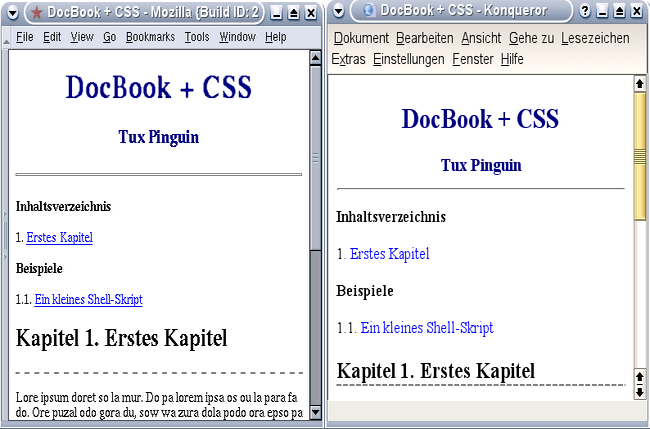
Figure: Formatting book and chapter elements (Mozilla left, Konqueror right)
Title pages for parts, articles, sections and other elements are generated and handled in the same way.
Formatting example elements
Start with the following code:
<example>
    <title>Ein kleines Shell-Skript</title>
    <screen>#!/bin/bash
echo "Hallo Welt"</screen></example>
After transformation, this becomes:
<div class="example">
    <a name="id2799898"></a>
    <p class="title"><b>Beispiel 1.1. Ein kleines Shell-Skript</b></p>
    <pre class="screen">#!/bin/bash
echo "Hallo Welt"</pre>
</div>
The CSS file is:
div.example {
  margin-left:      .5ex;
  margin-right:     .5ex;
  border:           medium solid black;
  background-color: #FEFFEA;
  padding-left:     5px;
  padding-right:    5px;
}

div.example > p.title {
  line-height:      150%;
  border-bottom:    thin solid black;
  padding-top:      0px;
}

div.example pre {
  margin: 2ex;
}
The following figure shows the result.
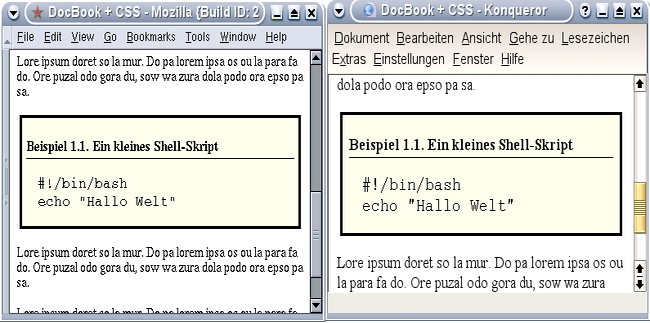
Figure: Formatting example (Mozilla left, Konqueror right)
Formatting sidebars
Sidebars were introduced in Sidebars. Using that example, transformation produces:
<div class="sidebar">
    <p>Eine Randnotiz, erzeugt mit dem Element sidebar.</p>
</div>
<p>Dies ist ein Blindtext. ...</p>
The rules for sidebar are:
div.sidebar {
  float:right;
  clear:right;
  align:right;
  width:150px;
  background:#EBFFE2;
  border:1px ridge #EBFFF2;
  margin-top:1px; margin-bottom:1px; margin-left:5px;
  padding-top:2px; padding-bottom:2px; padding-left:1px;
}

div.sidebar > p {
   margin:0px;
   padding:0px;
}
The parameter float controls alignment. To place the sidebar on the left, enter float:left;. The following figure shows the result.
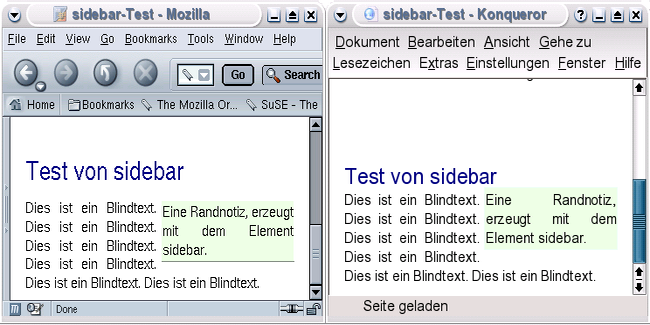
Figure: Formatting sidebar (Mozilla left, Konqueror right)
Copyright © 2009 Millin Verlag
You may print the online version for your private use.
Otherwise, this chapter from "DocBook-XML: Medienneutrales und plattformunabhängiges Publizieren" is subject to the same provisions as the printed edition: the work, including all its parts, is protected by copyright. All rights are reserved, including reproduction, translation, microfilming, and storage and processing in electronic systems.
Millin Verlag, Siebengebirgsring 36, 53797 Lohmar, info(at)millin.de