

XML technologies / DocBook / Generating (X)HTML / Formatting (X)HTML with CSS / Overview of CSS rules
(Excerpt from "DocBook-XML: Media-neutral and platform-independent publishing" by Thomas Schraitle)
The following rules are the most important for formatting your document.
- Element selectors:
h2 The simplest case formats only this one element (here
h2).- Universal selectors:
* The asterisk specifies that all (X)HTML elements are to be formatted with the corresponding style.
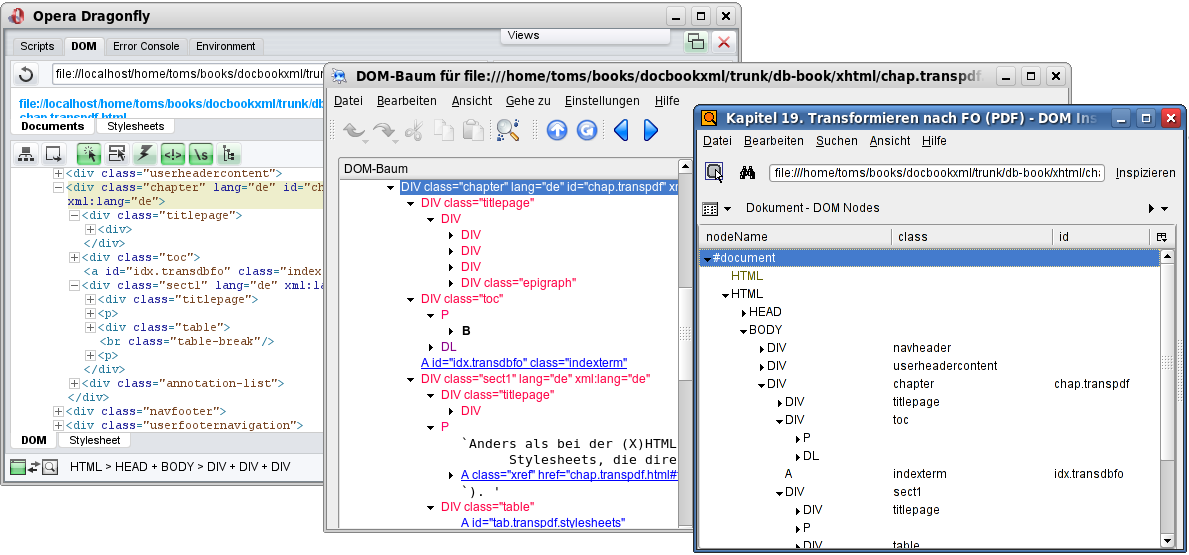
Figure: DOM tree view (Opera, Konqueror, and Firefox)
- Grouping:
h2, h3 Commas are used for elements that share the same formatting rules. This selector applies to all
h2andh3elements.- Class selectors:
div.section The period separates the element name from the value of the attribute
class. This notation is the most common in generated (X)HTML files. In the example above, it applies to all elements marked up with<div class="section">.- Child element selectors:
div.section > div.titlepage This rule applies only if a
<div class="section">element has a direct child element<div class="titlepage">.- Selectors for deeper nesting levels:
div.section * h2.title The reverse of the previous rule: it applies only if the element
<h2 class="title">is not a direct child of<div class="section">. This means thath2must be a child of another element.- Structural element selectors:
div.section div.titlepage This rule finds a
<div class="titlepage">at any nesting level below the element<div class="section">.- Sibling element selectors:
p.title + pre.screen This rule applies only if
<pre class="screen">is an immediate sibling of<p class="title">.- ID selectors:
#chap.xml These selectors are probably used less frequently, since they are only available for elements with a unique ID attribute, such as
<div id="chap.xml">.- Pseudo-formats:
a:link Pseudo-formats specify rules that cannot be assigned to a single element name. They can define styles for previously visited hyperlinks, styles before or after an element, and more.
The rule above uses the keywordlink, which applies to all unvisited links.
The selectors above allow many kinds of formatting. CSS 2 and CSS 3 provide additional notations, but you should first test whether your browser supports them. For more details, see SELFHTML: Stylesheets (CSS).
Copyright © 2009 Millin Verlag
You may print the online version for your private use.
Otherwise, this chapter from "DocBook-XML: Medienneutrales und plattformunabhängiges Publizieren" is subject to the same provisions as the printed edition: the work, including all its parts, is protected by copyright. All rights are reserved, including reproduction, translation, microfilming, and storage and processing in electronic systems.
Millin Verlag, Siebengebirgsring 36, 53797 Lohmar, info(at)millin.de
back to top