

XML technologies / CSS / Advanced websites with CSS / Text effects and the cascade / Horizontal and vertical spacing / The property line-height in CSS
(Excerpt from “CSS − Advanced websites with Cascading Stylesheets” by Rachel Andrew & Dan Shafer)
All text elements on a web page have the property line-height. It extends from the top of the tallest letter on one line to the top of the tallest letter on the next. By default, the browser automatically leaves enough space to distinguish adjacent lines and make them readable. If a paragraph’s font size is 12 points, for example, the browser adds two points of space, giving a total line-height of 14 points.
When you use line-height for an element such as a paragraph or heading, you tell the browser to increase or reduce line spacing. In typography, line spacing is called leading, a term from the days when each line was cast in lead and assembled with the others into a printing forme. Small metal strips, called leads, were inserted between lines to create enough space for legibility.
Well-proportioned leading adds white space and can significantly improve a web page’s typographic design. For example:
p {
  text-indent: 2em;
  line-height: 1.5em;
}
This rule produces a line height of 1.5em, one and a half times the font size, as shown in the following figure.
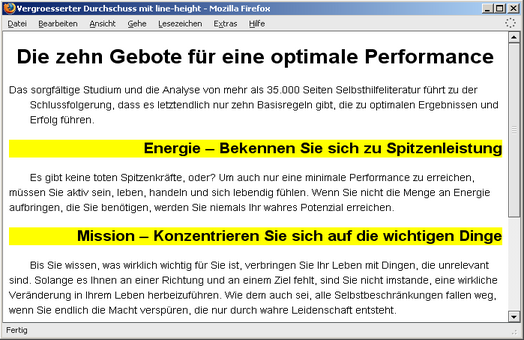
Figure: Increased leading with line-height.
Note that relative values in line-height behave differently from most other font properties. Relative values in line-height always use the font size of the element on which they are defined, rather than its parent’s values, as for example with font-size!
Take, for example, a paragraph p with a 12-pixel font, wrapped in a tag <div> whose font size is 18 pixels. If you set line-height in the paragraph p to 2em, the line height uses twice the 12-pixel em height, that is, twice the font size of p itself. The parent element div does not influence the calculation with its font size.
The property line-height has another special feature worth examining: it is the first CSS property in this book that accepts relative numeric values without a unit of measurement, as in this example:
p {
  text-indent: 2em;
}
Line height is calculated from the same base as in the previous example, so line-height again means twice the font size of p.
Defined on the same element, relative values with and without units thus give the same result. However, an important difference emerges in their inheritance.
To clarify this difference, again take a paragraph p nested in an area div. div gets a font size of 12px, p a font-size of 22px. We also define for div a line-height of 1.5em. What happens? First, the line height of div is calculated as 18 pixels. This is then inherited as an absolute value by the child element p. Consequently, for p the line height is also automatically 18 pixels, regardless of the font size in p.
Take a second area div with a child paragraph p, using the same font sizes as before. Now we set line-height for div using a relative, unitless value of 1.5. Again, the line height of div is calculated first, giving 18 pixels, one and a half times the font size. This time, however, what p inherits is the numeric value itself rather than the already calculated absolute line height of div. The line-height of p is recalculated using its own font size. The result is a much larger line height of 33 pixels.
The following figure illustrates our example. Each area div contains the paragraph p with the text. The upper area div has its line height set to 1.5em, and the lower paragraph uses 1.5. Clearly, in the first paragraph the smaller line height of div was inherited by p, while in the second the line height was recalculated from the larger font in p and the value inherited from div.
The first paragraph is wrapped in a tag <div> with a line-height of 1.5em. The line height valid for the area div and inherited by the paragraph p is calculated as twice the font size of the element div. However, the paragraph p uses a much larger font, 16 pt, than the area div, 8 pt, so the inherited height (8 × 1.5 = 12 pt) is insufficient to produce generous line spacing.
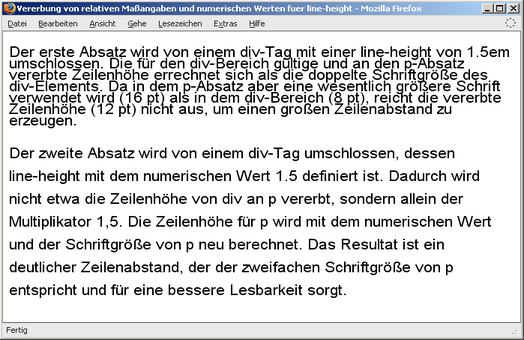
Figure: Inheritance of relative lengths and numeric values for line-height.
The second paragraph is wrapped in a tag <div> whose line-height is defined by the numeric value 1.5. This does not pass the line height from div to p, only the multiplier 1.5. The line height of p is recalculated using that numeric value and the font size of p. The result is clear line spacing, one and a half times the font size of p, improving readability.
It is therefore advisable to use relative, unitless values for line-height, preserving their relative nature and protecting against incorrect rendering. Relative values with units, or absolute point or pixel values, are better suited to special-effect designs, such as overlapping or stacked lines of text.
Copyright © 2006 of the German translation, dpunkt.verlag GmbH
You may print the online version for your private use.
Otherwise, this chapter from “CSS − Anspruchsvolle Websites mit Cascading Stylesheets” is subject to the same conditions as the bound edition: the work, including all its parts, is protected by copyright. All rights reserved, including reproduction, translation, microfilming, and storage and processing in electronic systems.
dpunkt.verlag GmbH, Ringstraße 19, 69115 Heidelberg
back to top