

Software / Octopus / Technical concepts / Octopus Container Format
The Octopus Container Format (OCF) is a specially developed container format used by Octopus to bundle different data in a single file. It is based on ZIP, a de facto industry standard for compressing and bundling files. OCF is used to store, transport and process data efficiently. As a powerful storage format, OCF combines all files belonging to a document in a single structured container file. This makes the data easy to handle and enables reliable checking and management of the data it contains.
One format, many possibilities
OCF is a neutral export format ideally suited to content management systems (CMS). It allows content to be stored and shared independently of the original file format. Whether websites, PDFs, DOCX documents or XML formats such as DocBook, DITA or TEI, OCF can bundle them all in a single container. This flexibility makes it an indispensable tool for companies seeking efficient, future-proof data management.
Independence and future readiness
A key advantage of OCF is its format independence. Whatever the original data format, OCF ensures that data is stored in a standardised structure. This guarantees long-term readability and usability and makes the data independent of proprietary software solutions.
Ideal for AI processes
OCF is both an archiving and exchange format and a solid foundation for downstream AI processes. Structured, standardised storage enables data to be used efficiently in AI-powered applications. Whether for analysis, processing or transformation, OCF ensures that data is optimally prepared.
Container functions:
Octopus Container Format (OCF) provides the following functions:
Data compression: Using the ZIP format reduces storage requirements.
Data organisation: It defines a clear directory structure that logically organises all contained files.
Data access: The contained files can easily be extracted and used directly.
Integration into Octopus Platform: The platform can process OCF files to convert or enrich data, or transform it into other formats.
Contents of the OCF container
As with EPUB or Office Open XML (such as DOCX), all associated files, including text, images, metadata, rules and layout information, are combined in one central container. At its heart is the file manifest.xml, which defines the package structure as a machine-readable control file.
A typical OCF container contains:
The manifest file (manifest.xml) describes the container’s content and the files it contains.
Content files: These include images, text, metadata and other resources organised in a clear folder structure.
Metadata: Information about the contained files, such as file types, paths and access permissions.
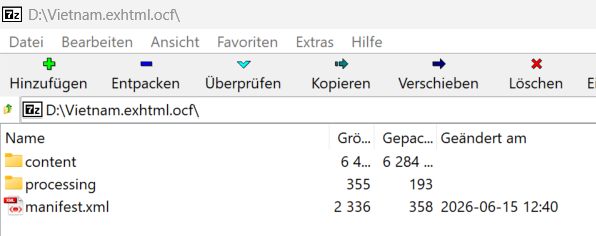
Fig.: Contents of an OCF container for exHTML.
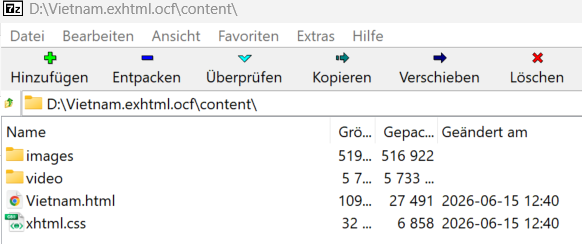
Fig.: Data in the OCF content folder: images, videos, exHTML document and CSS.
OCF benefits at a glance
Central storage: All files belonging to a document (such as images, text and metadata) are bundled in a single container, making them easier to handle and distribute.
Format independence: Works with websites, PDFs, DOCX, XML formats such as DocBook, DITA and TEI, and more.
Easy checking: Clear structure and metadata enable reliable validation.
Future readiness: Ideal for integration into AI-powered processes.
Efficient data exchange: Ideal for sharing and archiving content.
Transparency: The contained files can be extracted and viewed with standard tools such as 7-ZIP.
Octopus Container Format (OCF) is a powerful, flexible tool for bundling and processing data. It provides a clear structure, supports different file formats and is optimally integrated into Octopus Platform to ensure efficient data processing.
OCF validation: XML quality beyond individual documents
With OCF validation, Octopus extends conventional XML checks into a comprehensive quality process for complete publication packages.
In addition to schema and rule checks, links, package structures and semantic anomalies can be checked. The results are then combined in a shared Summary and made traceable down to the specific location in the document.
>> More information about OCF validation