

XML technologies / XSLT / Java and XSLT / XSLT processing with Java / Input and output
(Excerpt from “Java and XSLT” by Eric M. Burke)
Like other XML tools, XSLT processors read from many sources. Most simply, a static stylesheet and XML document are loaded through class java.io.File. More commonly, the stylesheet comes from a file while XML is generated dynamically from a database query. Writing query results to a file only to parse them into the XSLT processor makes no sense. Instead, feed XML directly through SAX or DOM. We will even see how to read non-XML data and transform it with XSLT.
System identifiers, files and URLs
Earlier simple examples introduced the concept of a system identifier. System identifiers are simply URIs widely used by XML tools. For example, a key interface in JAXP, javax.xml.transform.Source, has this API:
public interface Source {
    String getSystemId( );
    void setSystemId(String systemId);
}
The second method, setSystemId( ), is crucial. Giving the Source object a URI lets the processor resolve stylesheet URIs. Thus this code works:
<xsl:import href="allgemeineFusszeilen.xslt"/>In XSLT programming, methods from java.io.File and java.net.URL convert platform-specific filenames to system IDs usable by methods expecting them. For example:
public static void main(String[] args) {
 // es wird angenommen, daß der erste Kommandozeilenparameter
 // einen Dateinamen enthält
 // - unter Windows so ähnlich wie "C:\home\index.xml"
 // - unter Unix so ähnlich wie "/usr/home/index.xml"
 String dateiname = args[0];
 File fileObjekt = new File(dateiname);
 URL dateiURL = fileObjekt.toURL( );
 String systemID = dateiURL.toExternalForm( );
Split across lines for clarity, this code can be shortened to:
String systemID = new File(dateiname).toURL().toExternalForm( );Convert a system identifier back to a filename or File object as follows:
URL url = new URL(systemID);
String dateiname = url.getFile( );
File fileObjekt = new File(dateiname);
Again, one line suffices:
File fileObjekt = new File((new URL(systemID)).getFile( ));JAXP I/O design
Interfaces Source and Result in javax.xml.transform underpin transformation I/O in JAXP 1.1. Whether a stylesheet is a URI, filename or InputStream, its data enters JAXP through a Source implementation. Output goes to a Result implementation. The figure lists JAXP’s implementations.
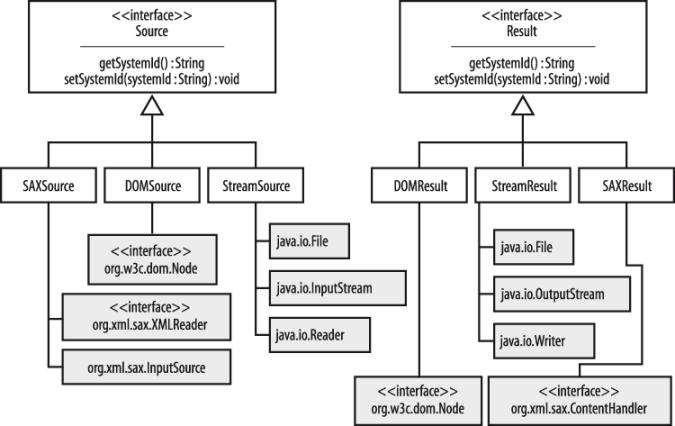
Figure: Source and Result interfaces
JAXP does not constrain input origins or output destinations. Remember there are always two instances of Source: one for XML and one for the stylesheet.
JAXP stream I/O
As shown, StreamSource implements interface Source. Besides system identifiers from Source, StreamSource accepts input through a File object, an InputStream object or a Reader object. Class BeispielJaxp in example BeispielJaxp.java demonstrated reading with StreamSource from a File object. Four further constructors create a StreamSource instance from either an InputStream object or a Reader object. The full constructor list follows:
public StreamSource( )
public StreamSource(File f)
public StreamSource(String systemId)
public StreamSource(InputStream byteStream)
public StreamSource(InputStream byteStream, String systemId)
public StreamSource(Reader characterStream)
public StreamSource(Reader characterStream, String systemId)
Constructors accepting InputStream and Reader take XML or stylesheet data first. Their optional second parameter resolves relative URIs. For example, a stylesheet might contain:
<xsl:import href="allgemeineFusszeilen.xslt"/>Giving the StreamSource object a system identifier tells the processor where to find allgemeineFusszeilen.xslt. Without it, URI resolution may fail. Call method setSystemId( ):
// ein StreamSource-Objekt, das von einem InputStream liest, wird erzeugt
Source meineSource = new StreamSource(einInputStream);
// die System-ID (ein String) wird spezifiziert, damit das Source-Objekt
// relative URIs auflösen kann, auf die es in XSLT-Stylesheets stößt.
meineSource.setSystemId(eineSystemId);
The documentation for StreamSource recommends InputStream over Reader, allowing the processor to handle encoding as specified in the XML declaration.
StreamResult resembles StreamSource in functionality, though relative URIs need not necessarily be resolved. Constructors:
public StreamResult( )
public StreamResult(File f)
public StreamResult(String systemId)
public StreamResult(OutputStream byteStream)
public StreamResult(Writer characterStream)
Let us explore other options for StreamSource and StreamResult. The next example modifies the earlier BeispielJaxp program. It downloads the XML specification from W3C to a local temporary file. A StreamSource object is constructed with a system identifier. A simple identity stylesheet copies unchanged XML into the result tree. The result goes through the File constructor to a StreamResult.
Example: Streams.java
package kapitel5;

import java.io.*;
import javax.xml.transform.*;
import javax.xml.transform.stream.*;

/**
 * Ein einfaches Beispiel für die JAXP 1.1-Klassen StreamSource und StreamResult.
 * Dieses Programm lädt die XML-Spezifikation vom W3C herunter und schreibt sie
 * in eine temporäre Datei.
 */
public class Streams {

    // ein Stylesheet zur Identitätskopie ...
    private static final String IDENTITAETS_XSLT =
        "<xsl:stylesheet xmlns:xsl='http://www.w3.org/1999/XSL/Transform'"
        + " version='1.0'>"
        + "<xsl:template match='/'><xsl:copy-of select='.'/>"
        + "</xsl:template></xsl:stylesheet>";

    // ... der XML-Spezifikationen im XML-Format
    // (mittels einer HTTP-URL statt einer file-URL)
    private static String xmlSystemId =
          "http://www.w3.org/TR/2000/REC-xml-20001006.xml";

    public static void main(String[] args) throws IOException,
          TransformerException {

        // zeigt, wie man von einem System-Identifikator und einem Reader-Objekt liest
       Source xmlSource = new StreamSource(xmlSystemId);
       Source xsltSource = new StreamSource(
               new StringReader(IDENTITAETS_XSLT));

       // sendet das Ergebnis an eine Datei
       File ergebnisDatei = File.createTempFile("Streams", ".xml");
       Result ergebnis = new StreamResult(ergebnisDatei);

       System.out.println("Die Ergebnisse gehen an: "
               + ergebnisDatei.getAbsolutePath( ));

       // die Factory-Instanz erzeugen
       TransformerFactory transFact = TransformerFactory.newInstance( );

       // einen Transformer für dieses spezielle Stylesheet erzeugen
       Transformer trans = transFact.newTransformer(xsltSource);

       // und die Transformation durchführen
       trans.transform(xmlSource, ergebnis);
   }
}
The identity stylesheet matches only /, the document itself, then selects it with <xsl:copy-of select='.'/> and copies it into the result tree. Here the stylesheet is embedded in the code, but it can be omitted:
// ein Transformer ohne XSLT-Stylesheet wird konstruiert
Transformer trans = transFact.newTransformer( );
The processor supplies its own equivalent stylesheet. This helps serialize DOM for debugging: the default Transformer simply copies XML without transformation.
JAXP DOM I/O
Often the fastest transformation passes an instance of org.w3c.dom.Document directly to JAXP. DOM construction takes time and much memory, making it less suitable for large documents. DOM data is usually generated dynamically from a database or another operation (see Introduction). Once built, the Document object is wrapped in a DOMSource object:
org.w3c.dom.Document domDokument = erzeugeDomDokument( );
Source xmlSource = new javax.xml.transform.dom.DOMSource(domDokument);
The remaining transformation matches the file-based example Streams.java. JAXP needs only the alternative Source object to read DOM.
JAXP SAX I/O
XSLT transforms well-formed XML, typically into HTML. Could stylesheets also transform non-XML data? Most spreadsheets export CSV (Comma Separated Values), as shown:
Burke,Eric,M
Burke,Jennifer,L
Burke,Aidan,G
One approach builds a DOM representation while parsing the file into memory, then sends it to JAXP. This works but adds an intermediate CSV-to-DOM step. A custom SAX parser feeding JAXP directly avoids DOM construction, improving memory use and performance.
The approach
Writing a SAX parser is straightforward; these examples use SAX 2. A parser reads XML sequentially and reports events for its elements. Ours reads CSV and emits equivalent events. A listener cannot tell that the data file is CSV rather than XML: it sees only events. The figure shows the conceptual model.
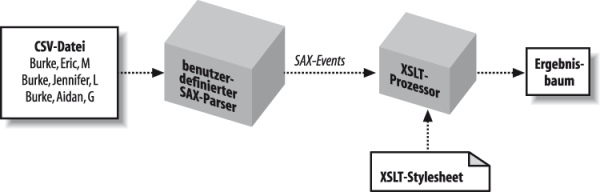
Figure: Custom SAX parser
The XSLT processor interprets events as XML and uses an ordinary stylesheet. Custom parsers for other formats thus make XSLT useful for transforming almost any existing application data.
SAX parsers implement standard interface org.xml.sax.XMLReader together with org.xml.sax.ContentHandler, the event listener interface. The processor must implement ContentHandler to receive events generated by XMLReader. JAXP uses javax.xml.transform.sax.TransformerHandler for this.
Obtaining an instance of TransformerHandler takes extra steps. First create a TransformerFactory object as usual:
TransformerFactory transFact = TransformerFactory.newInstance( );As before, TransformerFactory abstracts the underlying processor, which need not support SAX. Check support before continuing:
if (transFact.getFeature(SAXTransformerFactory.FEATURE)) {If it returns false, you cannot proceed. Otherwise cast to SAXTransformerFactory and create the TransformerHandler instance:
SAXTransformerFactory saxTransFact =
         (SAXTransformerFactory) transFact;
// ein ContentHandler ohne Angabe eines Stylesheets wird erzeugt.
// Ohne Stylesheet wird rohes XML ausgegeben.
TransformerHandler transHand = saxTransFact.newTransformerHandler( );
No stylesheet is specified here, so JAXP uses identity transformation, producing raw XML from events. For a real transformation, pass a Source object to the method:
Source xsltSource = new StreamSource(myXsltSystemId);
TransformerHandler transHand = saxTransFact.newTransformerHandler(xsltSource);
Detailed CSV-to-SAX design
Before the full program, examine a detailed diagram. The conceptual model is clear, but several classes and interfaces now enter. The figure shows SAX transformation components.
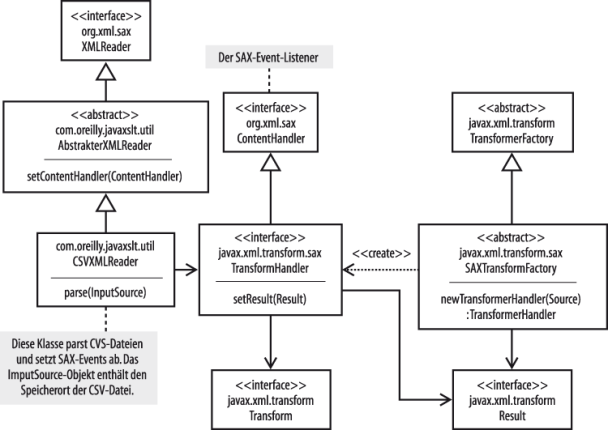
Figure: SAX and XSLT transformations
Though more complex, this resembles earlier approaches. Previously we used TransformerFactory to create Transformer instances; SAX starts with a subclass of TransformerFactory. First check SAX transformation support. The JAXP reference implementation provides it, but others need not. In this code, method getFeature of TransformerFactory returns true if casting to SAXTransformerFactory is possible:
TransformerFactory transFact = TransformerFactory.newInstance( );
if (transFact.getFeature(SAXTransformerFactory.FEATURE)) {
    // Typumwandlung ist erlaubt
    SAXTransformerFactory saxTransFact = (SAXTransformerFactory) transFact;
If getFeature returns false, find an implementation supporting SAX. Otherwise create a TransformerHandler instance:
TransformerHandler transHand = saxTransFact.newTransformerHandler(myXsltSource);This object represents the stylesheet. As figure SAX and XSLT transformations shows, TransformerHandler extends interface org.xml.sax.ContentHandler and can listen to parser events. Events provide the apparent XML; all that remains is setting the Result object and telling the parser to start. TransformerHandler also exposes a Transformer object to set encoding, indentation and other <xsl:output> attributes.
Writing a custom parser
Implementing the org.xml.sax.XMLReader interface is easier than it sounds: most of its many methods can be ignored. CSV parsing, for example, need not worry about namespaces or validation. The next example shows AbstrakterXMLReader.java, an abstract class providing basic implementations of every XMLReader method except parse( ). A custom parser need only subclass it and override that method.
Example: AbstrakterXMLReader.java
package com.oreilly.javaxslt.util;

import java.io.IOException;
import java.util.*;
import org.xml.sax.*;

/**
  * Eine abstrakte Klasse, die das SAX2-XMLReader-Interface imlementiert. Die
  * Absicht hinter dieser Klasse ist die Erleichterung für Unterklassen, als
  * SAX2-XMLReader-Implementierungen zu agieren. Das ermöglicht Ihnen beispielsweise,
  * SAX2-Events abzusetzen, die zwecks Transformation an einen XSLT-Prozessor
  * übergeben werden können.
  */
public abstract class AbstrakterXMLReader implements org.xml.sax.XMLReader {
    private Map featureMap = new HashMap( );
    private Map propertyMap = new HashMap( );
    private EntityResolver entityResolver;
    private DTDHandler dtdHandler;
    private ContentHandler contentHandler;
    private ErrorHandler errorHandler;

    /**
     * Die einzige abstrakte Methode in dieser Klasse. Abgeleitete Klassen können
     * jede Datenquelle parsen und SAX2-Events an ContentHandler senden.
     */
    public abstract void parse(InputSource input) throws IOException,
        SAXException;

    public boolean getFeature(String name)
        throws SAXNotRecognizedException, SAXNotSupportedException {
      Boolean featureWert = (Boolean) this.featureMap.get(name);
      return (featureWert == null) ? false
            : featureWert.booleanValue( );
    }

    public void setFeature(String name, boolean value)
        throws SAXNotRecognizedException, SAXNotSupportedException {
     this.featureMap.put(name, new Boolean(value));
    }

    public Object getProperty(String name)
        throws SAXNotRecognizedException, SAXNotSupportedException {
      return this.propertyMap.get(name);
    }

    public void setProperty(String name, Object value)
        throws SAXNotRecognizedException, SAXNotSupportedException {
      this.propertyMap.put(name, value);
    }

    public void setEntityResolver(EntityResolver entityResolver) {
      this.entityResolver = entityResolver;
    }

    public EntityResolver getEntityResolver( ) {
      return this.entityResolver;
    }

    public void setDTDHandler(DTDHandler dtdHandler) {
      this.dtdHandler = dtdHandler;
    }

    public DTDHandler getDTDHandler( ) {
      return this.dtdHandler;
    }

    public void setContentHandler(ContentHandler contentHandler) {
      this.contentHandler = contentHandler;
    }

    public ContentHandler getContentHandler( ) {
      return this.contentHandler;
    }

    public void setErrorHandler(ErrorHandler errorHandler) {
      this.errorHandler = errorHandler;
    }

    public ErrorHandler getErrorHandler( ) {
      return this.errorHandler;
    }

    public void parse(String systemId) throws IOException, SAXException {
      parse(new InputSource(systemId));
    }
}
Subclass CSVXMLReader overrides method parse( ) to scan CSV and emit events for its elements. SAX is simple, CSV parsing harder. For flexibility, it supports any CSV exported by a spreadsheet such as Microsoft Excel. Simple data might look like:
Burke,Eric,M
Burke,Jennifer,L
Burke,Aidan,G
The next example shows its XML representation. CSV’s positional columns have no names, so each row contains three <wert> elements and the stylesheet selects by position.
Example: Sample XML from a CSV parser
<?xml version="1.0" encoding="ISO-8859-1"?>
<csvDatei>
    <zeile>
        <wert>Burke</wert>
        <wert>Eric</wert>
        <wert>M</wert>
    </zeile>
    <zeile>
        <wert>Burke</wert>
        <wert>Jennifer</wert>
        <wert>L</wert>
    </zeile>
    <zeile>
        <wert>Burke</wert>
        <wert>Aidan</wert>
        <wert>G</wert>
    </zeile>
</csvDatei>
A better parser could accept meaningful column names as parameters, or another stylesheet could rename the initial XML’s columns. These features are omitted to keep the example manageable. CSV still has subtleties: fields containing commas must be quoted:
"Berater,Autor,Lehrer",Burke,Eric,M
Lehrerin,Burke,Jennifer,L
kein,Burke,Aidan,G
Fields can also contain quotation marks ("), doubled like Java’s double backslashes (\\) representing one backslash. Here the first field contains one quote, so it is quoted and the internal quote doubled:
"test""anführungszeichen",Lehrerin,Burke,Jennifer,LInterpreted as:
test"anführungszeichen,Lehrerin,Burke,Jennifer,LThe next example gives the full CSV parser.
Example: CSVXMLReader.java
package com.oreilly.javaxslt.util;

import java.io.*;
import java.net.URL;

import org.xml.sax.*;
import org.xml.sax.helpers.*;
/**
 * Eine Tool-Klasse, die eine Datei mit kommaseparierten Werten (CSV-Datei) parst
 * und deren Inhalte über SAX2-Events ausgibt. Das CSV-Format, das diese Klasse
 * lesen kann, ist identisch zum Exportformat von Microsoft Excel.
 * Bei einfachen Werten könnte die CSV-Datei wie folgt aussehen:
 * <pre>
 * a,b,c
 * d,e,f
 * </pre>
 * Anführungszeichen schließen den Wert ein, wenn er Kommas enthält:
 * <pre>
 * a,"b,c",d
 * e,"f,g","h,i"
 * </pre>
 * Wenn der Wert Anführungszeichen enthält, werden diese verdoppelt. Der Parser
 * entfernt auch an ein Komma angrenzende Leerzeichen.
 *
 * @author Eric M. Burke
 */
public class CSVXMLReader extends AbstrakterXMLReader {

  // ein leeres Attribut zur Verwendung mit SAX
  private static final Attributes LEERES_ATTR = new AttributesImpl( );

  /**
   * Eine CSV-Datei wird geparst. SAX-Events werden an das ContentHandler-Objekt,
   * das über <code>setContentHandler</code> registriert wurde, übergeben.
   *
   * @param input enthält die zu parsende CSV-Datei.
   */
  public void parse(InputSource input) throws IOException,
      SAXException {
  // wenn kein Handler zum Empfang von Events registriert wurde,
  // braucht die CSV-Datei auch nicht geparst zu werden.
  ContentHandler ch = getContentHandler( );
  if (ch == null) {
      return;
  }

  // Das InputSource-Objekt wird in einen BufferedReader konvertiert
  BufferedReader br = null;
  if (input.getCharacterStream( ) != null) {
      br = new BufferedReader(input.getCharacterStream( ));
  } else if (input.getByteStream( ) != null) {
      br = new BufferedReader(new InputStreamReader(
           input.getByteStream( )));
  } else if (input.getSystemId( ) != null) {
      java.net.URL url = new URL(input.getSystemId( ));
      br = new BufferedReader(new InputStreamReader(url.openStream( )));
  } else {
      throw new SAXException("Ungültiges InputSource-Objekt");
  }

  ch.startDocument( );

  // sende <csvDatei>
  ch.startElement("","","csvDatei",LEERES_ATTR);

  // nun wird jede Zeile der Datei gelesen, bis EOF erreicht ist.
  String aktZeile = null;
  while ((aktZeile = br.readLine( )) != null) {
     aktZeile = aktZeile.trim( );
     if (aktZeile.length( ) > 0) {
        // erzeuge das <zeile>-Element
        ch.startElement("","","zeile",LEERES_ATTR);
        // und gib die Daten dieser Zeile aus.
        parseZeile(aktZeile, ch);
        // schließe das </zeile>-Element
        ch.endElement("","","zeile");
    }
  }

  // sende </csvDatei>
  ch.endElement("","","csvDatei");
  ch.endDocument( );
}

//Eine einzelne Zeile wird in Token aufgebrochen. Diese rekursive Funktion
// extrahiert das erste Token und parst dann rekursiv den Rest der Zeile.
private void parseZeile(String aktZeile, ContentHandler ch)
  throws IOException, SAXException {

  String erstesToken = null;
  String restDerZeile = null;
  int kommaIndex = findeErstesTrennzeichen(aktZeile);
  if (kommaIndex > -1) {
     erstesToken = aktZeile.substring(0, kommaIndex).trim( );
     restDerZeile = aktZeile.substring(kommaIndex+1).trim( );
  } else {
     // keine Kommas, also ist die ganze Zeile ein Token
     erstesToken = aktZeile;
  }

  // entferne überflüssige Anführungszeichen
  erstesToken = bereinigeAnfuehrungszeichen(erstesToken);

  // sende das <wert>-Element
  ch.startElement("","","wert",LEERES_ATTR);
  ch.characters(erstesToken.toCharArray(), 0, erstesToken.length( ));
  ch.endElement("","","wert");

  // den Rest der Zeile rekursiv verarbeiten
  if (restDerZeile != null) {
     parseZeile(restDerZeile, ch);
  }
}

// finde die Position des Kommas und berücksichtige, daß Kommas in Token, die in
// Anführungszeichen eingeschlossen sind, ignoriert werden können.
private int findeErstesTrennzeichen(String aktZeile) {
  if (aktZeile.startsWith("\"")) {
     boolean inAnfuehrungszeichen = true;
     int zeichenZahl = aktZeile.length( );
     for (int i=1; i<zeichenZahl; i++) {
       char aktZeichen = aktZeile.charAt(i);
       if (aktZeichen == '"') {
          inAnfuehrungszeichen = !inAnfuehrungszeichen;
       } else if (aktZeichen == ',' && !inAnfuehrungszeichen) {
          return i;
       }
     }
     return -1;
  } else {
     return aktZeile.indexOf(',');
  }
}

// entfernt Anfuehrungszeichen um ein Token und doppelte Anfuehrungszeichen
// innerhalb eines Tokens.
private String bereinigeAnfuehrungszeichen(String token) {
  StringBuffer buf = new StringBuffer( );
  int laenge = token.length( );
  int aktIndex = 0;

  if (token.startsWith("\"") && token.endsWith("\"")) {
     aktIndex = 1;
     laenge--;
  }

  boolean einAnfuehrungszeichenGefunden = false;
  boolean zweiAnfuehrungszeichenGefunden = false;

  while (aktIndex < laenge) {
  char aktZeichen = token.charAt(aktIndex);
  if (aktZeichen == '"') {
      zweiAnfuehrungszeichenGefunden = (einAnfuehrungszeichenGefunden) ?
      true : false;
      einAnfuehrungszeichenGefunden = true;
  } else {
      einAnfuehrungszeichenGefunden = false;
      zweiAnfuehrungszeichenGefunden = false;
  }

  if (zweiAnfuehrungszeichenGefunden) {
      zweiAnfuehrungszeichenGefunden = false;
      einAnfuehrungszeichenGefunden = false;
      aktIndex++;
      continue;
  }

  buf.append(aktZeichen);
  aktIndex++;
  }

     return buf.toString( );
  }
}
Since CSVXMLReader subclasses AbstrakterXMLReader, CSVXMLReader must implement abstract method parse:
public void parse(InputSource input) throws IOException,
      SAXException {
   // wenn kein Handler zum Empfang von Events registriert wurde,
   // braucht die CSV-Datei auch nicht geparst zu werden.
   ContentHandler ch = getContentHandler();
   if (ch == null) {
      return;
   }
First it checks for a SAX ContentHandler. Base class AbstractXMLReader exposes this event listener. We use a JAXP TransformerHandler instance implementing SAX’s ContentHandler. Without a registered handler, method parse returns because no listener exists. A real SAX parser would still parse to check errors. Our early return is merely a performance optimization for this class.
The SAX InputSource parameter locates the CSV file. Since InputSource can read from many sources, parsers must check each in this order:
// Das InputSource-Objekt wird in einen BufferedReader konvertiert
BufferedReader br = null;
if (input.getCharacterStream() != null) {
  br = new BufferedReader(input.getCharacterStream());
} else if (input.getByteStream() != null) {
  br = new BufferedReader(new InputStreamReader(
  input.getByteStream()));
} else if (input.getSystemId() != null) {
  java.net.URL url = new URL(input.getSystemId());
  br = new BufferedReader(new InputStreamReader(url.openStream()));
} else {
  throw new SAXException("Ungültiges InputSource-Objekt");
}
With a valid InputSource object, begin parsing CSV and emitting events. First notify the ContentHandler that a document has started:
ch.startDocument( );

// sende <csvDatei>
ch.startElement("","","csvDatei",LEERE_ATTR);
The processor interprets this as:
<?xml version="1.0" encoding="UTF-8"?>
<csvDatei>
Our parser ignores many SAX 2 features, particularly namespaces. Hence many parameters to the ContentHandler methods are empty strings. Constant LEERES_ATTR indicates an element without attributes.
CSV itself is straightforward: iterate over lines and emit events for each. Private helper method parseZeile performs the actual CSV parsing:
// nun wird jede Zeile der Datei gelesen, bis EOF erreicht ist.
String aktZeile = null;
while ((aktZeile = br.readLine()) != null) {
  aktZeile = aktZeile.trim();
  if (aktZeile.length() > 0) {
    // erzeuge das <zeile>-Element
    ch.startElement("","","zeile",LEERES_ATTR);
    // und gib die Daten dieser Zeile aus.
    parseZeile(aktZeile, ch);
    // schließe das </zeile>-Element
    ch.endElement("","","zeile");
  }
}
Finally, signal the end:
// sende </csvDatei>
ch.endElement("","","csvDatei");
ch.endDocument( );
Other methods in CSVXMLReader merely split CSV lines and handle low-level comma/quote parsing, so are not detailed here. Note, however, the code emitting text like:
<wert>hier steht Text</wert>SAX parsers use method characters of ContentHandler for text, with this signature:
public void characters(char[] ch, int start, int length)Although it could accept a string, an array lets parsers preallocate and reuse a large character buffer. A ContentHandler cannot assume the entire ch array contains meaningful data; it must read only the specified count from position start.
Our simple approach converts a String to a character array passed to method characters:
// sende das <wert>-Element
ch.startElement("","","wert",LEERES_ATTR);
ch.characters(erstesToken.toCharArray(), 0, erstesToken.length());
ch.endElement("","","wert");
Using the parser
Finally, combine our CSV parser with XSLT. This standalone Java application accepts a CSV filename first and an optional stylesheet second, sending all output to System.out.
Example: SimplerCSVProzessor.java
package com.oreilly.javaxslt.util;

import java.io.*;
import javax.xml.transform.*;
import javax.xml.transform.sax.*;
import javax.xml.transform.stream.*;
import org.xml.sax.*;

/**
 * Zeigt, wie man die CSVXMLReader-Klasse einsetzt. Es handelt sich um ein
 * Kommandozeilen-Tool, das eine CSV-Datei und optional eine XSLT-Datei als
 * Kommandozeilenparameter erwartet. Die Transformation wird dann durchgeführt
 * und die Ausgabe an System.out geschickt.
 */
public class SimplerCSVProzessor {

  public static void main(String[] args) throws Exception {
    if (args.length == 0) {
      System.err.println("Syntax: java "
          + SimplerCSVProzessor.class.getName( )
          + " <csvDatei> [xsltDatei]");
      System.err.println(" - csvDatei ist erforderlich");
      System.err.println(" - xsltDatei ist optional");
      System.exit(1);
    }

    String csvDateiname = args[0];
    String xsltDateiname = (args.length > 1) ? args[1] : null;

    TransformerFactory transFact = TransformerFactory.newInstance( );
    if (transFact.getFeature(SAXTransformerFactory.FEATURE)) {
      SAXTransformerFactory saxTransFact =
         (SAXTransformerFactory) transFact;
      TransformerHandler transHand = null;
      if (xsltDateiname == null) {
         transHand = saxTransFact.newTransformerHandler( );
      } else {
         transHand = saxTransFact.newTransformerHandler(
           new StreamSource(new File(xsltDateiname)));
      }

    // das Ziel der XSLT-Transformation wird gesetzt
    transHand.setResult(new StreamResult(System.out));

    // der CSVXMLReader wird an die CSV-Datei gebunden
    CSVXMLReader csvReader = new CSVXMLReader( );
    InputSource csvInputSrc = new InputSource(
       new FileReader(csvDateiname));

    // der XSLT-Prozessor wird mit dem CSVXMLReader verbunden
    csvReader.setContentHandler(transHand);
    csvReader.parse(csvInputSrc);
  } else {
    System.err.println("SAXTransformerFactory wird nicht unterstützt.");
    System.exit(1);
  }
 }
}
As discussed, JAXP provides TransformerHandler, implementing interface org.xml.sax.ContentHandler. Construct it through SAXTransformerFactory:
TransformerHandler transHand = null;
if (xsltDateiname == null) {
    transHand = saxTransFact.newTransformerHandler( );
} else {
   transHand = saxTransFact.newTransformerHandler(
     new StreamSource(new File(xsltDateiname)));
}
Without a stylesheet, identity transformation displays raw XML. This helps plan a stylesheet. If supplied, that stylesheet is always used.
Then construct the custom parser:
CSVXMLReader csvReader = new CSVXMLReader( );Convert the CSV location to a SAX InputSource object:
InputSource csvInputSrc = new InputSource(
        new FileReader(csvDateiname));
Connect the processor by registering TransformerHandler as ContentHandler with csvReader. One call to method parse starts parsing and transformation:
// der XSLT-Prozessor wird mit dem CSVXMLReader verbunden
csvReader.setContentHandler(transHand);
csvReader.parse(csvInputSrc);
For a simple test, use the familiar federal presidents list as CSV:
Heuss,Theodor,
Lübke,Heinrich,
Heinemann,Gustav,W,
Scheel,Walter,
  etc...
Rau,Johannes
Invoke this way to inspect XML:
java com.oreilly.javaxslt.util.SimplerCSVProzessor bundespraesidenten.csvParsing and identity transformation print:
<?xml version="1.0" encoding="UTF-8"?>
<csvDatei>
    <zeile>
        <wert>Heuss</wert>
        <wert>Theodor</wert>
        <wert/>
        <wert/>
    </zeile>
    <zeile>
     etc...
</csvDatei>
Output is actually one long line, broken here for readability. Any good XML editor should pretty-print XML. To transform it use a stylesheet, such as the next example producing an HTML table.
Example: csvZuHTMLTabelle.xslt
<?xml version="1.0" encoding="ISO-8859-1"?>
<xsl:stylesheet version="1.0" xmlns:xsl="http://www.w3.org/1999/XSL/Transform">
<xsl:output method="html"/>
<xsl:template match="/">
<table border="1">
<xsl:apply-templates select="csvDatei/zeile"/>
</table>
</xsl:template>
<xsl:template match="zeile">
<tr>
<xsl:apply-templates select="wert"/>
</tr>
</xsl:template>
<xsl:template match="wert">
<td>
<!-- Wenn ein Wert leer ist, wird ein umbruchgeschütztes Leerzeichen ausgegeben, damit die HTML-Tabelle korrekt aufgebaut werden kann-->
<xsl:if test=".=''">
<xsl:text disable-output-escaping="yes">&nbsp;</xsl:text>
</xsl:if>
<xsl:value-of select="."/>
</td>
</xsl:template>
</xsl:stylesheet>Apply the stylesheet with:
java com.oreilly.javaxslt.util.SimplerCSVProzessor bundespraesidenten.csv csvZuHTMLTabelle.xsltResults, now an HTML table, again go to System.out. The stylesheet works for every CSV parsed by SimplerCSVProzessor, not just bundespraesidenten.xml. With the concept proven, format and customize HTML by editing or replacing the stylesheet, without changing Java.
Conclusion
Despite several related classes, this SAX/JAXP application needs only two command-line parameters and works with any CSV or XSLT file. The same approach works for almost any data source. Steps:
Write a SAX parser implementing
org.xml.sax.XMLReaderor extendingcom.oreilly.javaxslt.util.AbstrakterXMLReader.Emit appropriate events while reading data.
Modify
SimplerCSVProzessorto use your parser instead ofCSVXMLReader.
A custom parser could accept SQL instead of CSV, connect to a database, query it and emit events for each row in the ResultSet. This simplifies extraction from any relational database with little application-specific code. Direct SAX-to-JAXP events also avoid intermediate JDOM or DOM construction.
Passing JDOM output to JAXP
Many Java developers prefer JDOM over the cumbersome DOM API, dynamically generating XML then transforming it to web pages. JAXP, however, has no direct JDOM implementation of interface javax.xml.Source. At writing time the JDOM community was creating an implementation of javax.xml.Source for JAXP. At least three approaches exist:
Use
org.jdom.output.SAXOutputterto send SAX 2 events from JDOM to JAXP.Use
org.jdom.output.DOMOutputterto convert JDOM to DOM, thenjavax.xml.transform.dom.DOMSourceto feed JAXP.Use
org.jdom.output.XMLOutputterto serialize JDOM to XML text, thenjava.xml.transform.stream.StreamSourceto parse it into JAXP.
Option 1: Convert JDOM to SAX
SAX is generally preferable: no intermediate DOM or text conversion, minimum memory and potentially best performance.
JDOM supports SAX through class org.jdom.output.SAXOutputter, used as follows:
TransformerFactory transFact = TransformerFactory.newInstance( );
if (transFact.getFeature(SAXTransformerFactory.FEATURE)) {
  SAXTransformerFactory stf = (SAXTransformerFactory) transFact;
  // der 'stylesheet'-Parameter ist eine Instanz von JAXPs
  // javax.xml.transform.Templates-Interface
  TransformerHandler transHand = stf.newTransformerHandler(stylesheet);

  // Ergebnis ist eine Result-Instanz
  transHand.setResult(ergebnis);
  SAXOutputter saxOut = new SAXOutputter(transHand);
  // der 'jdomDoc'-Parameter ist eine Instanz von JDOMs
  // org.jdom.Document-Klasse. Er enthält die XML-Daten.
  saxOut.output(jdomDoc);
} else {
  System.err.println("SAXTransformerFactory wird nicht unterstützt");
}
Option 2: Convert JDOM to DOM
DOM is generally slower and fails if JDOM and JAXP use different underlying DOM implementations. They can both delegate to different implementations; a mismatch causes transformation exceptions. JAXP defaults to Apache Crimson, so configure JDOM for Crimson with class org.jdom.adapters.CrimsonDOM Adapter. This code converts JDOM to DOM:
org.jdom.Document jdomDoc = createJDOMDocument( );
// hier werden dem JDOM-Dokument Daten hinzugefügt
...

// dann wird das JDOM-Dokument in ein DOM-Dokument umgewandelt
org.jdom.output.DOMOutputter domOut = new org.jdom.output.DOMOutputter(
  "org.jdom.adapters.CrimsonDOMAdapter");
org.w3c.dom.Document domDoc = domOut.output(jdomDoc);
Highlighted line 6 is the likely trouble spot. Converting JDOM’s internal tree requires a DOM implementation. Like JAXP, JDOM delegates tasks to underlying classes. Constructors of DOMOutputter are overloaded as follows:
// verwende die Standard-Adapterklasse
public DOMOutputter( )

// verwende die übergebene Adapterklasse
public DOMOutputter(String adapterClass)
The first constructor uses JDOM’s default DOM parser, potentially different from JAXP’s. The second accepts an adapter class implementing interface org.jdom.adapters.DOMAdapter. JDOM provides adapters for common implementations; you may also write your own.
Option 3: Convert JDOM to text
Finally, use java.io.StringWriter and java.io.StringReader. Generate JDOM as usual, then use org.jdom.output.XMLOutputter to convert it to an XML String:
StringWriter sw = new StringWriter( );
org.jdom.output.XMLOutputter xmlOut
  = new org.jdom.output.XMLOutputter("", false);
xmlOut.output(jdomDoc, sw);
Parameters to XMLOutputter control indentation and a boolean flag for line breaks. Here both are omitted to minimize XML size. With the StringWriter object holding XML, use a StringReader object together with javax.xml.transform.stream.StreamSource to feed JAXP:
StringReader sr = new StringReader(sw.toString( ));
Source xmlSource = new javax.xml.transform.stream.StreamSource(sr);
Continue transformation as in example Streams.java. The main drawback is converting XML to text and reparsing it before transformation.
Copyright © 2002 O'Reilly Verlag GmbH & Co. KG
You may print the online version for your private use.
Otherwise, this chapter from “Java und XSLT” is subject to the same conditions as the bound edition. The work, including all its parts, is protected by copyright. All rights reserved, including reproduction, translation, microfilming, and storage and processing in electronic systems.
O’Reilly Verlag GmbH & Co. KG, Balthasarstraße 81, 50670 Köln, kommentar(at)oreilly.de