

XML technologies / Oracle & XML / Working with XML / The XML database
(Excerpt from "Oracle PL/SQL: Das umfassende Handbuch", chapter 16 "Arbeiten mit XML", by Jürgen Sieben)
Version 9.2 introduced a long-underappreciated feature: Oracle could now be accessed natively not only through Net8, but also HTTP(s), FTP(s) and WebDAV, an HTTP 1.1 extension. An Apache-based web server is integrated into the database and administered with:
begin
   dbms_xdb.setHttpPort(8080);
end;
/
Code example: administering the Apache web server
Likewise, calling the procedure with port 0 turns the server off again.
New features in version 12c
Packagedbms_xdbis being dissolved, with its functions distributed between packagesdbms_xdb_adminanddbms_xdb_repos.
This realized the idea of combining database strengths with filesystem simplicity. WebDAV makes some seemingly strange things possible. Consider the folder in the following figure.
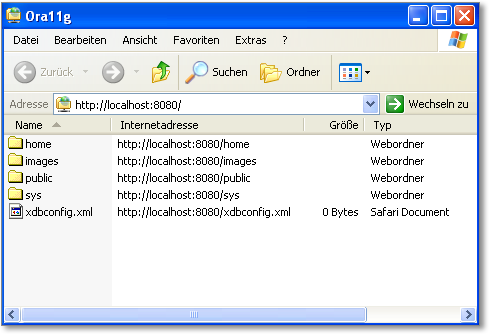
Figure: a WebDAV directory inside the database
Look at the path and internet address. Where is this folder? It resembles an ordinary operating system, supporting drag and drop, access protection and other familiar features. Yet it exists entirely inside a database. Dragging a file into it results in an insert statement in the database.
Introduction to the XML database
To inspect these data in the database, log in as system and try this query (scott also works, but you may not see the selected paths):
select path
      from path_view
   where under_path(res, 1, '/') > 0;


PATH
---------------------------------------
/home
/images
/public
/sys
/xdbconfig.xml
Code example: storing resources in XDB
This query, despite its unusual details, produces the same view as WebDAV above. What is happening? Examining user XDB helps: it owns tables and views, including path_view, queried above. The database also provides SQL functions under_path() and equals_path() for efficient searches within the view’s paths. Above I used under_path(), passing the XML resource column name first, the number of path nesting levels to search second, and the starting path last.
The definition of view path_view ultimately shows that the query reads rows from table xdb$resource of type XMLType, containing the resources displayed in path_view. Let us display one in readable form:
select x.res.getClobVal() inhalt
      from path_view x
    where equals_path(res, '/images/16admin.gif') > 0;


INHALT
---------------------------------------------------------------
<Resource xmlns="http://xmlns.oracle.com/xdb/XDBResource.xsd" Hidden="false" Invalid="false" Container="false" CustomRslv="false" VersionHistory="false" StickyRef="true">
    <CreationDate>2010-03-01T18:49:08.218</CreationDate>
    <ModificationDate>2010-03-01T18:49:08.218</ModificationDate>
    <DisplayName>16admin.gif</DisplayName>
    <Language>en-US</Language>
    <CharacterSet>UTF-8</CharacterSet>
    <ContentType>image/gif</ContentType>
    <RefCount>1</RefCount>
    <ACL>
        <acl description="Read-only privileges to anonymous" xmlns="http://xmlns.oracle.com/xdb/acl.xsd" xmlns:xsi="http://www.w3.org/2001/XMLSchema-instance" xsi:schemaLocation="http://xmlns.oracle.com/xdb/acl.xsd http://xmlns.oracle.com/xdb/acl.xsd" shared="true">
            <ace>
                <grant>true</grant>
                <principal>ANONYMOUS</principal>
                <privilege>
                    <read-properties/>
                    <read-contents/>
                    <resolve/>
                </privilege>
            </ace>
        </acl>
    </ACL>
    <Owner>SYS</Owner>
    <Creator>SYS</Creator>
    <LastModifier>SYS</LastModifier>
    <SchemaElement>http://xmlns.oracle.com/xdb/XDBSchema.xsd#binary</SchemaElement>
    <Contents>
        <binary>
            47494638396110001000A20000FFFFFFC0C0CA3G
            0CCCCFFCCCCCC9999996666CC66666600000021F
            90401000001002C000000001000100040034718B
            ADC4B409422A02C4E8062CAD19C1379CA78380A2
            148E8727826295ED288358471A67A1BA813DF2F4
            7981072288A87265B0C561C09D480B3556C338FC
            16072BC64DF9D109500003B75G3BD04A67B3F212
        </binary>
    </Contents>
</Resource>
Code example: displaying a resource in XDB
XML stores files and folders in the database together with an Access Control List (ACL), metadata such as creation and modification dates, owner and language, and the file itself in binary or XML form. Program logic provides external access through WebDAV, HTTP or FTP.
If the query returns nothing or raises an error, check whether user XDB exists. If not, XDB was deselected during installation and must be installed afterward, for example through the Database Configuration Assistant (DBCA) or script <Oracle_Home>/rdbms/admin/catqm.sql.
New features in version 12c
XDB installation is no longer optional: it is an integral part of Oracle Database. The scenario above therefore cannot occur in 12c.
Storing and publishing binary and XML documents
You can create directories and store documents there, but there is more. SQL can access XDB resources. For example, drag an XML order into a database directory and hand it directly to a program that splits it into tables, validates it or performs other processing.
The reverse works too: prepare relational query results as XML, perhaps transforming them through XSLT into HTML or even PDF. Insert the result into XDB’s tables with an insert statement to publish it in the folder.
Oracle offers an object-oriented data type to simplify access to different resources: URIType.
URIType
URIType is abstract, meaning you cannot instantiate it. You can nevertheless define a table column of this type. It also defines methods such as a series of get methods for accessing the represented resources, including GetXML(), GetBlob(), GetClob() and so on. Method GetContentType() reports the resource type.
Why define an abstract type we cannot instantiate? It serves as the ancestor of other data types that inherit from it and can be instantiated. These types inherit methods already defined by URIType and add more. Currently, all subtypes implement additional methods createURI() and their own constructor. The types are:
HttpURIType
TheHttpURITypehas appeared before in our discussion of supplied functions. It represents an internet or intranet resource and provides access to it. From 11g, configure an ACL for external resources or access will be denied.DBURIType
This unusual subtype accesses tables, rows or individual cells, treating table data like a directory of files. Here is an initial example before later ones: this resource is a cell of tableSCOTT.EMP:DBURIType.createURI('SCOTT/EMP/ROW[ENAME = "BLAKE"]')XDBURIType
This subtype accesses XDB resources. Create the pointer by calling its constructor with the resource’s path.
URIFactory
One way to create a subtype instance is its constructor, an approach now familiar. Alternatively, use the URIFactory. A factory is an object-oriented design pattern that creates a particular subtype instance from a parameter or other logic. A factory typically creates all subtypes of a parent, returning different instances through the same calling syntax. You need not hard-code the required subtype.
Like a factory producing different products, you visit the same factory but get what you currently need. More importantly, factories can learn to produce new products. Likewise, declare your own URIType subtypes for the factory to create. They must implement method createURI and be declared “under” type sys.URIType. A declaration could look like this:
create or replace type FileURIType under sys.UIRType(
  static function createURI(url in varchar2)
  return FileURIType);
You may also redeclare existing URIType methods by overriding them. The URIFactory can then return this URIType, but first register it through procedure registerURLHandler() and supply a prefix identifying when the factory should create this subtype.
Calling the URIFactory is simple: call the URIFactory with the URL for which you need a URIType. Internal logic uses the prefix to choose the concrete URI type. For example, given resource address "http://www.myserver.com/index.html" and needing a URIType, pass the URL to the factory to receive an HttpURIType instance: prefix http:// was recognized and mapped to subtype HttpURIType. If the prefix is unrecognized, the factory returns the default type XDBUriType.
Using URIType
What is this useful for? First, read resources directly from the database without SQL: XSLT files in XDB, images, HTML pages, CSS files and more. This views the database as a filesystem. From another angle, with a DBURI, the entire database is an accessible resource. Access a table through a DBURI rather than SQL as shown briefly before. This returns XML representing the data, not a cursor, which makes sense here. Its format reveals that dbms_xmlgen performs the conversion behind the scenes:
select dburitype.createURI('/SCOTT/EMP').getClob()
   from dual;


DBURITYPE.CREATEURI('/SCOTT/EMP').GETCLOB()
-------------------------------------------------------
<?xml version="1.0"?>
<EMP>
    <ROW>
        <EMPNO>7369</EMPNO>
        <ENAME>SCHMITZ</ENAME>
        <JOB>ANALST</JOB>
        <MGR>7902</MGR>
        <HIREDATE>17.12.80</HIREDATE>
        <SAL>800</SAL>
        <DEPTNO>20</DEPTNO>
    </ROW>
    <ROW>
        <EMPNO>7499</EMPNO>
        <ENAME>ALLEN</ENAME>
        <JOB>SALESMAN</JOB>
        <MGR>7698</MGR>
        <HIREDATE>20.02.81</HIREDATE>
        <SAL>1600</SAL>
        <COMM>300</COMM>
        <DEPTNO>30</DEPTNO>
    </ROW>
    ...
</EMP>
Code example: the whole database is XML, if you want.
Even output as clob is generated as XML internally. Accessing a table or row uses XPath syntax. This was less obvious above because basic XPath resembles a file path. Filtering a particular row, however, requires a node test, whose form makes clear this really is XPath. Consider:
select dburitype.createURI('/SCOTT/EMP/ROW[ENAME="BLAKE"]').getclob() resultat
 from dual;


RESULTAT
--------------------------------
<?xml version="1.0"?>
<ROW>
    <EMPNO>7698</EMPNO>
    <ENAME>BLAKE</ENAME>
    <JOB>MANAGER</JOB>
    <MGR>7839</MGR>
    <HIREDATE>01.05.81</HIREDATE>
    <SAL>2850</SAL>
    <DEPTNO>30</DEPTNO>
</ROW>
Code example: a where clause in XPath
Notice that element ROW is now the query’s root element. The database has become one large XML resource!
Managing documents through XDB
This section shows how XDB loads XML into the database and distributes it into tables, and how relational information is published through XDB. There are many approaches, so this cannot be exhaustive. I chose what I consider easiest to understand, not necessarily fastest in every situation. Faster solutions often mean much more complex code, which I leave to XML specialists and their publications. These approaches should nevertheless solve many problems efficiently and scalably. Not every Oracle problem involves multiterabyte databases, but such volumes need detailed, well-tested programming strategies to remain manageable. (Very Large Data Bases (VLDB) is an established Oracle term with many specialized techniques. Everything is relative, but Oracle currently considers databases larger than a few, or rather a few hundred, terabytes very large.) Such databases need substantial expertise and experience. Even so, many interesting solutions remain for OLTP databases without thousands of concurrent users.
Inserting documents by drag and drop
As mentioned, files can simply be dragged into the database, where they are stored as XMLType or blob, initially in a table owned by xdb, the repository. It holds XML and all other formats, but distinguishes them: XML goes into XMLType columns and other files into BLOB columns. In oath_view, or the similar resource_view, both appear as content in column res. Binary files appear as embedded Base64-encoded resources, as shown under Introduction to the XML database. FTP can also upload files to these directories. This differs only in protocol, so no separate example is needed.
Reading and creating documents with PL/SQL
Creating files through PL/SQL is more interesting. XDB supplies package dbms_xdb for complete file management. Here is an example:
create or replace directory xmldir as 'C:\XMLImport';


Verzeichnis wurde erstellt.


declare
     l_success boolean;
     begin
     l_success := dbms_xdb.createfolder('/public/scott');
     l_success := dbms_xdb.createresource(
             abspath =>'/public/scott/DocBookArticle.xml',
             data => bfilename('XMLDIR',
                     'DocBook_Article.xml'),
             csid => nls_charset_id('AL32UTF8'));
     commit;
   end;
 /


PL/SQL-Prozedur erfolgreich abgeschlossen.
Code example: creating an XDB resource with PL/SQL
This call opens a transaction that must finish before others can see the resource. Therefore commit is mandatory unless you explicitly control transactions elsewhere. Do not recreate existing directories; target directories must already exist. Create directories one level at a time. If you need path a/b/c and only a exists, first create a/b and then a/b/c. You can also choose a new resource name during insertion; I did so here.
The inserted resource can now also be queried and displayed through path_view:
select res
     from path_view
   where under_path(res, '/public/scott') > 0


RES
--------------------------------------------------------------
<Resource xmlns="http://xmlns.oracle.com/xdb/XDBResource.xsd">
    <CreationDate>2010-04-10T11:12:32.125000</CreationDate>
    <ModificationDate>2010-04-10T11:12:32.125000</ModificationDate>
    <DisplayName>DocBookArticle.xml</DisplayName>
    <Language>en-US</Language>
    <CharacterSet>UTF-8</CharacterSet>
    <ContentType>text/xml</ContentType>
    <RefCount>1</RefCount>
</Resource>
Instead of reading from the filesystem, we can similarly generate and publish a resource through SQL/XML:
declare
     l_success boolean;
     l_xml_doc XMLType;
   begin
     select x.xml_content
          into l_xml_doc
          from emp_xml x
      where rownum = 1;
     l_success := dbms_xdb.createresource(
                 abspath =>'/public/scott/EmloyeeList.xml',
                 data => l_xml_doc);
    end;
/


PL/SQL-Prozedur erfolgreich abgeschlossen.


commit;


Transaktion mit COMMIT abgeschlossen.
Code example: creating an XDB resource from relational data
The file is then visible and can be opened, edited and saved directly with, for example, XMLSpy, as the figure shows.
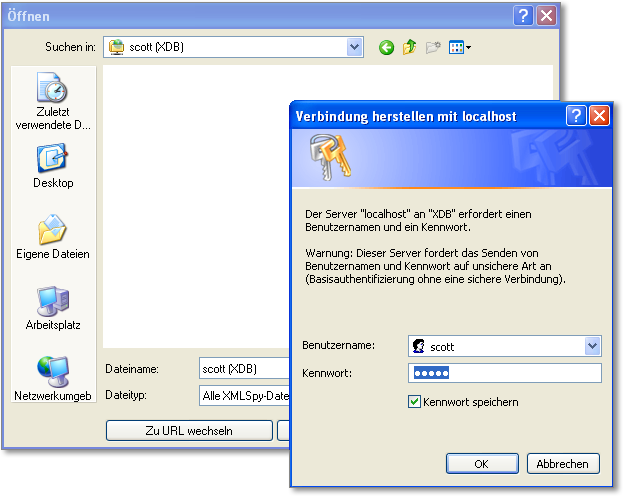
Figure: XMLSpy’s Open dialog connected to XDB
Read it like any XML file. Authenticating in XMLSpy with a database account may feel strange initially, but it is the intended, correct approach.
Storing XML files with a schema
XSD-backed files greatly extend XDB’s possibilities. This additional step makes sense for multiple documents sharing a structure. It enables validation before insertion and storage in application-owned tables rather than only the XDB repository. Storage becomes easier to plan, avoiding all users’ resources under XDB, and structural knowledge enables the other storage strategies already discussed.
Registering a schema in the database
First make the schema known to the database. XML instances must reference it, normally through attribute xsi:schemaLocation or, if the schema declares no namespace, through a schema pointer in attribute xsi:noNamespaceSchemaLocation. Where should it point when XSD is stored in the database? To its location after registration, following this pattern:
xsi:noNamespaceSchemaLocation="http://<IhrServer>:<XDB-Port>/sys/schema/(Benutzername|PUBLIC)/<Name des Schemas>"The same applies when a namespace is assigned. Here is a simple example: a small address schema, hardly worth the effort but easy to follow.
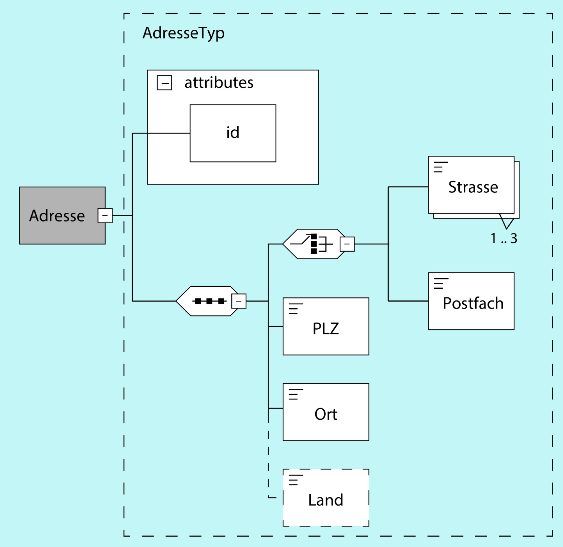
Figure: our address schema file
This impressive structure permits an address, requires attribute id and distinguishes Strasse and Postfach. Up to three streets are allowed, followed by the usual PLZ and Ort, plus optional element Land, restricted to values D-A-CH-BE-NE-LUX. The target namespace for this file is "www.galileo-press.de/PL/SQL/schema/Adresse". We will load XSD and register it under this namespace. First, examine it as XML:
<?xml version="1.0" encoding="UTF-8"?>
<xs:schema xmlns="www.galileo-press.de/PL/SQL/schema/Adresse" xmlns:xs="http://www.w3.org/2001/XMLSchema" targetNamespace="www.galileo-press.de/PL/SQL/schema/Adresse" elementFormDefault="qualified" attributeFormDefault="unqualified">
    <xs:element name="Adresse" type="AdresseTyp"/>
    <xs:complexType name="AdresseTyp">
        <xs:sequence>
            <xs:choice>
                <xs:element name="Strasse" type="xs:string" maxOccurs="3"/>
                <xs:element name="Postfach" type="xs:string"/>
            </xs:choice>
            <xs:element name="PLZ" type="xs:string"/>
            <xs:element name="Ort" type="xs:string"/>
            <xs:element name="Land" minOccurs="0">
                <xs:simpleType>
                    <xs:restriction base="xs:string">
                        <xs:enumeration value="D"/>
                        <xs:enumeration value="A"/>
                        <xs:enumeration value="CH"/>
                        <xs:enumeration value="BE"/>
                        <xs:enumeration value="NE"/>
                        <xs:enumeration value="LUX"/>
                    </xs:restriction>
                </xs:simpleType>
            </xs:element>
        </xs:sequence>
        <xs:attribute name="id" type="xs:int" use="required"/>
    </xs:complexType>
</xs:schema>
Code example: an XML schema defining an address
I highlighted the two items absent from the overview. To add XSD to the database’s schema list, first store it in XDB at /public/scott/xsd/Adresse.xsd, then register it using package dbms_xmlschema:
begin
    dbms_xmlschema.registerschema(
       schemaURL => 'www.galileo-press.de/PL/SQL/schema/Adresse',
       schemaDoc => xdburitype(
                  '/public/scott/xsd/Adresse.xsd').getclob(),
       local => true,
       genTypes => false,
       genBean => false,
       genTables => false,
       options => dbms_xmlschema.REGISTER_BINARYXML);
     end;
 /


PL/SQL-Prozedur erfolgreich abgeschlossen.
Code example: registering the schema in the database
The parameters work as follows: first pass the schema’s namespace to schemaURL, then use a procedure overload referencing the schema from the xdb through object type xdburitype, now familiar. Recall that it specializes the general uritype. Next, declare this a local schema visible only to this user. Its location becomes /sys/schema/scott/Adresse.xsd, where it can be referenced. If parameter local were false, making the schema public, the location would be /sys/schema/PUBLIC/Adresse.xsd. Other options prevent creation of object types, JavaBeans—classes allowing access through Java —and object-relational tables. Here, object types and tables could not be created anyway, since the unannotated schema lacks the necessary control information. Parameter options permits using the schema for binary XML storage, which we will use later. Other overloads of dbms_xmlschema.registerSchema can read schemas from the filesystem or accept them as CLOB or XMlType and so on. Preloading it into XDB is not mandatory.
Creating a schema-based table
Now that the schema is registered, a table or column can be based on it. Without further schema annotations, we can choose only between CLOB and binary storage. This time choose BinaryXML, the default from 12c onward:
create table employees(
     empno number,
     ename varchar2(30 char),
     address XMLType)
     XMLType address store as binary xml
         XMLSchema "www.galileo-press.de/PL/SQL/schema/Adresse"
         element "Adresse";


Tabelle wurde erstellt.
Code example: creating a schema-based table
Only the storage clause from line 5 is unusual. It requests binary XML storage; alternatives would be clob or object relational. We also specify the XSD namespace. Since XSD can declare multiple global elements, choose which becomes the column’s root. Binary storage with a schema requires prior registration using option dbms_xmlschema.register_binaryxml.
Is every inserted instance automatically validated? Yes and no. Parsing identifies the namespace; storage is allowed only when the namespaces match. Here is an example:
insert into employees
     select empno, ename,
            XMLType('<?xml version="1.0" encoding="UTF-8"?>
     <Adresse id="7369">
       <Strasse>Hauptstrasse 5</Strasse>
       <PLZ>12345</PLZ>
       <Ort>Wohndorf</Ort>
       <Land>D</Land>
     </Adresse>')
       from emp
    where empno = 7369;


            XMLType('<?xml version="1.0" encoding="UTF-8"?>
            *
FEHLER in Zeile 3:
ORA-31011: XML-Parsing nicht erfolgreich
ORA-19202: Fehler bei XML-Verarbeitung
LSX-00021: undefined element "Adresse"
aufgetreten
Code example: only XML in the declared namespace is allowed.
Insertion fails because namespaces differ. The error may seem vague but is accurate: root element Adresse belongs to the null namespace, since none was explicitly declared. The schema declares no element there: all its elements belong to the targetNamespace, so the parser does not recognize Adresse in our instance. Insertion succeeds only after setting the default namespace to the declared namespace:
insert into employees
   select empno, ename,
             XMLType('<?xml version="1.0" encoding="UTF-8"?>
    <Adresse id="7369" xmlns="www.galileo-press.de/PL/SQL/schema/Adresse">
       <Strasse>Hauptstrasse 5</Strasse>
       <PLZ>12345</PLZ>
       <Ort>Wohndorf</Ort>
       <Land>D</Land>
    </Adresse>')
       from emp
     where empno = 7369;


1 Zeile wurde erstellt.


commit;


Transaktion mit COMMIT abgeschlossen.
Code example: corrected XML—insertion succeeds.
Depending on storage, schema-invalid XML may still be inserted. Fortunately, we chose binary storage, which always validates by default: its special binary conversion makes validation inexpensive. Incorrectly omit PLZ; the schema must reject this file:
insert into employees
  select empno, ename,
           XMLType('<?xml version="1.0" encoding="UTF-8"?>
  <Adresse id="7369" xmlns="www.galileo-press.de/PL/SQL/schema/Adresse" >
     <Strasse>Hauptstrasse 5</Strasse>
     <Ort>Wohndorf</Ort>
     <Land>D</Land>
  </Adresse>')
   from emp
  where empno = 7369;


XMLType('<?xml version="1.0" encoding="UTF-8"?>
*
FEHLER in Zeile 3:
ORA-31011: XML-Parsing nicht erfolgreich
ORA-19202: Fehler bei XML-Verarbeitung
LSX-00213: only 0 occurrences of particle "PLZ", minimum is 1
aufgetreten
Code example: the database validates incoming XML against the schema.
The file was validated and the error reported. Object-relational or CLOB storage behaves differently: insertion fails only for malformed XML or specific violations of object-relational structures, such as a nonexistent column. Otherwise a trigger must enforce validation, which costs considerably more. Oracle assumes already validated instances are inserted more often, so validation is optional for these formats.
XDB access protection and security
Access control is another major XDB topic. Trying these version 11 examples with different directories probably caused permission problems. I deliberately chose examples avoiding them initially. Now we must address how XDB access is controlled and administered.
Database roles and ACLs
Oracle distinguishes database roles from Access Control Lists (ACLs). A role collects object and system privileges that can be granted to a user, who then exercises them all. XDB resource access is more granular: permission must be granted or denied per resource, effectively per row. Role privileges are insufficient, so each resource has an ACL defining who may do what. ACLs are XML instances stored in table xdb.xdb$acl. ACLs also exist in Windows and WebDAV. Each has a unique object ID (OID), an Oracle-internal, database-unique identifier from object orientation. Each resource references it through column acloid, allowing one ACL to cover several resources. Oracle supplies predefined ACLs for easy permission assignment, including:
all_all_acl.xml: grants all permissions to all users.all_owner_acl.xml: grants all permissions to the resource owner.ro_all_acl.xml: grants read access (read only) to all users.
All ACLs can also be viewed in XDB directory /sys/acls. Let us inspect one to understand its structure:
<acl description="Private: All privileges to OWNER only and not accessible to others" xmlns="http://xmlns.oracle.com/xdb/acl.xsd" xmlns:dav="DAV:" xmlns:xsi="http://www.w3.org/2001/XMLSchema-instance" xsi:schemaLocation="http://xmlns.oracle.com/xdb/acl.xsd http://xmlns.oracle.com/xdb/acl.xsd" shared="true">
    <ace>
        <grant>true</grant>
        <principal>dav:owner</principal>
        <privilege>
            <all></all>
        </privilege>
    </ace>
</acl>
Code example: an access-control ACL
Within root element acl we find the usual long namespace declarations and attribute description, summarizing the ACL’s purpose. Child element ace —any number of ace children may occur inside acl —uses its children to grant a permission (grant = true). We also see users (principal) and privileges (privilege). Our example uses one of WebDAV’s predefined users. dav:owner shows that the function behind keyword owner is declared in namespace dav. Also supplied by Oracle, this namespace defines principals such as the owner, privileges such as read or write, and resource actions such as lock or unlock. Our ACL grants all permissions to the owner.
Each resource may have its own ACL, reused across resources. A new resource normally receives its parent’s ACL, with other assignments configurable at creation or through API calls. Supplied ACLs themselves have ACL protection against unauthorized changes. The root ACL for these accesses is bootstrap_acl.xml. It protects itself, grants read access to all resources and full access to users with roles xdbadmin and dba. These users are XDB administrators who can create and manage ACLs. ACLs can build on one another in a permission hierarchy, simplifying complex access administration.
Working with ACLs
Consider a directory usable only by user scott. We might try creating it through WebDAV’s context-menu command NEW FOLDER. A login prompt then requests an XDB user identity. scott/tiger fails: we cannot create top-level resources, only resources under public, where we have worked so far. Logging in as xdb would make the folder belong to xdb rather than scott. Instead, first create an ACL and assign it to the resource created by user xdb.
Use the following code, which must run as an XDB administrator.
connect xdb/xdb


Connect durchgeführt.


declare
     l_success boolean;
   begin
     l_success := dbms_xdb.createfolder('/SCOTT');
     l_success := dbms_xdb.createresource(
       '/sys/acls/all_scott_acl.xml',
       '<acl description="Grant all to scott" xmlns="http://xmlns.oracle.com/xdb/acl.xsd" xmlns:dav="DAV:" xmlns:xsi="http://www.w3.org/2001/XMLSchema-instance" xsi:schemaLocation="http://xmlns.oracle.com/xdb/acl.xsd http://xmlns.oracle.com/xdb/acl.xsd">
         <ace>
             <grant>true</grant>
             <principal>SCOTT</principal>
             <privilege>
                 <dav:all/>
             </privilege>
         </ace>
        </acl>');
   dbms_xdb.setACL('/SCOTT', '/sys/acls/all_scott_acl.xml');
   commit;
  end;
 /


PL/SQL-Prozedur erfolgreich abgeschlossen.
The directory is now available to user scott. Let us inspect the resource to confirm:
select x.res.getClobVal()
     from path_view x
   where path = '/SCOTT'


X.RES.GETCLOBVAL()
------------------------------------------------------------
<Resource xmlns="http://xmlns.oracle.com/xdb/XDBResource.xsd" Hidden="false" Invalid="false" Container="true" CustomRslv="false" VersionHistory="false" StickyRef="true">
    <CreationDate>2010-04-13T09:54:30.078000</CreationDate>
    <ModificationDate>2010-04-13T09:55:09.656000</ModificationDate>
    <DisplayName>SCOTT</DisplayName>
    <Language>en-US</Language>
    <CharacterSet>UTF-8</CharacterSet>
    <ContentType>application/octet-stream</ContentType>
    <RefCount>1</RefCount>
    <ACL>
        <acl description="Grant all to scott" xmlns="http://xmlns.oracle.com/xdb/acl.xsd" xmlns:dav="DAV:" xmlns:xsi="http://www.w3.org/2001/XMLSchema-instance" xsi:schemaLocation="http://xmlns.oracle.com/xdb/acl.xsd http://xmlns.oracle.com/xdb/acl.xsd" shared="true">
            <ace>
                <grant>true</grant>
                <principal>SCOTT</principal>
                <privilege>
                    <dav:all/>
                </privilege>
            </ace>
        </acl>
    </ACL>
    <Owner>XDB</Owner>
    <Creator>XDB</Creator>
    <LastModifier>XDB</LastModifier>
</Resource>
Code example: creating an ACL
That is one approach, but the resource owner is still xdb. Alternatively, change the owner. This would let us use standard ACL all_owner_acl.xml, granting its owner all permissions. The code would be:
begin
     dbms_xdb.setACL('/SCOTT', '/sys/acls/all_owner_acl.xml');
     update resource_view
          set r.res = updateXML(
                 res,
                 '/Resource/Owner/text()',
                 'SCOTT')
       where equals_path(res, '/SCOTT') > 0;
     commit;
   end;
 /


PL/SQL-Prozedur erfolgreich abgeschlossen.
Here I use SQL/XML function updateXML() to change specific nodes in XML. I pass the instance from column res and the XPath of the required resource. A simple string suffices as the replacement because I specifically select and modify the text node of Owner. Finally, I use equals_path to find the resource efficiently. A final check confirms the change:
select x.res.getClobVal()
     from path_view x
   where path = '/SCOTT'


X.RES.GETCLOBVAL()
------------------------------------------------------------
<Resource xmlns="http://xmlns.oracle.com/xdb/XDBResource.xsd" Hidden="false" Invalid="false" Container="true" CustomRslv="false" VersionHistory="false" StickyRef="true">
    <CreationDate>2010-04-13T09:54:30.078000</CreationDate>
    <ModificationDate>2010-04-13T10:21:00.203000</ModificationDate>
    <DisplayName>SCOTT</DisplayName>
    <Language>en-US</Language>
    <CharacterSet>UTF-8</CharacterSet>
    <ContentType>application/octet-stream</ContentType>
    <RefCount>1</RefCount>
    <ACL>
        <acl description="Private: All privileges to OWNER only and not accessible to others" xmlns="http://xmlns.oracle.com/xdb/acl.xsd" xmlns:dav="DAV:" xmlns:xsi="http://www.w3.org/2001/XMLSchema-instance" xsi:schemaLocation="http://xmlns.oracle.com/xdb/acl.xsd http://xmlns.oracle.com/xdb/acl.xsd" shared="true">
            <ace>
                <grant>true</grant>
                <principal>dav:owner</principal>
                <privilege>
                    <all/>
                </privilege>
            </ace>
        </acl>
    </ACL>
    <Owner>SCOTT</Owner>
    <Creator>XDB</Creator>
    <LastModifier>XDB</LastModifier>
</Resource>
Code example: changing an ACL’s access permissions
These examples only scratch the surface of XDB permissions. Many more restrictions and options exist, covered in three chapters of the Oracle XML Developers Guide, which I recommend if needed. I hope the basics are clear; next comes resource versioning.
New features in version 12c
ACL administration is simpler now: proceduredbms_network_acl_admin.append_host_aceassigns them in one operation.
Resource versioning
XDB can manage document versions. Versioning is not automatic because not all documents need it. Any resource except folders and ACLs can be versioned. Since versions occupy separate documents, a path cannot identify a specific version. Documents in object-relational tables each have a unique object ID, used to identify versions. Path access returns the current version by default.
Enable versioning through package dbms_xdb_version. You must now manage object IDs. The function enabling versioning returns the resource’s ID:
declare
     l_doc_id dbms_xdb_version.resid_type;
   begin
     l_doc_id :=
        dbms_xdb_version.makeVersioned('/SCOTT/Kap_16.doc');
   end;
 /


PL/SQL-Prozedur erfolgreich abgeschlossen.


commit;


Transaktion mit COMMIT abgeschlossen.
Code example: enabling resource versioning
Again, XDB changes are transactional and require a commit statement. Managing versions adds work. Read the current version normally, but check it out before editing, then save and check it in. The code below demonstrates this on a test file. For a DOC file, an application would request it; the serving procedure must check it out, deliver it to Word and check it in after saving. Word can open the resource through WebDAV, but direct saving is rejected if Word has not checked it out.
We modify the test file directly, so this causes no problem. The following code shows the full cycle: create, enable versioning, check out, edit and check in.
set serveroutput on
declare
     l_success boolean;
     l_doc_id dbms_xdb_version.resid_type;
     l_doc varchar2(30) := '/SCOTT/Test.xml';
   begin
     l_success := dbms_xdb.createresource(
                           l_doc, '<Comment xmlns="Foo"></Comment>');
     l_doc_id := dbms_xdb_version.makeVersioned(l_doc);
     dbms_xdb_version.checkOut(l_doc);
     update resource_view
         set res = updateXML(
             res, '//Comment',
             '<Comment>Das ist ein Kommentar</Comment>',
             'xmlns="Foo"')
      where equals_path(res, l_doc) > 0;
     l_doc_id := dbms_xdb_version.checkIn(l_doc);
     commit;
   exception
     when others then
       rollback;
       dbms_output.put_line(
         'Fehler bei der Ausfuehrung des Blocks: ' || sqlerrm);
   end;
/


PL/SQL-Prozedur erfolgreich abgeschlossen.
Code example: working with versioned resources
The process should be clear. Instead of checking in, you can also cancel checkout using dbms_xb_version.unCheckOut(), discarding all changes since checkout. To see an earlier version, obtain its object ID by asking a resource for lists of preceding or following IDs through dbms_xdb_version.getPredecessor() or dbms_xdb_version.getSuccessors respectively. Open the selected version using dbms_xdb_version.getRessourceByResId(). Versioning cannot be removed once enabled: recreate the resource and delete its versioned predecessor to stop versioning.
Encapsulate the required functions in a wrapper package to avoid constantly handling XDB internals. XDB then offers a powerful document repository. For more functionality, consider Oracle Content Database. This extension supports document creation, approval, publication and archiving. A PL/SQL source-code version-control system would still take substantial work; the facility is too basic. I have, however, used XDB very successfully for user-created documents partly prefilled from database information and then stored for a customer. Check-in and checkout provide a full creation and modification history without extra programming. To protect a resource from further changes, either store an immutable format, such as a signed, protected PDF, or change its ACL to read-only. Persistent changes are then prevented.
Copyright © Rheinwerk Verlag, Bonn 2014, second edition
You may print the online version for private use.
Otherwise, this chapter from "Oracle PL/SQL: Das umfassende Handbuch" is subject to the same terms as the printed edition: the work and all its parts are protected by copyright. All rights reserved, including reproduction, translation, microfilming, and storage and processing in electronic systems.
Rheinwerk Verlag GmbH, Rheinwerkallee 4, 53227 Bonn, www.rheinwerk-verlag.de, service(at)rheinwerk-verlag.de