

Tecnologías XML / XSLT / Recetario XSLT / Ampliar e integrar XSLT / Añadir funciones de extensión con Java: extensiones
(Extracto de «XSLT Kochbuch» de Sal Mangano)
Problema
Quiere añadir sus propias funciones de extensión escritas en Java.
Solución
La introducción del capítulo trató cómo conectar una hoja de estilo con una implementación Java, por lo que esta sección se centra en ejemplos.
En Cadenas vio cómo convertir números decimales a otras bases, como la base 16, hexadecimal. Es fácil implementar un conversor hexadecimal en Java:
package com.ora.xsltckbk.util;

public class HexConverter
{

  public static String toHex(String intString)
  {
    try
    {
       Integer temp = new Integer(intString) ;
       return new String("0x").concat(Integer.toHexString(temp.intValue( ))) ;
     }
     catch (Exception e)
    {
       return new String("0x0") ;
     }
  }
}
El formato del resultado con el prefijo 0x sugiere que esta función sirve para una aplicación concreta de generación de código. Así podría utilizarse:
<?xml version="1.0" encoding="UTF-8"?>
<xsl:stylesheet version="1.0" xmlns:xsl="http://www.w3.org/1999/XSL/Transform" xmlns:xalan="http://xml.apache.org/xslt" xmlns:hex="xalan://com.ora.xsltckbk.util.HexConverter" exclude-result-prefixes="hex xalan">
  <xsl:template match="group">
    enum <xsl:value-of select="@name"/>
    {
      <xsl:apply-templates mode="enum"/>
    } ;
  </xsl:template>
  <xsl:template match="constant" mode="enum">
    <xsl:variable name="rep">
      <xsl:call-template name="getRep"/>
    </xsl:variable>
    <xsl:value-of select="@name"/> = <xsl:value-of select="$rep"/>
    <xsl:if test="following-sibling::constant">
      <xsl:text>,</xsl:text>
    </xsl:if>
  </xsl:template>
  <xsl:template match="constant">
    <xsl:variable name="rep">
      <xsl:call-template name="getRep"/>
    </xsl:variable>
    const int <xsl:value-of select="@name"/> = <xsl:value-of select="$rep"/> ;
  </xsl:template>
  <xsl:template name="getRep">
    <xsl:choose>
      <xsl:when test="@rep = 'hex'">
        <xsl:value-of select="hex:toHex(@value)"/>
      </xsl:when>
      <xsl:otherwise>
        <xsl:value-of select="@value"/>
      </xsl:otherwise>
    </xsl:choose>
  </xsl:template>
</xsl:stylesheet>
El siguiente ejemplo construye objetos Java y llama a sus métodos. Al transformar XML en SVG (Scalable Vector Graphics), resulta difícil disponer el texto. SVG no permite determinar el ancho de una cadena representada. Afortunadamente, Java ofrece esta funcionalidad. La cuestión es si Java y el motor SVG coinciden sobre el ancho de una cadena en una fuente determinada. Aun así, la idea merece probarse:
package com.ora.xsltckbk.util ;
import java.awt.* ;
import java.awt.geom.* ;
import java.awt.font.* ;
import java.awt.image.*;

public class SVGFontMetrics
{
  public SVGFontMetrics(String fontName, int size)
  {
    m_font = new Font(fontName, Font.PLAIN, size) ;
    BufferedImage bi = new BufferedImage(1, 1, BufferedImage.TYPE_INT_ARGB);
    m_graphics2D = bi.createGraphics( ) ;
  }

  public SVGFontMetrics(String fontName, int size, boolean bold, boolean italic)
  {
    m_font = new Font(fontName, style(bold,italic) , size) ;
    BufferedImage bi = new BufferedImage(1, 1, BufferedImage.TYPE_INT_ARGB);
    m_graphics2D = bi.createGraphics( ) ;
  }

  public double stringWidth(String str)
  {
    FontRenderContext frc = m_graphics2D.getFontRenderContext( );
    TextLayout layout = new TextLayout(str, m_font, frc);
    Rectangle2D rect = layout.getBounds( ) ;
    return rect.getWidth( ) ;
  }

  public double stringHeight(String str)
  {
    FontRenderContext frc = m_graphics2D.getFontRenderContext( );
    TextLayout layout = new TextLayout(str, m_font, frc);
    Rectangle2D rect = layout.getBounds( ) ;
    return rect.getHeight( ) ;
  }

  static private int style(boolean bold, boolean italic)
  {
    int style = Font.PLAIN ;
    if (bold) { style |= Font.BOLD;}
    if (italic) { style |= Font.ITALIC;}
    return style ;
  }

  private Font m_font = null ;
  private Graphics2D m_graphics2D = null;
}
Las clases de Java 2 (JDK 1.3.1) Graphics2D y TextLayout proporcionan la información necesaria. Dos constructores públicos admiten fuentes normales y variantes en negrita o cursiva. Dos métodos públicos, stringWidth( ) y stringHeight( ), obtienen las dimensiones de una cadena representada con la fuente indicada al constructor. La técnica suele ser suficientemente precisa con las fuentes habituales, pero sin garantías absolutas tendrá que experimentar.
Esta hoja de estilo comprueba los resultados:
<xsl:stylesheet version="1.0" xmlns:xsl="http://www.w3.org/1999/XSL/Transform" xmlns:xalan="http://xml.apache.org/xslt" xmlns:font="xalan://com.ora.xsltckbk.util.SVGFontMetrics" exclude-result-prefixes="font xalan">
  <xsl:output method="xml"/>
  <xsl:template match="/">
    <svg width="100%" height="100%">
      <xsl:apply-templates/>
    </svg>
  </xsl:template>
  <xsl:template match="text">
    <xsl:variable name="fontMetrics" select="font:new(@font, @size, boolean(@weight), boolean(@stytle))"/>
    <xsl:variable name="text" select="."/>
    <xsl:variable name="width" select="font:stringWidth($fontMetrics, $text)"/>
    <xsl:variable name="height" select="font:stringHeight($fontMetrics, $text)"/>
    <xsl:variable name="style">
      <xsl:if test="@style">
        <xsl:value-of select="concat('font-style:',@style)"/>
      </xsl:if>
    </xsl:variable>
    <xsl:variable name="weight">
      <xsl:if test="@weight">
        <xsl:value-of select="concat('font-weight:',@weight)"/>
      </xsl:if>
    </xsl:variable>
    <g style="font-family:{@font};font-size:{@size};{$style};{$weight}">
      <!-- Verwende die SVGFontMetrics-Angaben, um ein Rechteck zu rendern, das leicht größer ist als die erwartete Größe des Texts. Passe die Y-Position je nach vorheriger Textgröße an. -->
      <rect x="10" y="{sum(preceding-sibling::text/@size) * 2}pt" width="{$width + 2}" height="{$height + 2}" style="fill:none; stroke:black; stroke-width:0.5;"/>
      <!-- Platziere den Text so, dass er im Rechteck zentriert ist. -->
      <text x="11" y="{sum(preceding-sibling::text/@size) * 2 + @size div 2 + 2}pt">
        <xsl:value-of select="."/>
      </text>
    </g>
  </xsl:template>
</xsl:stylesheet>
<TextWidthTest>
<text font="Serif" size="9">Ein M ist BREIT; ein l ist SCHMAL;</text>
<text font="Serif" size="10">Der Umgang mit Text in SVG ist kein Vergnügen</text>
<text font="Helvetica" size="12">Und wenn ich ein wenig mit Java mogele...</text>
<text font="Arial" size="14" weight="bold">VERSPRECHEN SIE, MEINER MUTTER NICHTS ZU SAGEN!</text>
<text font="Century" size="16" style="italic">Und wenn Sie's tun, dann sei es drum.</text>
<text font="Courier New" size="18" weight="bold" style="italic">Nur meinem Lektor nehm ich's krumm!</text>
</TextWidthTest>Como muestra la siguiente figura, la prueba produjo buenos resultados con varias fuentes habituales.
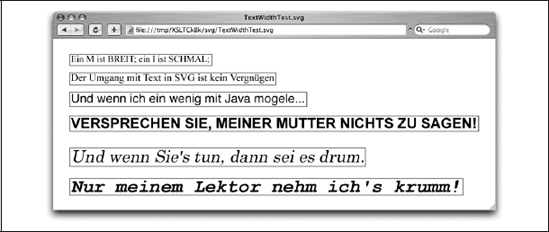
Figura: crear rectángulos del tamaño correcto alrededor del texto con la extensión SVGFontMetrics.
Discusión
Los ejemplos de «Solución» funcionan sin cambios tanto con Xalan como con Saxon, pese al espacio de nombres "xml.apache.org/xslt". Esto funciona gracias a las convenciones abreviadas del procesador para codificar la clase Java en el espacio de nombres.
Se accede a los constructores mediante una función llamada new( ); los argumentos permiten al procesador XSLT determinar qué constructor sobrecargado debe llamar. Las funciones miembro de una clase Java reciben un primer argumento adicional correspondiente a this. El ejemplo HexConverter muestra que los miembros estáticos se llaman sin el parámetro adicional this.
El ejemplo SVGFontMetrics no funciona con versiones antiguas del JDK, pero puede obtener resultados similares con la clase java.awt.FontMetrics junto con la clase java.awt.Graphics:
package com.ora.xsltckbk.util ;
import java.awt.* ;
import java.awt.geom.* ;
import java.lang.System ;

public class FontMetrics
{
  public FontMetrics(String fontName, int size)
  {
    // Eine beliebige konkrete Komponente reicht aus
    Label component = new Label( ) ;
    m_metrics = component.getFontMetrics(new Font(fontName, Font.PLAIN, size)) ;
    m_graphics = component.getGraphics( ) ;
  }

  public FontMetrics(String fontName, int size, boolean bold, boolean italic)
  {
    // Eine beliebige konkrete Komponente reicht aus
    Label component = new Label( ) ;
    m_metrics = component.getFontMetrics(new Font(fontName, style(bold,italic) , size)) ;
    m_graphics = component.getGraphics( ) ;
  }

  // Einfach, aber bei manchen Schriften ungenau
  public int stringWidth(String str)
  {
    return  m_metrics.stringWidth(str) ;
  }

  // Bessere Genauigkeit bei den meisten Schriften
  public double stringWidthImproved(String str)
  {
    Rectangle2D rect = m_metrics.getStringBounds(str, m_graphics) ;
    return rect.getWidth( ) ;
  }

  static private int style(boolean bold, boolean italic)
  {
    int style = Font.PLAIN ;
    if (bold) { style |= Font.BOLD;}
    if (italic) { style |= Font.ITALIC;}
    return style ;
  }
  private java.awt.FontMetrics m_metrics = null;
  private java.awt.Graphics m_graphics = null ;
}
Aunque estos ejemplos no cubran sus necesidades inmediatas, muestran mecanismos para sus propias funciones de extensión Java. Estas son otras posibilidades, por dificultad creciente:
Utilizar
Hashtableen Java en lugar dexsl:key. Esto proporciona mayor control sobre los elementos indexados y permite modificar el índice durante la ejecución. También elimina la restricción que impide a las definiciones dexsl:keyreferenciar variables y permite crear un índice general que abarque varios documentos.Implementar una función para ordenar nodos que supere las limitaciones de
xsl:sort, por ejemplo al ordenar según las reglas de otros idiomas. Doug Tidwell lo demuestra con Saxon en su libro XSLT (O'Reilly, 2001).Leer y escribir varios formatos de archivo en una misma hoja, como formatos de texto no XML, CSV o archivos binarios propietarios. XSLT 2.0 ofrece algunas posibilidades mediante el elemento
xsl:result-document(véase Aprovechar el potencial de XSLT 2.0).Procesar XML comprimido directamente desde un archivo Zip con
java.util.zip.ZipFile. Conviene estudiar el código fuente de la funcióndocumentde su procesador XSLT.
Véase también
Consultar XML trataba la disposición del texto en los nodos SVG generados. Como parte de una solución podría utilizar SVGFontMetrics.
Los desarrolladores interesados en Java y SVG deberían consultar Batik, aunque no está directamente relacionado con las extensiones XSLT.
Copyright © 2006 O'Reilly Verlag GmbH & Co. KG
Puede imprimir la versión en línea para uso privado.
Para cualquier otro uso, este capítulo de «XSLT Kochbuch» está sujeto a las mismas condiciones que la edición encuadernada. La obra y todas sus partes están protegidas por derechos de autor. Todos los derechos reservados, incluidos reproducción, traducción, microfilmación, almacenamiento y tratamiento en sistemas electrónicos.
O'Reilly Verlag GmbH & Co. KG, Balthasarstraße 81, 50670 Köln, kommentar(at)oreilly.de