

XML technologies / CSS / Advanced websites with CSS / Behind the scenes / Selectors and CSS rule structure / Pseudo-element selector
(Excerpt from “CSS − Advanced websites with Cascading Stylesheets” by Rachel Andrew & Dan Shafer)
This and the remaining selectors in this section work only in browsers supporting CSS2, such as Firefox, Safari, Opera or Internet Explorer 7. Older browsers recognize some features, such as the pseudo-class :hover, but their implementations are incomplete.
Pseudo-element and pseudo-class selectors are special cases: they have neither an equivalent HTML element nor an HTML attribute, hence “pseudo” in their names.
So far, the CSS specification lists only three pseudo-elements: first-letter, first-line and first-child. Although the first two terms are understandable to humans, browsers interpret these selectors in widely varying ways. first-line, for example, can mean either the first sentence or the first physical screen line. Elements also behave differently between browsers when the window is resized. The pseudo-element first-child works independently of browser interpretation, always referring to the immediate descendants of its assigned HTML element, as explained in How inheritance works in CSS.
To use a pseudo-element as a selector, prefix it with a colon:
p:first-letter {
   font-face: serif;
   font-size: 500%;
   float: left;
   color: gray;
}
This rule displays each paragraph’s first letter as a drop cap, as shown below. It is five times the base font size. The property float, described in A simple CSS layout, makes the following text wrap around the enlarged initial.
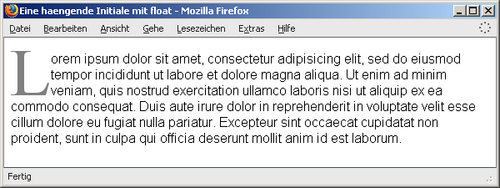
Figure: A drop cap created with a pseudo-element.
Copyright © 2006 of the German translation, dpunkt.verlag GmbH
You may print the online version for your private use.
Otherwise, this chapter from “CSS − Anspruchsvolle Websites mit Cascading Stylesheets” is subject to the same conditions as the bound edition: the work, including all its parts, is protected by copyright. All rights reserved, including reproduction, translation, microfilming, and storage and processing in electronic systems.
dpunkt.verlag GmbH, Ringstraße 19, 69115 Heidelberg
back to top