

XML technologies / CSS / Advanced websites with CSS / Fixed-width layouts / Multicolumn layouts with fixed widths / Positioned columns
(Excerpt from “CSS − Advanced websites with Cascading Stylesheets” by Rachel Andrew & Dan Shafer)
To add a second column to our layout using absolute positioning, first insert its content or text into the document in a separate element div. Immediately after the closing tag </div> of this new element div, add another element div named extras. On a real page, this sidebar might contain advertising or additional information about games or venues, but placeholder text suffices here.
In the document’s normal flow, this text appears below the white box, as shown in the following figure.
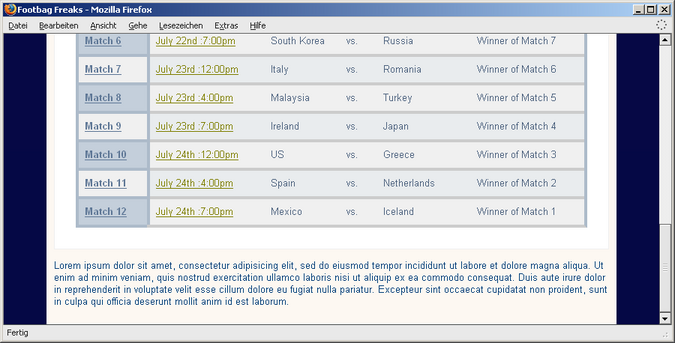
Figure: The sidebar’s div element before CSS rules are defined for it.
As with the dynamic layouts developed earlier, we must wrap this sidebar in two elements div: one creates the positioning context, while we use the other element div to reserve space for the sidebar. Add these two elements div to the document exactly as in the following code fragment: the element #content-wrapper contains the element #content, while the element #main encloses the elements #content-wrapper and #extras.
</div> <!-- header -->
  <div id="main">
    <div id="content-wrapper">
      <div id="content">
       ...
      </div> <!-- content -->
    </div> <!-- content-wrapper -->
    <div id="extras">
     ...
    </div> <!-- extras -->
  </div> <!-- main -->
</div> <!-- wrapper -->
Now we can define style rules for these elements div. For #content-wrapper, define 200 pixels of left padding, while the element div named #main provides the positioning context.
#content-wrapper {
  margin: 0 0 0 200px;
}
#main {
  position: relative;
}
Refresh the page in your browser: space should now be available for the sidebar. Next, position the sidebar in that space. Simply add the following rules to the stylesheet to place the sidebar at the top left or top right of the browser window.
#extras {
  position: absolute;
  top: 0;
  left: 0;
  width: 180px;
  background-color: white;
  border: 1px solid #f0f0f0;
}
This rule positions the sidebar and gives it the same white background and border as the content area. The following figure shows the completed result.

Figure: The completed layout with a positioned sidebar.
Copyright © 2006 of the German translation, dpunkt.verlag GmbH
You may print the online version for your private use.
Otherwise, this chapter from “CSS − Anspruchsvolle Websites mit Cascading Stylesheets” is subject to the same conditions as the bound edition: the work, including all its parts, is protected by copyright. All rights reserved, including reproduction, translation, microfilming, and storage and processing in electronic systems.
dpunkt.verlag GmbH, Ringstraße 19, 69115 Heidelberg
back to top