

XML technologies / SVG / Filters, transformations and gradients / Rotating and skewing elements / Skewing elements
(Excerpt from “Das Einsteigerseminar SVG — Webgrafiken mit XML” by Helma Spona)
Besides the rotate instruction, the transform attribute offers the instructions skewX and skewY to skew or mirror an element on the x or y axis. Both take an angle as parameter.
The result also depends on the elements’ positions, because the angle always refers to the origin. The next figure skews two texts with identical settings but different positions. Unskewed texts appear gray for comparison.
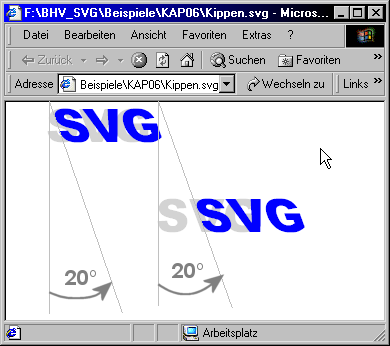
Figure: Skewing text 20° on the x axis.
The required code is:
<g transform="skewX(20)">
  <text x="150" y="130" style="font-family:'Arial Black';font-size:46;stroke:none;fill:rgb(0,0,255)">SVG</text>
  <text x="40" y="40" style="font-family:'Arial Black';font-size:46;stroke:none;fill:rgb(0,0,255)">SVG</text>
</g>
Note:
Skewing a group or its individual elements makes no difference, because the angle always refers to the group’s or graphic’s origin.
Any angle from 0 to 360° can be specified, but multiples of 90° produce no visible change.
Like the skewX instruction, use skewY to skew on the y axis. The result again depends on the position in the coordinate system.
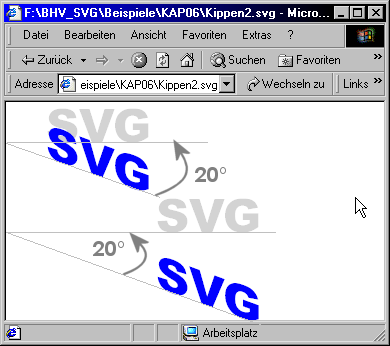
Figure: Skewing text on the y axis.
Note:
When skewing text on the y axis, remember its baseline is used. Unlike graphic elements, text has its origin at the baseline’s intersection with the x axis, not at its upper-left corner.
Both effects can be combined, as the next figure shows. It uses skewY at 20° and skewX at 45°.
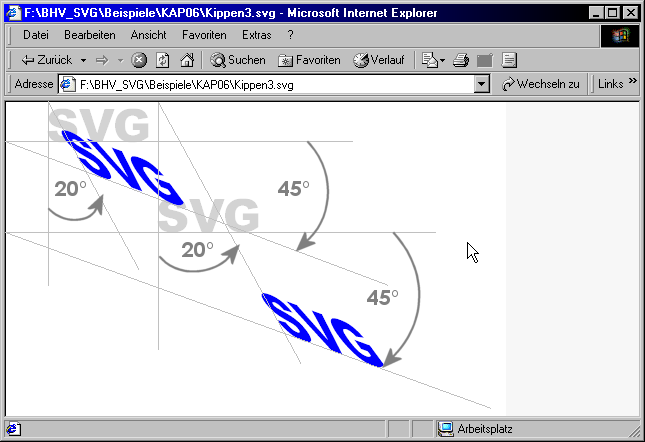
Figure: Skewing text on the x and y axes.
Copyright © verlag moderne industrie GmbH 2001
You may print the online version for your private use.
Otherwise, this chapter from “Das Einsteigerseminar SVG — Webgrafiken mit XML” is subject to the same conditions as the bound edition. The work, including all its parts, is protected by copyright. All rights reserved, including reproduction, translation, microfilming, and storage and processing in electronic systems.
verlag moderne industrie GmbH, Justus-von-Liebig-Straße 1, D-86899 Landsberg/Lech, fon ++49 (0) 81 91 / 125 – 0, leserservice(at)mi-verlag.de
back to top