

XML technologies / SVG / Filters, transformations and gradients / Rotating and skewing elements / Rotating graphic elements
(Excerpt from “Das Einsteigerseminar SVG — Webgrafiken mit XML” by Helma Spona)
Graphic elements can be rotated and skewed just as easily. This example uses the SVG logo with its crescent, aiming to rotate the crescent and its surrounding text toward the upper right.
Since the text follows the crescent, rotating the crescent itself also rotates the surrounding text. Simply adjust the <path> tag.
<?xml version="1.0" standalone="no"?>
...
<svg width="500" height="500">
  <text x="100" y="130" style="font-family:Arial Black;font-size:46;stroke:none;fill:rgb(0,0,255)">SVG</text>
  <path id="sichel" transform="rotate(-10) translate(-30,30)" d="M130 80 Q333 96 215 135 Q315 96 130 80" style="stroke:rgb(0,0,0);stroke-width:1;fill:rgb(0,0,139)"/>
  <text style="alignment-baseline:text-bottom;baseline-shift:5;font-family:Arial;font-size:11;fill:darkblue">
    <textPath xlink:href="#sichel" startOffset="5">Scalable Vector Graphics</textPath>
  </text>
</svg>
Again, adjust the object’s position after rotation, because rotation is around the origin, the crescent’s upper-left corner. This moves it away from the “SVG” text element, corrected by the translate command.
Note:
The following graphic shows the crescent’s original position in a lighter shade in the background, with its new position in front.
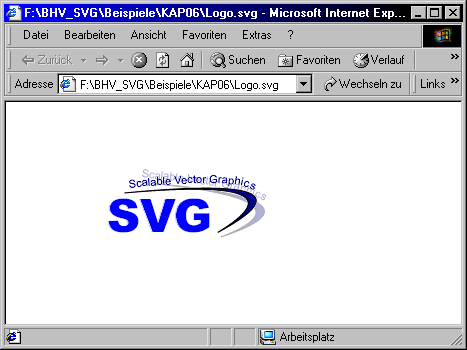
Figure: Crescent with text before and after rotation.
Copyright © verlag moderne industrie GmbH 2001
You may print the online version for your private use.
Otherwise, this chapter from “Das Einsteigerseminar SVG — Webgrafiken mit XML” is subject to the same conditions as the bound edition. The work, including all its parts, is protected by copyright. All rights reserved, including reproduction, translation, microfilming, and storage and processing in electronic systems.
verlag moderne industrie GmbH, Justus-von-Liebig-Straße 1, D-86899 Landsberg/Lech, fon ++49 (0) 81 91 / 125 – 0, leserservice(at)mi-verlag.de
back to top