

XML technologies / SVG / Filters, transformations and gradients / Rotating and skewing elements / Rotating text
(Excerpt from “Das Einsteigerseminar SVG — Webgrafiken mit XML” by Helma Spona)
To rotate elements or entire groups, use the instruction rotate in the transform attribute. Its parameter is the rotation angle in degrees. For example, rotate text with this instruction:
<text x="100" y="10" transform="rotate(30)">Dieser Text ist um 30 Grad gedreht!</text>It produces the text in the following figure. The two lines intersect at the text’s origin, around which rotation occurs.
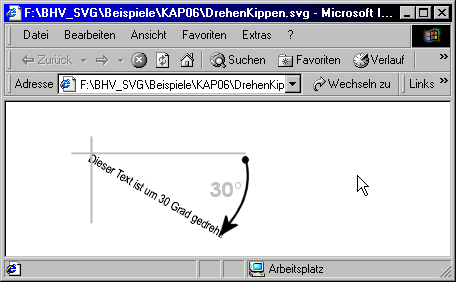
Figure: Text rotated 30° around its upper-left corner.
For an upward rotation, specify a negative angle. This can modify all texts in the left navigation bar of the file navbanner.svg, to which gradients were added at this chapter’s beginning. It could then look as follows:
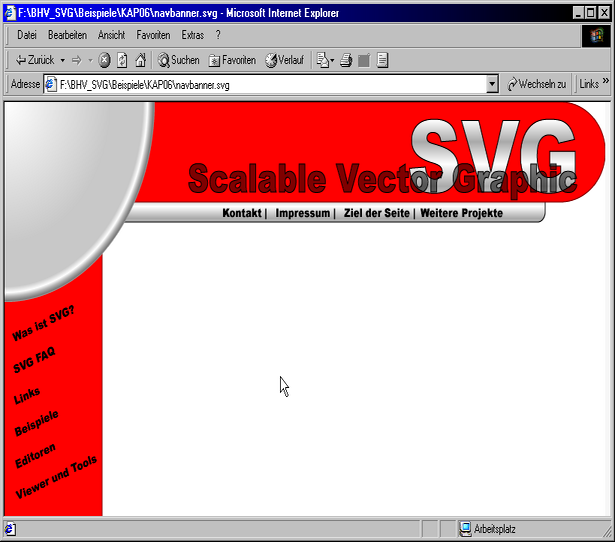
Figure: Rotated, left-aligned text.
To left-align the rotated texts again, also move them left. Rotation therefore requires repositioning here. After the rotate instruction, append a translate instruction.
<g id="vertikal"  style="font-family:'Arial Black',Helvetica;font-size:12; fill:rgb(0,0,0)">
  <text x="0" y="230" transform="rotate(-20) translate(-70,0)">Was ist SVG?</text>
  <text x="0" y="260" transform="rotate(-20) translate(-80,0)">SVG FAQ</text>
  <text x="0" y="290" transform="rotate(-20) translate(-90,0)">Links</text>
  <text x="0" y="320" transform="rotate(-20) translate(-100,0)">Beispiele</text>
  <text x="0" y="350" transform="rotate(-20) translate(-110,0)">Editoren</text>
  <text x="0" y="380" transform="rotate(-20) translate(-120,0)">Viewer und Tools</text>
</g>
Copyright © verlag moderne industrie GmbH 2001
You may print the online version for your private use.
Otherwise, this chapter from “Das Einsteigerseminar SVG — Webgrafiken mit XML” is subject to the same conditions as the bound edition. The work, including all its parts, is protected by copyright. All rights reserved, including reproduction, translation, microfilming, and storage and processing in electronic systems.
verlag moderne industrie GmbH, Justus-von-Liebig-Straße 1, D-86899 Landsberg/Lech, fon ++49 (0) 81 91 / 125 – 0, leserservice(at)mi-verlag.de
back to top