

XML technologies / SVG / Using animations / Ways to implement animations / animateMotion moves an element along a path
(Excerpt from “Das Einsteigerseminar SVG — Webgrafiken mit XML” by Helma Spona)
The tag <animateMotion> moves an element along a defined path. It has these attributes:
pathspecifies the movement path, using the same commands as thedattribute of the<path>tag.keyPointsdefines semicolon-separated floating-point numbers from 0 to 1 specifying how far the object moves away from the path. Each value inkeyPointsmust match a value inkeyTimes. The value inkeyTimesspecifies when to use the value inkeyPoints.
Note:
keyPoints, when used in the tag <animateMotion>, must contain x/y coordinate pairs. Lists take the form x1,y1;x2,y2;...;xn,yn: semicolons separate pairs and commas separate their values. The attributes from, to and by must also contain value pairs.
rotaterotates the element as it moves. Possible values areauto,auto-reverseor a numeric angle in degrees. Withauto, the element follows the path’s angle. Withauto-reverse, 180° is added to the rotation produced byauto.The first animation in the next listing uses the attribute
calcMode="discrete". This displays the square only at the animation’s start and end, without intermediate frames.The second animation shows how the
rotateattribute rotates the animated element. Specifyingrotate="45"rotates the square 45° when the animation starts.The attributes
repeatCount="10"andrepeatDur="12s"specify ten repetitions, with a maximum duration of twelve seconds.
<defs>
  <animateMotion xlink:href="#Quadr1" dur="3s" path="M0 0 l+200 +200" fill="freeze" calcMode="discrete"/>
  <animateMotion xlink:href="#Quadr2" dur="6s" path="M0 0 l+200 +200" rotate="45"/>
  <animateMotion xlink:href="#Quadr3" dur="3s" path="M0 0 l+200 +200" repeatCount="10" repeatDur="12s"/>
</defs>
<g>
  <path id="Pfad" d="M0 0 l+200 +200" style="stroke:black;stroke-opacity:0.5;fill:none"/>
  <rect id="Quadr1" x="0" y="0" width="10" height="10" style="fill:red;stroke:black;"/>
</g>
<g transform="translate(0 50)">
  <path id="Pfad" d="M0 0 l+200 +200" style="stroke:black;stroke-opacity:0.5;fill:none"/>
  <rect id="Quadr2" x="0" y="0" width="10" height="10" style="fill:red;stroke:black;"/>
</g>
<g transform="translate(0 100)">
  <path id="Pfad" d="M0 0 l+200 +200" style="stroke:black;stroke-opacity:0.5;fill:none"/>
  <rect id="Quadr3" x="0" y="0" width="10" height="10" style="fill:red;stroke:black;"/>
</g>
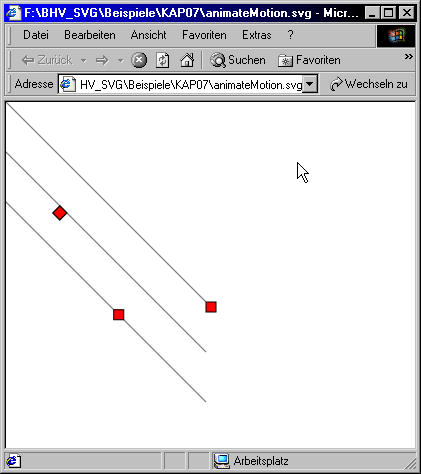
Figure: Animations at runtime.
Note:
Still images rarely represent animations well, so try the animation yourself.
Copyright © verlag moderne industrie GmbH 2001
You may print the online version for your private use.
Otherwise, this chapter from “Das Einsteigerseminar SVG — Webgrafiken mit XML” is subject to the same conditions as the bound edition. The work, including all its parts, is protected by copyright. All rights reserved, including reproduction, translation, microfilming, and storage and processing in electronic systems.
verlag moderne industrie GmbH, Justus-von-Liebig-Straße 1, D-86899 Landsberg/Lech, fon ++49 (0) 81 91 / 125 – 0, leserservice(at)mi-verlag.de
back to top