

Tecnologías XML / SVG / Utilizar animaciones / Formas de realizar animaciones / animateMotion mueve un elemento por un trazado
(Extracto de «Das Einsteigerseminar SVG — Webgrafiken mit XML» de Helma Spona)
La etiqueta <animateMotion> mueve un elemento por un trazado definido. Tiene estos atributos:
pathdefine el trazado, con las mismas órdenes que el atributodde la etiqueta<path>correspondiente.keyPointsdefine números decimales de 0 a 1 separados por punto y coma, que indican cuánto se aleja el objeto del trazado. Cada valor dekeyPointsdebe corresponder a un valor dekeyTimes. El valor dekeyTimesindica cuándo utilizar el valor dekeyPoints.
Nota:
keyPoints, en la etiqueta <animateMotion>, debe contener pares de coordenadas x/y. Las listas tienen la forma x1,y1;x2,y2;...;xn,yn: el punto y coma separa pares y las comas sus valores. Los atributos from, to y by también deben contener pares.
rotategira el elemento mientras se mueve. Los valores posibles sonauto,auto-reverseo un ángulo numérico en grados. Conauto, el elemento sigue el ángulo del trazado. Conauto-reverse, se añaden 180° al giro producido porauto.La primera animación del siguiente listado utiliza el atributo
calcMode="discrete". El cuadrado solo se muestra al principio y al final, sin fotogramas intermedios.La segunda muestra cómo el atributo
rotategira el elemento animado. Indicarrotate="45"gira el cuadrado 45° al empezar la animación.Los atributos
repeatCount="10"yrepeatDur="12s"indican diez repeticiones con una duración máxima de doce segundos.
<defs>
  <animateMotion xlink:href="#Quadr1" dur="3s" path="M0 0 l+200 +200" fill="freeze" calcMode="discrete"/>
  <animateMotion xlink:href="#Quadr2" dur="6s" path="M0 0 l+200 +200" rotate="45"/>
  <animateMotion xlink:href="#Quadr3" dur="3s" path="M0 0 l+200 +200" repeatCount="10" repeatDur="12s"/>
</defs>
<g>
  <path id="Pfad" d="M0 0 l+200 +200" style="stroke:black;stroke-opacity:0.5;fill:none"/>
  <rect id="Quadr1" x="0" y="0" width="10" height="10" style="fill:red;stroke:black;"/>
</g>
<g transform="translate(0 50)">
  <path id="Pfad" d="M0 0 l+200 +200" style="stroke:black;stroke-opacity:0.5;fill:none"/>
  <rect id="Quadr2" x="0" y="0" width="10" height="10" style="fill:red;stroke:black;"/>
</g>
<g transform="translate(0 100)">
  <path id="Pfad" d="M0 0 l+200 +200" style="stroke:black;stroke-opacity:0.5;fill:none"/>
  <rect id="Quadr3" x="0" y="0" width="10" height="10" style="fill:red;stroke:black;"/>
</g>
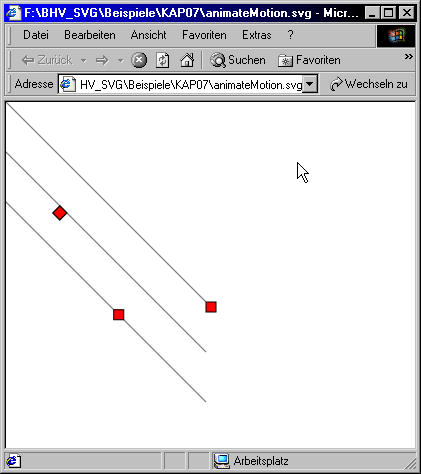
Figura: animaciones en ejecución.
Nota:
Las imágenes fijas representan mal las animaciones: pruébela usted mismo.
Copyright © verlag moderne industrie GmbH 2001
Puede imprimir la versión en línea para uso privado.
Para cualquier otro uso, este capítulo de «Das Einsteigerseminar SVG — Webgrafiken mit XML» está sujeto a las mismas condiciones que la edición encuadernada. La obra y todas sus partes están protegidas por derechos de autor. Todos los derechos reservados, incluidos reproducción, traducción, microfilmación, almacenamiento y tratamiento en sistemas electrónicos.
verlag moderne industrie GmbH, Justus-von-Liebig-Straße 1, D-86899 Landsberg/Lech, fon ++49 (0) 81 91 / 125 – 0, leserservice(at)mi-verlag.de
volver arriba