

XML technologies / PresentationML / The slide part / Shape / Text frames
2.2.2 Text boxes
Text frames and polygon shapes have the same structure. A normal text frame is simply a rectangular shape; any polygon shape is also an empty text frame. Text frames can have all properties described above. A frame like those in typesetting applications is thus a p:sp with transparent background, no outline properties and no special effects.
<p:sp>
    <p:nvSpPr>
        <p:cNvPr id="3" name="Rechteck 2"/>
        <p:cNvSpPr/>
        <p:nvPr/>
    </p:nvSpPr>
    <p:spPr>
        <a:xfrm>
            <a:off x="2786050" y="2000240"/>
            <a:ext cx="3357586" cy="733663"/>
        </a:xfrm>
    </p:spPr>
    <p:txBody>                                                (1)
        <a:bodyPr/>                                           (2)
        <a:p>                                                 (3)
            <a:r>                                             (4)
                <a:t>Dies ist der Text in einem Absatz</a:t>  (5)
            </a:r>
        </a:p>
    </p:txBody>
</p:sp>
1 | Element for the text area, containing all elements related to text content. |
2 | This element holds text-area properties. |
3 | a:p represents a paragraph. |
4 | a:r is an inline element for inline formatting. Differently formatted text segments are placed in separate a:r elements. |
5 | a:t contains plain text without further properties: "HalloWelt" |
2.2.2.1 The OOXML paragraph model
Text can be divided into one or more paragraphs. A paragraph’s text normally shares formatting, but inline formatting can make individual segments differ. XML documents commonly use a mixed-content model: a paragraph contains both plain text and inline elements holding the specially formatted text.
Example of an HTML paragraph with inline formatting:
<p>Es gibt jedoch auch die Möglichkeit einer sogenannten Inline-Auszeichnung, also dass spezifischer Text <i>innerhalb einer Zeile anders formatiert ist</i>, als der restliche Absatz.</p>OOXML avoids complex structures such as mixed content wherever possible. Thus DrawingML, like WordML, uses a different paragraph structure. Each paragraph (<a:p>) contains one or more runs (<a:r>), each holding exactly one text element (<a:t>) for plain text. All a:r elements in a paragraph share paragraph formatting but may have individual formatting. A paragraph may be divided into any number of a:r elements. Each a:t holds its run’s plain text without additional formatting.
<a:p>                                                              (1)
   <a:r>                                                           (2)
      <a:t>Es gibt jedoch auch die Möglichkeit einer sogenannten Inline-Auszeichnung,
           also dass spezifischer Text </a:t>                      (3)
    </a:r>
    <a:r>                                                          (2)
       <a:rPr i="1"/>                                              (4)
       <a:t>innerhalb einer Zeile anders formatiert ist</a:t>      (3)
    </a:r>
    <a:r>                                                          (2)
       <a:t>, als der restliche Absatz.</a:t>                      (3)
    </a:r>
</a:p>
1 | Paragraph element |
2 | Run element |
3 | Text element |
4 | a:rPr defines run properties and must be its first child. Here i="1" activates italic formatting; 0 would disable it. |
2.2.2.2 Inline formatting
Besides italic formatting, other inline formats are available and can be combined freely.
<a:p>
   <a:r>
      <a:rPr i="1"/>                            (1)
      <a:t>Dieser Text ist kurzsiv.</a:t>
   </a:r>
   <a:r>
      <a:rPr b="1"/>                            (1)
      <a:t>Dieser Text ist fett.</a:t>
   </a:r>
   <a:r>
      <a:rPr sz="2400"/>                        (2)
      <a:t>Dieser Text hat die Schriftgröße 24pt.</a:t>
   </a:r>
   <a:r>
      <a:rPr u="sng"/>                          (3)
      <a:t>Dieser Text ist einfach unterstrichen.</a:t>
   </a:r>
   <a:r>
      <a:rPr u="dotted"/>                       (3)
      <a:t>Dieser Text ist gepunktet unterstrichen.</a:t>
   </a:r>
   <a:r>
      <a:rPr strike="sngStrike"/>               (4)
      <a:t>Dieser Text ist einfach durchgestrichen.</a:t>
   </a:r>
   <a:r>
      <a:rPr strike="dblStrike"/>               (4)
      <a:t>Dieser Text ist doppelt durchgestrichen.</a:t>
   </a:r>
   <a:r>
      <a:rPr spc="500"/>                        (2)
      <a:t>Dieser Text ist mit 5pt gesperrt.</a:t>
   </a:r>
   <a:r>
      <a:rPr cap="all"/>                        (5)
      <a:t>Dieser Text wird in Großbuchstaben dargestellt.</a:t>
   </a:r>
   <a:r>
      <a:rPr cap="small"/>                      (5)
      <a:t>Von diesem Text werden die Kleinbuchstaben als Kapitälchen dargestellt.</a:t>
   </a:r>
</a:p>
1 | Values 1 and 0 enable and disable the corresponding property. Disabling is useful when a style enables it but it should not apply to this run. |
2 | Length is expressed in hundredths of a point to avoid decimal places: 100 means 1pt and 1200 means 12pt. |
3 | Underlining has several forms. The example shows normal underlining (sng) and a dotted line (dotted). Other options include dashed (dash), double (dbl), wavy (wavy) and heavy (heavy) lines. To disable underlining, use none. |
4 | Strikethrough also has several forms, all shown here: single (sngStrike) and double (dblStrike). noStrike disables it. |
5 | The capitalization variants are also all shown. all displays every letter in uppercase, not true small caps. small produces small caps: lowercase letters use uppercase glyphs at lowercase height. none disables this formatting. |
Font and color
a:rPr also controls text color and font through corresponding child elements.
Text color is specified like a shape’s fill color (see 2.2.1.4 Area fills). Text can therefore also have a gradient (<a:gradFill>) or texture (<a:blipFill>), and its outline can have its own color (<a:ln>).
<a:latin> specifies the font. Its typeface attribute gives the name to use.
<a:r>
   <a:rPr sz="4800" b="1">                  (1)
      <a:gradFill>                          (2)
         <a:gsLst>
            <a:gs pos="0">
               <a:srgbClr val="4F491D"/>
            </a:gs>
            <a:gs pos="100000">
               <a:srgbClr val="F38222"/>
            </a:gs>
         </a:gsLst>
      </a:gradFill>
      <a:latin typeface="Arial"/>           (3)
   </a:rPr>
   <a:t>Dies ist der Text eines Absatzes.</a:t>
</a:r>
1 | In this a:rPr, sz and b specify bold text at 48pt. |
2 | A gradient is selected for text color. |
3 | a:latin selects Arial as the font. |
2.2.2.3 Paragraph properties
Formatting for an entire paragraph is specified in a:pPr, the first child of a:p, just as a:rPr comes first in a:r. Properties use attributes or specific children. Attributes include alignment (align), first-line indent (indent), and right or left margins (marR or marL). Elements specify line height (<lnSpc>) and space before or after the paragraph (<spcBef> or <spcAft>).
a:defRPr also applies the inline formatting described above to an entire paragraph. <a:defRPr> uses the same attributes and children as a:rPr. Its formatting supplies paragraph-wide defaults that individual runs can override.
<a:p>
   <a:pPr marL="720000" marR="720000" indent="720000" align="just">  (1, 2)
      <a:lnSpc>                    (3)
         <a:spcPct val="150000"/>  (6)
      </a:lnSpc>
      <a:spcBef>                   (4)
         <a:spcPts val="600"/>     (5)
      </a:spcBef>
      <a:spcAft>                   (4)
         <a:spcPts val="600"/>     (5)
      </a:spcAft>
      <a:defRPr sz="2400" b="1">   (6)
         <a:gradFill>
            <a:gsLst>
               <a:gs pos="0">
                  <a:srgbClr val="4F491D"/>
               </a:gs>
               <a:gs pos="100000">
                  <a:srgbClr val="F38222"/>
               </a:gs>
            </a:gsLst>
         </a:gradFill>
         <a:latin typeface="Arial"/>
      </a:defRPr>
   </a:pPr>
   <a:r>
      <a:t>Dies ist der Text eines Absatzes. Dies ist der Text eines Absatzes.
           Dies ist der Text eines Absatzes.</a:t>
   </a:r>
</a:p>
1 | align determines paragraph alignment. Here just (justify) produces justified text. Other values are ctr (center) for centered text, l (left) for left alignment and r (right) for right alignment. |
2 | marL, marR and indent express lengths in EMUs (see 2.2.1.2 Position and size). |
3 | <a:lnSpc> specifies paragraph line height, relatively or absolutely. Relative values use the default line height for the font size, which is 1.2 times the font size. Absolute values specify the exact distance between successive baselines. |
4 | This element specifies space before (<a:spcBef>) or after (<a:spcAft>) the paragraph. Relative values again use default line height; absolute values specify the exact distance. |
5 | Lengths here use percentages through <a:spcPct> for relative values, or points through <a:spcPts> for absolute values. Both use val. Percentages are multiplied by 1000 (100%=100000), points by 100 (1pt = 100). |
6 | These are the same inline formats as in the previous example, now assigned to <a:defRPr> as defaults for every r element in this paragraph. |
2.2.2.4 Lists
Lists are common design elements in PowerPoint presentations. A list contains items, each with a label and content. Labels may be ordered (1., 2., 3. or a), b), c), etc.) or unordered (-, , o, etc.). Items may belong to different levels, shown by indentation and possibly label choice. Labels at the same level should share a style, while different levels may differ.
Example of a list using all these design features:
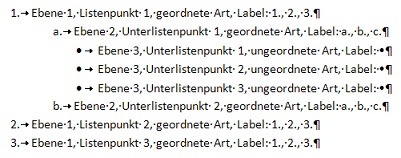
In DrawingML, a list item is simply a specially formatted paragraph, and a list is a sequence of these paragraphs. For unordered lists, a:pPr assigns a label, called a bullet, a level and possibly a different indent. Ordered lists specify a numbering type instead of a bullet.
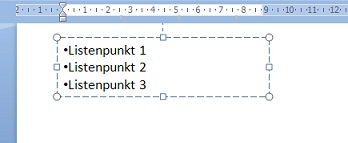
Unordered list
The simplest list is an unordered list with one level:
<a:p>                               (1)
   <a:pPr>
      <a:buFont typeface="Arial"/>  (2)
      <a:buChar char="•"/>          (3)
   </a:pPr>
   <a:r>
      <a:t>Listenpunkt 1</a:t>
   </a:r>
</a:p>
<a:p>                               (1)
   <a:pPr>
      <a:buFont typeface="Arial"/>
      <a:buChar char="•"/>
   </a:pPr>
   <a:r>
      <a:t>Listenpunkt 2</a:t>
   </a:r>
</a:p>
<a:p>                               (1)
   <a:pPr>
      <a:buFont typeface="Arial"/>
      <a:buChar char="•"/>
   </a:pPr>
   <a:r>
      <a:t>Listenpunkt 3</a:t>
   </a:r>
</a:p>
1 | These paragraphs are further items in the same list, with identical formatting. |
2 | <a:buFont> can assign a separate font to the bullet through typeface. This helps when the text font lacks the desired glyph. Without this element, the bullet uses the list content’s font. |
3 | <a:buChar> both identifies an unordered list and specifies its bullet. Any character may be used, but if a string is supplied, only its first character becomes the bullet. |
Ordered list
To create an ordered list, replace a:buChar with <a:buAutoNum>. Its type attribute selects the numbering style.
arabicPeriod | 1., 2., 3., |
arabicParenR | 1), 2), 3), |
alphaLcParenR | a), b), c), |
alphaUcParenR | A), B), C), |
romanUcPeriod | I., II., III., |
romanUcParenR | I), II), III), |
An ordered-list item can be created as follows:
<a:p>
   <a:pPr>
      <a:buFont typeface="Arial"/>
      <a:buAutoNum type="romanUcPeriod"/>
   </a:pPr>
   <a:r>
      <a:t>Listenpunkt 1</a:t>
   </a:r>
</a:p>
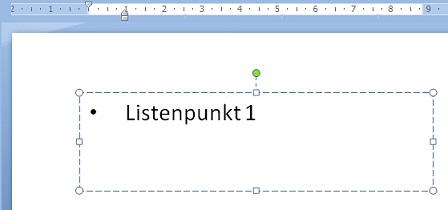
These lists have no further formatting: they start at the text frame’s left edge, with no gap between bullet and content. To create a gap, set a left margin and a negative first-line indent. The bullet follows the first-line indent, while content follows only the left margin. The negative indent therefore moves the bullet outward.
<a:p>
   <a:pPr marL="342900" indent="-342900">
      <a:buFont typeface="Arial"/>
      <a:buChar char="•"/>
   </a:pPr>
   <a:r>
      <a:t>Listenpunkt 1</a:t>
   </a:r>
</a:p>
List levels
Different item levels are needed for a complex list like the one above, both visually and technically. Visually, indent the entire item through marL. Different left margins establish a visual hierarchy; different formatting for each level is another option.
Numbering from the first level must not continue into the second, for example. PowerPoint therefore also needs an explicit technical level. Add lvl (level) to a:pPr, with an integer from 0 to 8 selecting one of nine levels. Level 0 is the first and the default, so all previous examples belong to it. DrawingML permits no more than nine levels.
<a:p>
   <a:pPr marL="342900" lvl="0" indent="-342900">   (1)
      <a:buFont typeface="Arial"/>
      <a:buAutoNum type="arabicPeriod"/>
   </a:pPr>
   <a:r>
      <a:t>Ebene 1, Listenpunkt 1, geordnete Art, Label: 1., 2., 3.</a:t>
   </a:r>
</a:p>
<a:p>
   <a:pPr marL="800100" lvl="1" indent="-342900">   (2)
      <a:buFont typeface="Arial"/>
      <a:buAutoNum type="alphaLcPeriod"/>
   </a:pPr>
   <a:r>
      <a:t>Ebene 2, Unterlistenpunkt 1, geordnete Art, Label: a., b., c.</a:t>
   </a:r>
</a:p>
<a:p>
   <a:pPr marL="1257300" lvl="2" indent="-342900">  (3)
      <a:buFont typeface="Arial"/>
      <a:buChar char="•"/>
   </a:pPr>
   <a:r>
      <a:t>Ebene 3, Unterlistenpunkt 1, ungeordnete Art, Label: •</a:t>
   </a:r>
</a:p>
<a:p>
   <a:pPr marL="1257300" lvl="2" indent="-342900">  (3)
      <a:buFont typeface="Arial"/>
      <a:buChar char="•"/>
   </a:pPr>
   <a:r>
      <a:t>Ebene 3, Unterlistenpunkt 2, ungeordnete Art, Label: •</a:t>
   </a:r>
</a:p>
<a:p>
   <a:pPr marL="1257300" lvl="2" indent="-342900">  (3)
      <a:buFont typeface="Arial"/>
      <a:buChar char="•"/>
   </a:pPr>
   <a:r>
      <a:t>Ebene 3, Unterlistenpunkt 3, ungeordnete Art, Label: •</a:t>
   </a:r>
</a:p>
<a:p>
   <a:pPr marL="800100" lvl="1" indent="-342900">   (2)
      <a:buFont typeface="Arial"/>
      <a:buAutoNum type="alphaLcPeriod"/>
   </a:pPr>
   <a:r>
      <a:t>Ebene 2, Unterlistenpunkt 1, geordnete Art, Label: a., b., c.</a:t>
   </a:r>
</a:p>
<a:p>
   <a:pPr marL="342900" lvl="0" indent="-342900">   (1)
      <a:buFont typeface="Arial"/>
      <a:buAutoNum type="arabicPeriod"/>
   </a:pPr>
   <a:r>
      <a:t>Ebene 1, Listenpunkt 2, geordnete Art, Label: 1., 2., 3.</a:t>
   </a:r>
</a:p>
<a:p>
   <a:pPr marL="342900" lvl="0" indent="-342900">   (1)
      <a:buFont typeface="Arial"/>
      <a:buAutoNum type="arabicPeriod"/>
   </a:pPr>
   <a:r>
      <a:t>Ebene 1, Listenpunkt 3, geordnete Art, Label: 1., 2., 3.</a:t>
   </a:r>
</a:p>
1 | First-level list item |
2 | Second-level list item |
3 | Third-level list item |