

XML technologies / PresentationML / The slide part / Shape / Shapes
2.2.1 Shapes
As explained above, p:sp creates a shape. Child elements specify its basic properties (<p:nvSpPr> & <p:spPr>), styles (<p:spPr>), such as colors and fonts, and text (<p:txBody>).
<p:sp>                                                      (1)
   <p:nvSpPr>                                               (2)
      <p:cNvPr id="4" name="Gleichschenkliges Dreieck 3"/>  (3)
      <p:cNvSpPr/>
      <p:nvPr/>
   </p:nvSpPr>
   <p:spPr>                                                 (4)
      <a:xfrm>                                              (5)
         <a:off x="2786050" y="2000240"/>
         <a:ext cx="3357586" cy="733663"/>
      </a:xfrm>
      <a:prstGeom prst="triangle"/>                         (6)
      <a:noFill/>                                           (7)
   </p:spPr>
   <p:style>                                                (8)
      <a:lnRef idx="2">                                     (9)
         <a:schemeClr val="accent1"/>                      (10)
      </a:lnRef>
      <a:fillRef idx="1">                                  (11)
         <a:schemeClr val="accent1"/>                      (10)
      </a:fillRef>
      <a:effectRef idx="0">                                (12)
         <a:schemeClr val="accent1"/>                      (10)
      </a:effectRef>
      <a:fontRef idx="minor">                              (13)
         <a:schemeClr val="lt1"/>                          (10)
      </a:fontRef>
   </p:style>
</p:sp>
1 | Element for a text frame or polygon shape. |
2 | Defines non-visual properties. |
3 | Examples of non-visual properties are the ID (here “4”) and name (“Gleichschenkliges Dreieck 3”). |
4 | Defines visual properties. |
5 | The a:xfrm element defines the shape’s position (<a:off>) on the slide and its size (<a:ext>). |
6 | Defines the shape’s geometry, here referencing an isosceles triangle. |
7 | Indicates a transparent fill (“No fill”). |
8 | The p:style element defines style properties. |
9 | References a style property for the shape’s lines, mainly its outline. |
10 | References a color in the current Color Map used by the document. |
11 | References a fill style property, with no effect here because (7) specifies a transparent fill. |
12 | References a style property for an effect to apply. |
13 | Defines basic style properties for the shape’s text content. |
2.2.1.1 Shape properties
For basic properties, PresentationML distinguishes visual and non-visual properties. Visual properties (<p:spPr>, Shape Properties) include geometry (<a:prstGeom>), position and size (<a:xfrm>), fill type (<a:gradFill>, <a:blipFill>, <a:noFill>) and outline coloring (<a:ln>).
Some properties may also be specified as styles in p:style. These provide defaults overridden by shape properties. Non-visual properties (<p:nvSpPr>, Non-Visual Properties for a Shape) include at least an ID and name in <p:cNvPr>. The ID need only be unique within the shape collection.
2.2.1.2 Position and size
Position and size in a:xfrm, like all lengths in DrawingML, use English Metric Units (EMUs). Microsoft created this “high precision coordinate space”. One EMU is 1/360000 cm or 1/914400 inch. The a:off child of <a:xfrm> gives the shape’s position through x and y attributes.
x is the distance from the slide’s left edge; y is the distance from its top. For nonrectangular shapes, this positions an imaginary rectangular frame enclosing the entire object. Another child of <a:xfrm> gives its size: a:ext uses cx for width and cy for height.
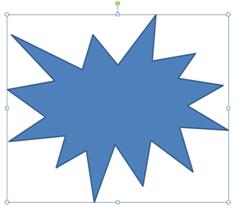
Fig. 7: imaginary frame
2.2.1.3 Geometric shapes
Geometry is referenced by a name in the prst attribute of a:prstGeom. This name identifies a shape from a library in the namespace schemas.openxmlformats.org/drawingml/2006/main.
2.2.1.4 Area fills
Shapes support several fills. Without explicit settings, the fill style property applies. To specify transparency (“no fill”), a particular color, gradient or texture, add the corresponding element as a visual property inside p:spPr.
Table 3: fill overview
Fill type | Corresponding element |
|---|---|
Transparent fill | <a:noFill> |
Solid fill | <a:solidFill> |
Gradient | <a:gradFill> |
Texture | <a:blipFill> |
Gradient example:
<a:gradFill>                           (1)
   <a:gsLst>                           (2)
      <a:gs pos="0">                   (3)
         <a:schemeClr val="accent1"/>  (4)
      </a:gs>
      <a:gs pos="100000">              (3)
         <a:schemeClr val="accent2"/>  (4)
      </a:gs>
   </a:gsLst>
</a:gradFill>
1 | <a:gradFill> | Gradient fill | This element is inserted in p:spPr. |
2 | <a:gsLst> | Gradient stop list | A gradient is defined through color specifications at arbitrary positions. This element contains a list of any number of such color-position pairs (gradient stops). |
3 | <a:gs> | Gradient stops |
|
4 | <a:schemeClr> | Scheme color | References a color in the current color map. |
2.2.1.5 Colors in DrawingML
DrawingML supports several color specifications: a predefined color from the current color map, an RGB value in hexadecimal or percentages, or a predefined color from the library in the schemas.openxmlformats.org/drawingml/2006/main namespace.
Each kind of color specification has its own element.
Table 4: color specification elements
Color specification type | Corresponding element |
|---|---|
RGB value in percentages | <a: scrgbClr> |
Hexadecimal RGB value | <a: srgbClr> |
Color from the namespace library | <a: prstClr> |
Color from a color map or color scheme | <a: schemeClr> |
All these elements specify color through val, except a:scrgbClr, which uses r, g and b.
Hexadecimal value:
Hexadecimal notation closely resembles HTML color specifications. It uses six hexadecimal digits. Besides 0 to 9, hexadecimal has six further digits: A(10), B(11), C(12), D(13), E(14) and F(15).
The six digits encode red, green and blue. The first two give red, positions 3 and 4 green, and the last two blue. Two hexadecimal digits have 256 possible values, from 0 to 255, giving that many levels for each component.
FF (255) is the maximum component, 00 the minimum. Additive color mixing makes FFFFFF pure white and 000000 black.
Table 5: basic colors in hexadecimal
Color | Hexadecimal value |
|---|---|
Red | FF0000 |
Green | 00FF00 |
Blue | 0000FF |
Yellow | FFFF00 |
Cyan | 00FFFF |
Magenta | FF00FF |
Percentage:
Color can also be defined through three percentages for red, green and blue. As with gradients, percentages are multiplied by 1000 to avoid decimal places, so 100000 represents 100%.
Table 6: basic colors in percentages
Color | Defining element |
|---|---|
White | <a:scrgbClr r="100000" g="100000" b="100000"/> |
Black | <a:scrgbClr r="0" g="0" b="0"/> |
Red | <a:scrgbClr r="100000" g="0" b="0"/> |
Green | <a:scrgbClr r="0" g="100000" b="0"/> |
Blue | <a:scrgbClr r="0" g="0" b="100000"/> |
Yellow | <a:scrgbClr r="100000" g="100000" b="0"/> |
Cyan | <a:scrgbClr r="0" g="100000" b="100000"/> |
Magenta | <a:scrgbClr r="100000" g="0" b="100000"/> |
Namespace library:
As in HTML, standard colors can be referenced by name. The library contains 140 colors predefined through RGB values. The color name goes in the val attribute of a:prstClr.
Table 7: predefined color examples
Color | Name | Red, green, blue values |
|---|---|---|
White | white | 255,255,255 |
Black | black | 0,0,0 |
Red | red | 255,0,0 |
Green | lime | 0,255,0 |
Blue | blue | 0,0,255 |
Yellow | yellow | 255,255,0 |
Cyan | cyan | aqua | 0,255,255 |
Magenta | magenta | fuchsia | 255,0,255 |
Color map:
As explained in 2.1 Basic structure, p:clrMapOvr can define the color map through a:overrideClrMapping. A color map has twelve fixed color slots. Only each slot’s name and purpose are fixed; the map assigns its color.
Table 8: color-map slots
Attribute/name | Purpose |
|---|---|
accent1 | Accent 1 |
accent2 | Accent 2 |
accent3 | Accent 3 |
accent4 | Accent 4 |
accent5 | Accent 5 |
accent6 | Accent 6 |
bg1 | Automatic background color |
bg2 | Alternative background color |
hlink | Color assigned automatically to links. |
folHlink | Color assigned automatically to visited links. |
tx1 | Color assigned automatically to text. |
tx2 | Alternative text color. |
Every default color must be defined in a color map. a:overrideClrMapping has a corresponding attribute for each, referencing a color in the document’s color scheme, defined in the theme part.
A color scheme also has a fixed number of named color slots. Confusingly, some names match color-map slots. Unlike a color map, however, a scheme permits defining each color freely through the methods above (<a: scrgbClr>, <a: srgbClr>, <a: prstClr>).
Table 9: color-scheme slots
Element/name | Purpose |
|---|---|
accent1 | Accent 1 |
accent2 | Accent 2 |
accent3 | Accent 3 |
accent4 | Accent 4 |
accent5 | Accent 5 |
accent6 | Accent 6 |
dk1 | Dark color |
dk2 | Alternative dark color |
hlink | Hyperlink color |
folHlink | Visited hyperlink color |
lt1 | Light color |
lt2 | Alternative light color |
A typical color-map definition looks like this:
<a:overrideClrMapping bg1="lt1" tx1="dk1" bg2="lt2" tx2="dk2" accent1="accent1" accent2="accent2" accent3="accent3" accent4="accent4" accent5="accent5" accent6="accent6" hlink="hlink" folHlink="folHlink"/>The <a: schemeClr> element can now reference a color-map or color-scheme color through val. Where names coincide, the color map takes priority; the color scheme is used secondarily.