

XML technologies / XML / Python & XML / The Simple API for XML / Converting XML to HTML
(Excerpt from “Python & XML” by Christopher A. Jones & Fred L. Drake, Jr.)
PyXML includes XML parsers such as PyExpat, support for SAX and DOM, and much more. While learning PyXML, a complete list of its classes and methods would be useful. As this is a programming book, let us write Python to extract that information—in XML, of course.
Let us generate XML detailing every PyXML file, its classes and methods. This quickly gives useful XML. Rather than replace sophisticated code-documentation generators, this example provides a simple way to generate experimental data for all subsequent examples here. A few hundred thousand bytes to play with are helpful. It also demonstrates how easily a directory tree can be examined with os.path.walk.
Example: genxml.py
"""
genxml.py
Wandert durch den PyXML-Baum, indexiert Quelldateien und
erzeugt XML-Tags zur Navigation in den Quellen.
"""
import os
import sys
from xml.sax.saxutils import escape
def quoteattr(data):
# Basiert auf quoteattr() aus xml.sax.saxutils in Python 2.2.
'''Schützt einen Attributwert und setzt ihn in Anführungszeichen.
Schützt &, < und > in einem Datenstring und setzt ihn dann in
Anführungszeichen zum Gebrauch als Attributwert. Das Zeichen "
wird wenn nötig ebenfalls geschützt.
'''
data = escape(data)
if '"' in data:
if "'" in data:
data = '"%s"' % data.replace('"', """)
else:
data = "'%s'" % data
else:
data = '"%s"' % data
return data
def process(filename, fp):
print "* Bearbeiten von:", filename,
# Parse die Datei
pyFile = open(filename)
fp.write("<file name=\"" + filename + "\">\n")
inClass = 0
line = pyFile.readline( )
while line:
line = line.strip( )
if line.startswith("class") and line[-1] == ":":
if inClass:
fp.write(" </class>\n")
inClass = 1
fp.write(" <class name='" + line[:-1] + "'>\n")
elif line.startswith("def") and line[-1] == ":" and inClass:
fp.write(" <method name='" + escape(line[:-1]) + "'/>\n")
line = pyFile.readline( )
pyFile.close( )
if inClass:
fp.write(" </class>\n")
inClass = 0
fp.write("</file>\n")
def finder(fp, dirname, names):
"""Füge Dateien im Verzeichnis dirname zu einer Liste hinzu."""
for name in names:
if name.endswith(".py"):
path = os.path.join(dirname, name)
if os.path.isfile(path):
process(path, fp)
def main( ):
print "[genxml.py gestartet]"
xmlFd = open("pyxml.xml", "w")
xmlFd.write("<?xml version=\"1.0\"?>\n")
xmlFd.write("<pyxml>\n")
os.path.walk(sys.argv[1], finder, xmlFd)
xmlFd.write("</pyxml>")
xmlFd.close( )
print "[genxml.py beendet]"
if __name__ == "__main__":
main( ) The function main uses the function os.path.walk to search for Python files in PyXML. For each source file beneath the starting directory supplied as the script argument, the function process extracts class information and writes it to the open XML file.
The script continues by parsing each Python file, identifying classes and methods through keywords such as class and def on each line:
def process(filename, fp):
    print "* Bearbeiten von:", filename,
    # Parse die Datei
    pyFile = open(filename)
    fp.write("<file name='" + filename + "'>\n")
    inClass = 0
    line = pyFile.readline()
    while line:
       line = line.strip()
Finding a class declaration produces a corresponding class tag and appropriate attributes in XML:
if line.startswith("class") and line[-1] == ":":
        if inClass:
           fp.write(" </class>\n")
        inClass = 1
        fp.write(" <class name='" + line[:-1] + "'>\n")
For a method definition, special characters are replaced with entities to avoid XML problems. The definition string is trimmed and marked up:
elif line.startswith("def") and line[-1] == ":" and inClass:
     fp.write(" <method name='" + escape(line[:-1]) + "'/>\n")

line = pyFile.readline()
At the end of a file, the program closes the last class and the file tag:
pyFile.close()
    if inClass:
      fp.write(" </class>\n")
      inClass = 0

    fp.write("</file>\n")
Python makes text parsing easy. Each line is manipulated, quotes become entities using the function escape from the module xml.sax.saxutils, and XML tags enclose class definitions and method names.
Run it from the shell as follows:
$> python genxml.py /home/chris/PyXML/xml The argument is your PyXML source directory, including its xml subdirectory.
The generated document
Generated XML is stored in pyxml.xml. Each file element looks roughly like this:
<file name="../xml/dom/ext/reader/Sax2Lib.py">
  <class name="class LexicalHandler">
    <method name="def xmlDecl(self, version, encoding, standalone)"/>
    <method name="def startDTD(self, doctype, publicID, systemID)"/>
    <method name="def endDTD(self)"/>
    <method name="def startEntity(self, name)"/>
    <method name="def endEntity(self, name)"/>
    <method name="def comment(self, text)"/>
    <method name="def startCDATA(self)"/>
    <method name="def endCDATA(self)"/>
  </class>
  <class name="class EntityRefList">
    <method name="def getLength(self)"/>
    <method name="def getEntityName(self, index)"/>
    <method name="def getEntityRefStart(self, index)"/>
    <method name="def getEntityRefEnd(self, index)"/>
    <method name="def __len__(self)"/>
  </class>
  <class name="class NamespaceHandler">
    <method name="def startNamespaceDeclScope(prefix, uri)"/>
    <method name="def endNamespaceDeclScope(prefix)"/>
  </class>
  <class name="class SAXNotSupportedException(Exception)"></class>
</file>
The attribute name of the file tag varies with the supplied PyXML source path. Functions not defined as class methods are missed by the simple parsing loop —this is no compiler! Nevertheless, the standard library and PyXML contain many useful functions; consult reference documentation. The function escape used here is a perfect example. New Python users will discover that small helpers are typical of its libraries. Most helpers for making bigger components easier to use are already supplied, leaving you free to focus on the application.
Examining the XML familiarizes you with PyXML’s scope. Later, a script converts it to HTML using SAX and Python string processing. The following figure shows it in a browser.
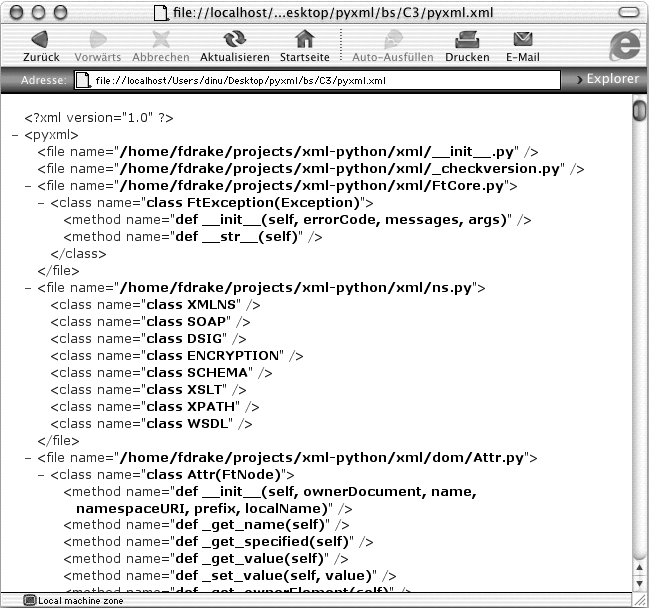
Figure: genxml.py output in a browser
The conversion handler
Complete the program by implementing the class PyXMLConversionHandler. It generates HTML from the earlier XML, allowing you to view all PyXML files, classes and methods as formatted text in your browser. Create it in the file handlers.py as shown next.
Example: handlers.py
from xml.sax import ContentHandler
class PyXMLConversionHandler(ContentHandler):
"""Ein einfacher Handler, der drei Methoden der SAX-Schnittstelle implementiert."""
def __init__(self, fp):
"""Speichere Dateiobjekt, in dem wir HTML erzeugen."""
self.fp = fp
def startDocument(self):
"""Schreibe den Anfang des HTML-Dokuments."""
self.fp.write("<html><body><b>\n")
def startElement(self, name, attrs):
if name == "file":
# Erzeuge Anfang von HTML
s = attrs.get('name', "")
self.fp.write("<p>File: %s<br>\n" % s)
elif name == "class":
self.fp.write(" " * 3 + "Class: " + attrs.get('name', "") + "<br>\n")
elif name == "method":
self.fp.write(" " * 6 + "Method: " + attrs.get('name', "") + "<br>\n")
def endDocument(self):
"""Beende das zu erzeugende HTML-Dokument."""
self.fp.write("</b></body></html>")Conversion is simple. Notice, however, that output is written to a file object passed to the constructor rather than assembling XML text in memory. This avoids maintaining a potentially huge buffer built incrementally with many copying operations. If a final in-memory string is required, the creator can supply a StringIO instance as the output file; the implementation of StringIO builds large strings more efficiently than many concatenations. This Python idiom has proved useful across many projects.
Running the conversion handler
The main script is much like earlier ones: create the parser, instantiate the handler class, register it, and start parsing, as shown next.
Example: genhtml.py
#!/usr/bin/env python
#
# Erzeugt HTML aus pyxml.xml

import sys

from xml.sax import make_parser
from handlers import PyXMLConversionHandler

dh = PyXMLConversionHandler(sys.stdout)
parser = make_parser( )

parser.setContentHandler(dh)
parser.parse(sys.stdin)
This script writes to standard output.
Copyright © 2002 O'Reilly Verlag GmbH & Co. KG
You may print the online version for your private use.
Otherwise, this chapter from “Python & XML” is subject to the same conditions as the bound edition: the work, including all its parts, is protected by copyright. All rights reserved, including reproduction, translation, microfilming, and storage and processing in electronic systems.
O’Reilly Verlag GmbH & Co. KG, Balthasarstraße 81, 50670 Köln, kommentar(at)oreilly.de