

XML technologies / XML / Python & XML / The Simple API for XML / SAX explained
(Excerpt from “Python & XML” by Christopher A. Jones & Fred L. Drake, Jr.)
Your first SAX task is to design and implement a handler for your XML documents. Large projects or catalogs of valid documents may benefit from comprehensive handlers supporting several document types. Small projects may instead need separate handlers for each type. In complex applications, both the XML documents and what you want to accomplish influence handler design. SAX methods often extract data from the event stream to pass to another application, such as a database, or to apply intelligent business logic. The task will very likely influence your design strategy.
SAX is a callback API: implement handler objects and pass references to them to a SAX-capable parser or driver; we call both parsers. During parsing, it calls your handlers’ methods, letting you process XML usefully in applications and distributed systems.
SAX is an excellent streaming API, enabling faster processing and documents too large for memory. Events and errors can be handled in real time as they occur, without waiting for the full document to load. This is especially useful for responsive graphical applications. Many applications also benefit from lower memory consumption than DOM code. By controlling access to objects created during parsing, applications can minimize overhead and release objects as soon as they are no longer needed.
Choose SAX when building application-specific data structures from documents without retaining their XML structure. Its simple handler events require careful state tracking; modeling the application as a finite-state machine helps. There is no unavoidable memory or performance penalty from loading potentially huge documents. DOM generally keeps the whole tree until released, making such overhead difficult to avoid. We examine DOM in The Document Object Model.
Using SAX in an application
When building a SAX application, think in components. The XML parser and SAX driver form a black box needing little control from the application. Handlers are its only communication route, but should interpret parser events rather than implement application logic. They often form a separate layer supplying a data model. The application does its real work with the derived structures and higher-level handler events. The following figure shows these relationships.
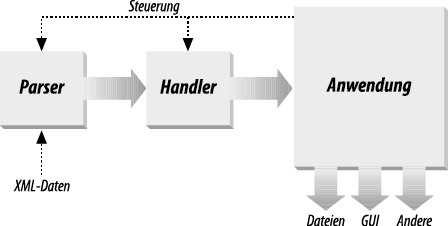
Figure: Components of a SAX application
Small applications often are their own handlers, placing application code inside callbacks. This scales poorly but suits simple cases. It is also instructive while learning SAX, so our examples place application code directly in handlers. Abstracting a separate layer for a larger application is straightforward.
SAX calls the parser object a reader. It reads input from a source and calls handlers for particular events. The source need not be XML, though it usually is. The application registers handlers through reader methods and may set other parser properties. Our API overview examines handlers first, then briefly the reader interface.
SAX handler objects
SAX comprises four main interfaces called by parsers for events during parsing. Python slightly adapted the original Java methods, mostly using Python’s richer primitive data types, to implement SAX properly in Python. Implementing these callback interfaces receives all events as the parser traverses the document. Let us briefly examine the possible handlers. A complete method reference is in The Python SAX API.
ContentHandler
The ContentHandler interface is the most used SAX interface and the main route for parsing events. These concern the document’s principal markup and character data. Register your implementation with setContentHandler.
The callback API interests most XML users. Implement it to receive the parser’s event stream. Each element triggers a call to your handler’s startElement method. The startElement handler for this XML must know what to do with every element encountered:
def startElement(self, name, attrs):
  if name == "webArticle":
    subcat = attrs["subcategory"]
    if subcat.find("tech") > -1:
      self.inArticle = 1
      self.isMatch = 1

elif self.inArticle:
    if name == "header":
      self.title = attrs["title"]
      self.inBody = 1
    if name == "body":
      self.inBody = 1
ErrorHandler
The ErrorHandler interface lets applications handle parser errors at runtime. Register it with the reader using setErrorHandler. Parsing errors have three severity categories, each handled by a different method. The least severe go to warning; serious violations go to error if the parser can continue looking for errors, or otherwise to fatalError.
Each takes one parameter, always an instance of the SAXException interface. It provides error details, including location and input source. To stop processing, a handler can simply raise the SAXException object as an exception.
Without an error handler, the default reports warnings on sys.stdout and raises exceptions for ordinary and fatal errors.
PyXML provides convenient implementations in xml.sax.saxutils. The class ErrorPrinter prints errors to standard output regardless of severity, whereas ErrorRaiser simply raises exceptions so errors always stop processing.
DTDHandler
Applications needing notations and unparsed entities can use the parser’s setDTDHandler method to register a DTDHandler object. This interface needs only two methods, one for notation definitions and one for entity definitions. Only unparsed entities with specified notations are reported here.
This may seem to cover little of the information in a DTD, but covers typical unparsed-entity needs. SAX’s S means Simple: most applications need neither content-model details nor other entity definitions. For more DTD information, several mechanisms exist:
SAX’s optional
DeclHandlerhandler, not necessarily supported by every parser.Expat’s native interface; see the standard library’s
xml.parsers.expatmodule documentation.PyXML’s
xml.parsers.xmlproc.dtdparsermodule.
EntityResolver
If implemented, this handler must also be registered before parsing, using the parser’s setEntityResolver method. On encountering external entities, the parser calls your resolveEntity method. Applications can redirect entity resolution to another location, such as a cache. If it returns None or a system identifier, the parser tries to load the entity using the standard library’s HTTP and FTP facilities.
Other handler objects
SAX defines two more optional handlers, without equally convenient registration methods. Most applications do not need them, but knowing them may help when required.
DeclHandler
Methods called when the parser finds document structure definitions: element and attribute declarations, and internal or external entity declarations.
LexicalHandler
Methods for events applications usually ignore, but useful for transformations preserving the original document as closely as possible: comments, entity boundaries, DTD start and end, and CDATA section boundaries.
SAX parsers have no setDeclHandler or setLexicalHandler methods. Install these handlers through the parser’s property interface, described shortly.
SAX reader objects
Register handler objects with a SAX reader or parser. All parsers must support the four common handlers with convenient setters and getters. The routines setContentHandler, setDTDHandler, setEntityResolver and setErrorHandler have corresponding methods retrieving the current handler, named with get instead of set. Another method, setLocale, sets the locale for errors and warnings.
SAX also defines concepts called features and properties. A feature is functionality that can be enabled or disabled; a property is a named value tied to parser state. Depending on the feature, property and parser, they may be mutable, immutable or changeable only outside parsing. The previously discussed DeclHandler and LexicalHandler are configured through parser properties. Most applications need neither features nor properties.
Copyright © 2002 O'Reilly Verlag GmbH & Co. KG
You may print the online version for your private use.
Otherwise, this chapter from “Python & XML” is subject to the same conditions as the bound edition: the work, including all its parts, is protected by copyright. All rights reserved, including reproduction, translation, microfilming, and storage and processing in electronic systems.
O’Reilly Verlag GmbH & Co. KG, Balthasarstraße 81, 50670 Köln, kommentar(at)oreilly.de