

XML technologies / SVG / The coordinate system of SVG graphics / Grouping and positioning graphic elements
(Excerpt from “Das Einsteigerseminar SVG — Webgrafiken mit XML” by Helma Spona)
Every SVG graphic consists of simple elements that can be combined and positioned. Group elements belonging to a more complex component so the component can be positioned without changing individual elements’ coordinates.
Grouping elements
Group related elements by enclosing them in a <g> tag, as in a graphics program. WebDraw represents this similarly; grouped elements move together only.
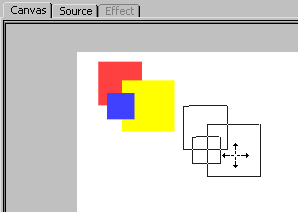
Figure: Grouped elements move only as a unit in WebDraw.
Add the <g> tag directly in source: insert <g> before the first group element and </g> after the last.
Group elements must therefore be consecutive. If necessary, rearrange their tags first. A result might look like this:
<g id="aufz01">
  <rect x="0" y="0" width="35" height="35" rx="0" ry="0" style="fill:rgb(255,64,64)"/>
  <rect x="36" y="22" width="42" height="42" rx="0" ry="0" style="fill:rgb(255,255,0)"/>
  <rect x="24" y="32" width="22" height="22" rx="0" ry="0" style="fill:rgb(64,64,255)"/>
</g>
Positioning groups
You might expect to position groups with the attributes x and y, but these universal attributes are unavailable for <g> tags. Instead use the transform attribute and the transformation translate to position the group.
All coordinates inside the group are then relative to its position. Two efficient approaches follow.
When planning a group from the start, align its elements to the origin. They remain correctly displayed at any group position because that position becomes the new coordinate system’s origin.
If grouping existing elements later, adjusting coordinates may be costly. Keep the group at 0/0 so its coordinate system matches the graphic’s.
<g id="aufz01" transform="translate(0,0)">
  ...
</g>
Aligning group elements relatively
SVG supports absolute and relative coordinates. Earlier examples used absolute coordinates, specifying an unambiguous position in a coordinate system.
Alternatively use relative values with + and -. The listing positions elements relative to the group origin. The black dot defined by <circle> merely marks that origin.
<g id="aufz01" transform="translate(50,50)">
  <rect x="-35" y="-35" width="35" height="35" style="fill:rgb(255,64,64)"/>
  <rect x="+2" y="-21" width="42" height="42" style="fill:rgb(255,255,0)"/>
  <rect x="-5" y="-16" width="22" height="22" style="fill:rgb(64,64,255)"/>
  <circle cx="0" cy="0" r="4" style="fill:rgb(0,0,0)"/>
</g>
Running this SVG code produces:
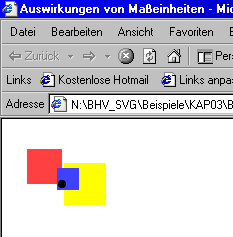
Figure: Elements arranged around the group’s origin.
Note:
Paths also use relative positions, defined differently. Details appear in the chapter Using complex graphic elements and formatting.
Copyright © verlag moderne industrie GmbH 2001
You may print the online version for your private use.
Otherwise, this chapter from “Das Einsteigerseminar SVG — Webgrafiken mit XML” is subject to the same conditions as the bound edition. The work, including all its parts, is protected by copyright. All rights reserved, including reproduction, translation, microfilming, and storage and processing in electronic systems.
verlag moderne industrie GmbH, Justus-von-Liebig-Straße 1, D-86899 Landsberg/Lech, fon ++49 (0) 81 91 / 125 – 0, leserservice(at)mi-verlag.de