

XML technologies / SVG / The coordinate system of SVG graphics / What is the coordinate system? / Creating new coordinate systems
(Excerpt from “Das Einsteigerseminar SVG — Webgrafiken mit XML” by Helma Spona)
Besides SVG’s two coordinate systems, define your own with the transform attribute in a tag. It creates a new system whose origin lies within the parent system.
The transform attribute supports several values creating and initializing coordinate systems. Each transformation takes a list with different meanings, separated by spaces or commas.
The listing creates a coordinate system at 50/50 for the group defined by <g>. Positions within the group refer to it: the first rectangle begins at its origin, therefore at 50/50 in the graphic.
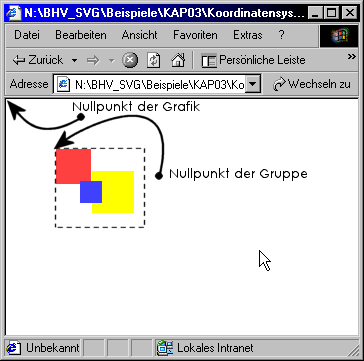
Figure: Defined coordinate systems.
<g id="aufz01" transform="translate(50,50)">
  <rect x="0" y="0" width="35" height="35" rx="0" ry="0" style="fill:rgb(255,64,64)"/>
  <rect x="36" y="22" width="42" height="42" rx="0" ry="0" style="fill:rgb(255,255,0)"/>
  <rect x="24" y="32" width="22" height="22" rx="0" ry="0" style="fill:rgb(64,64,255)"/>
</g>
The transform attribute accepts these values:
translate(tx,ty)sets the new origin. The parametertxis required;tyis optional, defaulting to0. Both accept absolute and relative values.scale(sx,sy)changes size. The parameterssxandsygive relative X and Y scale factors. Values above 1 enlarge; below 1 reduce. To reduce by 50%, usescale(0.5,0.5). The parametersyis optional and then takes the same value assx. An example follows.rotate(rotate-angle,cx,cy)rotates the object by the anglerotate-anglein degrees. Ifcxandcyare omitted, rotation is around the upper-left corner; otherwise around cx/cy.skewX(skew-angle)skews the element on the X axis by the supplied angle in degrees.skewY(skew-angle)skews the element on the Y axis by the supplied angle in degrees.matrix(a,b,c,d,e,f)adds a six-value matrix to the group, capable of representing all other transformations. Without matrix mathematics knowledge, avoid it to prevent unpredictable results.
Note:
WebDraw converts an entered transform attribute into a matrix operation when switching to layout view or saving.
Examples of the transformations skewX, skewY and rotate appear under Filters, transformations and gradients.
Consider a group defined by the <g> tag whose elements need uniform reduction. Either reduce widths, heights and radii manually, or scale the whole group with a transformation.
Note:
Values below 1 reduce, above 1 enlarge. Decimals must use a dot: 0.2 = 0,2 = 20%.
The listing reduces the group to 20% of its original size.
<g id="aufz01" transform="scale(0.2)">
  <rect x="0" y="0" width="35" height="35" rx="0" ry="0" style="fill:rgb(255,64,64)"/>
  <rect x="36" y="22" width="42" height="42" rx="0" ry="0" style="fill:rgb(255,255,0)"/>
  <rect x="24" y="32" width="22" height="22" rx="0" ry="0" style="fill:rgb(64,64,255)"/>
</g>
Note:
This transform instruction initializes a coordinate system. Without a specified start, it begins at the graphic’s origin, moving the entire group there. Preserve the original position with a second transformation.
List simultaneous transformations sequentially in the transform attribute. The listing again scales with scale and positions the group with translate:
<g id="aufz01" transform="translate(50,50) scale(0.2)">
  <rect x="0" y="0" width="35" height="35" rx="0" ry="0" style="fill:rgb(255,64,64)"/>
  <rect x="36" y="22" width="42" height="42" rx="0" ry="0" style="fill:rgb(255,255,0)"/>
  <rect x="24" y="32" width="22" height="22" rx="0" ry="0" style="fill:rgb(64,64,255)"/>
</g>
Note:
Transformation order can affect the result.
Copyright © verlag moderne industrie GmbH 2001
You may print the online version for your private use.
Otherwise, this chapter from “Das Einsteigerseminar SVG — Webgrafiken mit XML” is subject to the same conditions as the bound edition. The work, including all its parts, is protected by copyright. All rights reserved, including reproduction, translation, microfilming, and storage and processing in electronic systems.
verlag moderne industrie GmbH, Justus-von-Liebig-Straße 1, D-86899 Landsberg/Lech, fon ++49 (0) 81 91 / 125 – 0, leserservice(at)mi-verlag.de
back to top