

XML technologies / PresentationML / Introduction to PresentationML / XML output
1.2 The XML output
The PPTX container is designed as a file format that is modified at most for conversion. For XML development, output as a single XML file is intended. To obtain this XML output, select “Save As…” and then the file type “PowerPoint XML Presentation (*.xml)”.
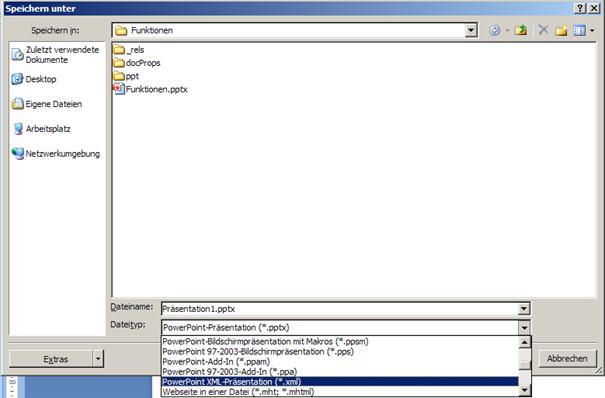
Fig. 5: saving XML output
The saved XML file contains all information normally held in a PPTX container. It uses a simple system: the root element is pkg:package, where the prefix represents the namespace “http://schemas.microsoft.com/office/2006/xmlPackage”. This root element contains any number of pkg:part elements. Each pkg:part represents a part in the PPTX container and has a pkg:name attribute holding that part’s name.
The name is the same as in the PPTX container: the internal path to the file. Besides pkg:name, each pkg:part has a pkg:contentType attribute whose unique string identifies the part’s content model. In the PPTX container, all parts’ content types are listed in [Content_Types].xml at the container’s top level.
<?mso-application progid="PowerPoint.Show"?>
<pkg:package xmlns:pkg="http://schemas.microsoft.com/office/2006/xmlPackage">
    …
    …
    <pkg:part pkg:name="/ppt/presentation.xml" pkg:contentType="application/vnd.openxmlformats-officedocument.presentationml.presentation.main+xml">
        …
        …
    </pkg:part>
    <pkg:part pkg:name="/ppt/slides/slide1.xml" pkg:contentType="application/vnd.openxmlformats-officedocument.presentationml.slide+xml">
        …
        …
        …
    </pkg:part>
The PI (processing instruction) <?mso-application progid="PowerPoint.Show"?> at the start tells the operating system to open this otherwise ordinary XML document with PowerPoint instead of the usual XML editor.
Each pkg:part contains exactly one child, depending on the part’s content. Some parts hold binary data. An embedded image, for example, stores its binary data here instead of a file reference; the pkg:part then contains pkg:binaryData. If the part contains XML data, as most do, its child is pkg:xmlData.
<pkg:part pkg:name="/ppt/slides/_rels/slide50.xml.rels" pkg:contentType="application/vnd.openxmlformats-package.relationships+xml">
   <pkg:xmlData>
      <Relationships xmlns="http://schemas.openxmlformats.org/package/2006/relationships">
         <Relationship Id="rId2" Type="http://schemas.openxmlformats.org/officeDocument/2006/relationships/notesSlide" Target="../notesSlides/notesSlide43.xml"/>
         <Relationship Id="rId1" Type="http://schemas.openxmlformats.org/officeDocument/2006/relationships/slideLayout" Target="../slideLayouts/slideLayout3.xml"/>
      </Relationships>
   </pkg:xmlData>
</pkg:part>

...
  ...
  ...
  ...

     <Relationships xmlns="http://schemas.openxmlformats.org/package/2006/relationships">
        <Relationship Id="rId2" Type="http://schemas.openxmlformats.org/officeDocument/2006/relationships/notesSlide" Target="../notesSlides/notesSlide43.xml"/>
        <Relationship Id="rId1" Type="http://schemas.openxmlformats.org/officeDocument/2006/relationships/slideLayout" Target="../slideLayouts/slideLayout3.xml"/>
     </Relationships>
  ...
...
The content of pkg:xmlData is identical to that of the corresponding part in the PPTX container. Its child is therefore the part’s root element. This element also defines all the namespaces of that part, although XML documents normally declare all required namespaces on their root element, here pkg:package. Namespaces used repeatedly must thus be declared again for each part.