

XML technologies / SVG / Interactive graphics / The event and object model in detail / The Document Object Model, DOM
(Excerpt from “Das Einsteigerseminar SVG — Webgrafiken mit XML” by Helma Spona)
Earlier examples only changed existing elements. Scripts adding, moving or deleting elements are more useful and efficient.
So far only attributes have changed. To change a <text> tag’s text, access its contents rather than attributes. For this, an SVG graphic has a DOM just like XML files.
Previous examples showed DOM access: use an onload attribute or another event handler to access an element. Its parent SVG document becomes accessible too, represented by the SVGDocument object.
The SVGDocument object represents the entire file, not the <svg> tag. The <svg> tag is the first element of the SVGDocument object, retrieved through the method getFirstChild( ). The instruction svgdok.getFirstChild( ).getChildNodes( ).length counts elements inside the <svg> tag, returned by the method getFirstChild( ). The method getChildNodes( ) lists child elements of the <svg> tag and the length property gives their count. For Netscape compatibility, retrieve the length property through the getLength( ) method rather than directly. A simple loop can then access every SVG element, as the first example shows.
Note:
Corresponding to the method getFirstChild( ), the method getLastChild( ) retrieves the last child element.
Properties and methods access individual elements. The method getElementById accesses only named elements. SVG’s hierarchical object model also allows traversing objects without knowing names or types. Methods and properties distinguish a <text> element from a <circle> element, and visible drawings from hidden elements. The first example traverses all elements, resetting the fill property of visible elements.
The example defines black-filled text, rectangle and circle, except the rectangle has only a black outline and no fill. On loading, the function init runs. The variable svgTag first receives the <svg> tag as an object for accessing children. A for loop counts the variable i from 0 to the child count. Inside it, the method getChildNodes( ) retrieves each element using the counter i as the index i.
Note:
Because indices start at 0, the counter i runs from 0 to below the value returned by length.
The collection retrieved by getChildNodes( ) also contains invisible elements. Retrieving their style attribute and setting properties causes runtime errors. Check the element type with the method getNodeType( ), returning 1 for visible elements and 3 for others. Process only elements returning 1, using an if instruction as shown. Then set the fill color as before.
Note:
Tests suggest invisible elements arise from separate closing tags and represent those tags. The reason is unclear, but this differs from W3C DOM. Use the demonstrated method to access visible elements regardless of these extras; it should also work with browsers or plug-ins that omit them.
<?xml version="1.0" encoding="iso-8859-1"?>
...
<svg width="320" height="300" onload="init(evt)">
  <script type="text/ecmascript">
    <![CDATA[
      var elem;
      var svgdok;
      var eingabe="";
      function init(evt)
      {
        var i=0;
        var svgTag;
        var styleAttr;
        svgdok=evt.getTarget().getOwnerDocument();
        svgTag=svgdok.getFirstChild();
        for (i=0;i<svgTag.getChildNodes()
          .getLength();i++)
        {
          elem=svgTag.getChildNodes(i);
          if (elem.getNodeType()==1)
          {
            styleAttr=elem.getStyle();
            styleAttr.setProperty("fill","blue");
          }
        }
      }
    ]]>
  </script>
  <text x="10" y="40">Textelement</text>
  <rect x="50" y="50" width="10" height="10" style="stroke:black;fill:none"/>
  <circle cx="120" cy="120" r="10" width="10" height="10" style="stroke:black;fill:black"/>
</svg>
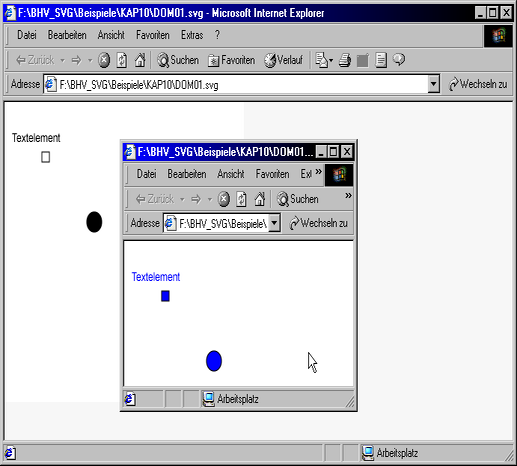
Figure: Same graphic before and after running the script.
To color text red, circles yellow and rectangles blue instead of making everything blue, slightly change the function init. Retrieve the element’s property NodeName with the getNodeName( ) method, returning the tag name: text for <text> elements, rect for <rect> elements, and circle for <circle> elements.
function init(evt)
{
  var i=0;
  var svgTag;
  var styleAttr;
  svgdok=evt.getTarget().getOwnerDocument();
  svgTag=svgdok.getFirstChild();
  for (i=0;i<svgTag.getChildNodes().getLength();i++)
  {
    elem=svgTag.getChildNodes(i);
    if (elem.getNodeType()==1)
    {
      styleAttr=elem.getStyle();
      if (elem.getNodeName()=="rect")
      {styleAttr.setProperty("fill","blue");}
      if (elem.getNodeName()=="text")
      {styleAttr.setProperty("fill","red");}
      if (elem.getNodeName()=="circle")
      {styleAttr.setProperty("fill","yellow");}
    }
  }
}
These DOM capabilities become especially useful with dynamic element creation: insert or remove elements and change text or other tag contents, as the next section explains.
Copyright © verlag moderne industrie GmbH 2001
You may print the online version for your private use.
Otherwise, this chapter from “Das Einsteigerseminar SVG — Webgrafiken mit XML” is subject to the same conditions as the bound edition. The work, including all its parts, is protected by copyright. All rights reserved, including reproduction, translation, microfilming, and storage and processing in electronic systems.
verlag moderne industrie GmbH, Justus-von-Liebig-Straße 1, D-86899 Landsberg/Lech, fon ++49 (0) 81 91 / 125 – 0, leserservice(at)mi-verlag.de
back to top