

XML technologies / CSS / Advanced websites with CSS / A simple CSS layout / Positioning page elements / Spacing in lists
(Excerpt from “CSS − Advanced websites with Cascading Stylesheets” by Rachel Andrew & Dan Shafer)
Graphical browsers normally give lists 50 pixels of space on the left for markers, such as bullets or numbers. Unfortunately, CSS does not specify whether this should be left margin or left padding. However, the description of the property marker-offset suggests the indentation was set with the property margin.
Whatever the specification intended, Firefox and Safari use left padding by default, while other browsers, including Internet Explorer and Opera, use left margin. Test this by giving a colored background to an element ul or ol. Most browsers leave the markers outside the background, except Firefox and Safari.
Always define both properties when changing default list spacing. With only a margin, Firefox retains its normal indentation while other browsers override it. With only padding, Internet Explorer retains the normal 50-pixel indentation. Only defining both—usually setting padding: 0 and assigning a value only to the property margin—makes left list spacing consistent across browsers.
Vertical margins are set with the properties margin-top and margin-bottom. The following HTML page illustrates vertical margins:
<!DOCTYPE html PUBLIC "-//W3C//DTD XHTML 1.0 Strict//EN" "http://www.w3.org/TR/xhtml1/DTD/xhtml1-strict.dtd">
<html xmlns="http://www.w3.org/1999/xhtml">
  <head>
    <title>margin in Kombination mit padding</title>
    <meta http-equiv="Content-Type" content="text/html; charset=iso-8859-1" />
    <style type="text/css">
      body {
        background-color: #808080;
        color: black;
      }
      h1 {
        background-color: #c0c0c0;
        color: black;
        margin-bottom: 3cm;
      }
      h2 {
        background-color: #c0c0c0;
        color: black;
        margin-left: 5%;
        margin-top: 3cm;
        margin-bottom: 3cm;
        padding-left: 1em;
      }
      p {
        background: #c0c0c0;
        color: black;
        margin-left: 20%;
        padding-left: 10%;
        margin-top: 3cm;
        margin-bottom: 3cm;
      }
    </style>
  </head>
  <body>
    <h1>Kein oberer Außenrand, aber ein unterer Außenrand von 3cm</h1>
    <h2>Ich besitze oben und unten einen Außenrand von jeweils 3cm und einen linken Innenrand von 1 em.</h2>
    <p>Ein Absatz mit einem Außenrand oben und unten von jeweils 3cm</p>
  </body>
</html>
The following figure shows how this page appears.
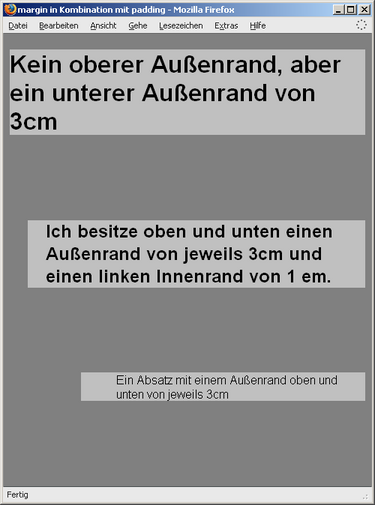
Figure: Vertical margins do not add up.
Unlike horizontal margins, vertical margins do not add up. When two elements sit directly above each other, like h1 and h2 in the figure, their spacing uses the larger value of the upper element’s property margin-bottom or the lower element’s property margin-top. Both are set to 3cm in our example, so the gap is 3cm rather than 6cm, as you might expect. That would only happen if the element h1 had margin-bottom: 6cm. Here, the element body is the containing block, effectively the browser window’s visible area.
Margins can also be negative. For example, if the area body of an HTML page has a value for margin-left and an element should extend beyond that margin to the left, this can help. The following source produces the next figure.
<!DOCTYPE html PUBLIC "-//W3C//DTD XHTML 1.0 Strict//EN" "http://www.w3.org/TR/xhtml1/DTD/xhtml1-strict.dtd">
<html xmlns="http://www.w3.org/1999/xhtml">
  <head>
    <title>Negative Werte für den Aussenrand</title>
    <meta http-equiv="Content-Type" content="text/html; charset=iso-8859-1" />
    <style type="text/css">
      body {
        background-color: #808080;
        color: black;
        margin-left: 5cm;
      }
      h1 {
        background-color: #c0c0c0;
        color: black;
        margin-left: -3cm;
      }
      h2 {
        background-color: #c0c0c0;
        color: black;
      }
    </style>
  </head>
  <body>
    <h1>Der linke Außenrand des Body-Bereichs beträgt zwar 5cm, aber ich besitze den Wert -3cm.</h1>
    <h2>Da ich keine eigene margin-left-Einstellung besitze, nehme ich die 5cm des Body-Bereichs an.</h2>
  </body>
</html>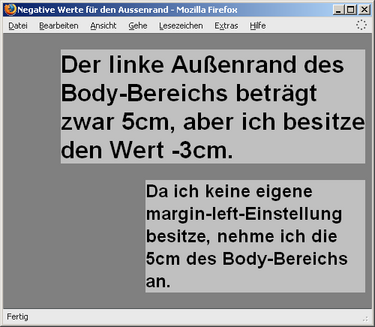
Figure: Negative margin values.
Just as padding provides padding shorthand, margin provides margin shorthand. Multiple values for margin follow the rules in the table The number of values in padding shorthand.
Copyright © 2006 of the German translation, dpunkt.verlag GmbH
You may print the online version for your private use.
Otherwise, this chapter from “CSS − Anspruchsvolle Websites mit Cascading Stylesheets” is subject to the same conditions as the bound edition: the work, including all its parts, is protected by copyright. All rights reserved, including reproduction, translation, microfilming, and storage and processing in electronic systems.
dpunkt.verlag GmbH, Ringstraße 19, 69115 Heidelberg
back to top