

XML technologies / CSS / Advanced websites with CSS / A simple CSS layout / Positioning the page elements / Margin properties
(Excerpt from “CSS − Advanced websites with Cascading Stylesheets” by Rachel Andrew & Dan Shafer)
The only difference between an element’s two kinds of spacing is that a margin defines an area outside the box, whereas padding defines an area inside it. Margin properties are specified in exactly the same way as padding properties: simply replace padding with margin in the individual property names and the shorthand property. The following style rules and figure make the difference clearer.
body {
  background-color: #808080;
  color: black;
}
h1 {
  background-color: #c0c0c0;
  color: black;
}
h2 {
  background-color: #c0c0c0;
  color: black;
  margin-left: 5%;
}
p {
  background-color: #c0c0c0;
  color: black;
  margin-left: 20%;
}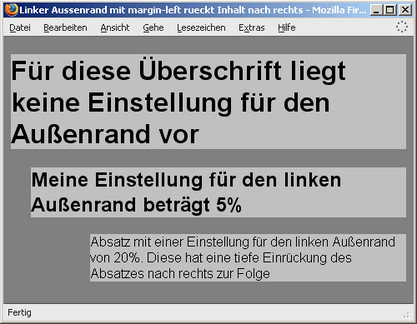
Figure: The left margin, margin-left, moves the content to the right.
Our style rule defines the property margin-left for the level-two heading and paragraph. Both elements move to the right in the browser window. The colored backgrounds move too, showing that, unlike our examples using padding-left, the entire interior of the boxes moves, not just their content. Padding therefore remains unchanged; only the margin increases.
To make the effects of these two kinds of spacing even clearer, give one HTML element padding and the other a margin:
body {
  background-color: #808080;
  color: black;
}
h1 {
  background-color: #c0c0c0;
  color: black;
}
h2 {
  background-color: #c0c0c0;
  color: black;
  margin-left: 5%;
  padding-left: 1em;
}
p {
  background: #c0c0c0;
  color: black;
  margin-left: 20%;
  padding-left: 10%;
}
As the following figure shows, the margin moves both the text and the box’s padding to the right, whereas padding moves only the text to the right.
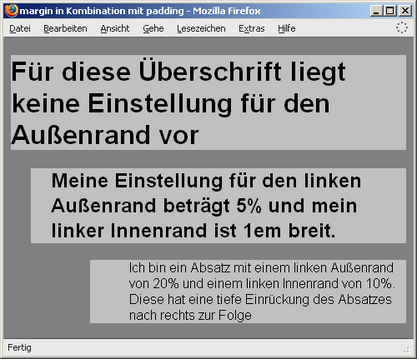
Figure: margin-left combined with padding-left.
Load the HTML file above in your browser and resize its window: the text’s and heading’s indentation changes with the browser window’s width. This happens because we specified a relative width of 20% for margins and 10% for padding. Both values are calculated proportionally to the containing block’s width, which in this example is the browser window. The wider the window, the wider the text’s margins and padding. The heading’s padding does not change because it is specified in em.
Copyright © 2006 of the German translation, dpunkt.verlag GmbH
You may print the online version for your private use.
Otherwise, this chapter from “CSS − Anspruchsvolle Websites mit Cascading Stylesheets” is subject to the same conditions as the bound edition: the work, including all its parts, is protected by copyright. All rights reserved, including reproduction, translation, microfilming, and storage and processing in electronic systems.
dpunkt.verlag GmbH, Ringstraße 19, 69115 Heidelberg
back to top