

XML technologies / CSS / Advanced websites with CSS / A simple CSS layout / Positioning the page elements / Absolute and relative positioning in context
(Excerpt from “CSS − Advanced websites with Cascading Stylesheets” by Rachel Andrew & Dan Shafer)
The property position can only be assigned a single, constant value. This determines the space an area occupies on the page. The most frequently used values for the property position are absolute and relative. The default value is static. A fourth possible value is fixed, but Internet Explorer does not support it.
Assigning an element an exact position on the page with CSS is not entirely straightforward: the reference points used to determine its position depend on the parent element’s context and can therefore change. There is no fixed coordinate system valid for every element, even when the property position has the value absolute. Whenever a block anywhere on the page is positioned with a value other than static, a new positioning context is created for its contents. The enclosing block’s upper-left corner then has coordinates (0,0). An element positioned inside this block with CSS is positioned relative to this new coordinate system, the “positioning context.”
A few simple related examples illustrate this concept best. Start with an empty page. Here the origin (0,0) is at the upper-left corner of the browser’s visible area. From there we position an area div on the page containing some plain text. The following figure shows the result.
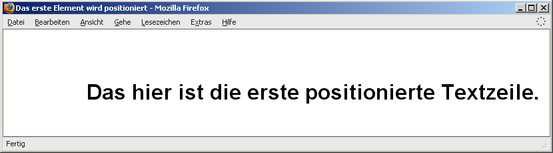
Figure: Positioning the first element on an empty page.
Here is the HTML fragment producing the result above. The CSS properties top and left assign a position on the page to the area div.
<div style="position: absolute; left: 125px; top: 75px;" class="big">Das hier ist die erste positionierte Textzeile.</div>Now we position another area div as a child of the first:
<div style="position: absolute; left:125px; top: 75px;" class="big">
  Das hier ist die erste positionierte Zeile.
  <div style="position: absolute; left: 25px; top: 30px;" class="big">
    Das ist die zweite Zeile.
  </div>
</div>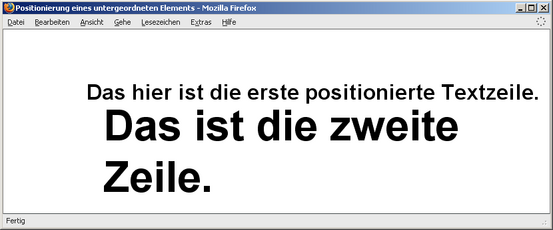
Figure: Positioning a child element.
In the figure above, the second line of text is shifted 25 pixels to the right relative to the first. For the second area div, the origin is therefore no longer the page’s left edge, but the left edge of the parent area div. This is the second line’s parent and defines its positioning context. Both areas use absolute positioning, but the first line’s origin is the upper-left corner of the viewport, while the second line’s is the upper-left corner of its parent. You probably noticed that the second line’s font is quite large. Why? Look at the style rule for the class big and you will see:
.big {
  font-family: Helvetica, Arial, sans-serif;
  font-size: 2em;
  font-weight: bold;
}
Since the second div is a child of the first, its font size is also calculated relative to its parent’s font size. The style rule sets the font size to 2em, telling the browser to display text twice as large as it normally would. When the rule 2em applies to the first line, it therefore appears at twice the size. Applied to the second, it doubles the first line’s font size and assigns that to the second line.
An absolute constant for the font size corrects this behavior:
.big {
  font-family: Helvetica, Arial, sans-serif;
  font-size: large;
  font-weight: bold;
}
Both areas div should then use the same font size.
Our page currently consists of two nested elements div, both positioned on the page using absolute values. We now add a third element, in this case a span, inside the second area div and position it there with a relative value. The HTML looks like this:
<div style="position: absolute; left: 125px; top: 75px;" class="big">
  Das ist die erste Zeile, die abdsolut positioniert wird.
  <div style="position: absolute; left: 25px; top: 30px;">
    Dies ist <span style="position: relative; left: 10px; top: 30px;">ein Beispiel für</span> eine zweite Zeile.
  </div>
</div>
The result appears below. Notice that the words “ein Beispiel für,” most recently inserted in the tag <span>, appear below the second line and slightly to the right of their original position. Positioning with the value relative always takes the element’s unpositioned location as its origin. In other words, a relatively positioned element’s positioning context is defined by its normal position. In our example, the element span appears as in the next figure, below and slightly to the right of its unpositioned location. The figure after that shows the unpositioned case.
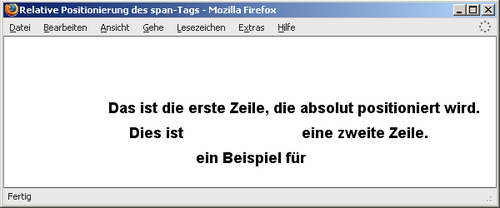
Figure: Example with relative positioning of the <span> tag.
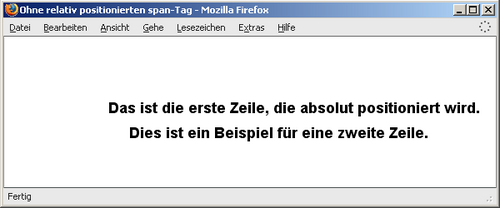
Figure: Example without positioning of the <span> tag.
The key rules for positioning elements with the property position can be summarized as follows: absolute positioning always aligns an element with its parent. Relative positioning always aligns it with the place it would occupy without positioning.
Do not worry if these concepts still seem a little confusing. As we build our layout, we will learn how everything fits together.
Copyright © 2006 of the German translation, dpunkt.verlag GmbH
You may print the online version for your private use.
Otherwise, this chapter from “CSS − Anspruchsvolle Websites mit Cascading Stylesheets” is subject to the same conditions as the bound edition: the work, including all its parts, is protected by copyright. All rights reserved, including reproduction, translation, microfilming, and storage and processing in electronic systems.
dpunkt.verlag GmbH, Ringstraße 19, 69115 Heidelberg
back to top