

XML technologies / SVG / Filters, transformations and gradients / Gradient and pattern settings / Types of gradients / Examples of the linearGradient tag
(Excerpt from “Das Einsteigerseminar SVG — Webgrafiken mit XML” by Helma Spona)
A small example producing five different gradients demonstrates the attributes and their effects. The following figure shows the result. Black lines represent the virtual gradient paths defined by the attributes x1/y1 and x2/y2.
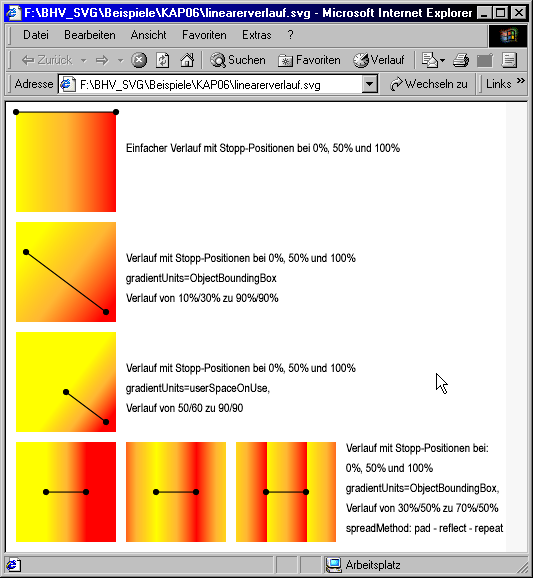
Figure: Various linear gradients.
First define a simple linear gradient from yellow through orange to red, with no additional attributes, and immediately use it to fill a square. Name this first gradient “verlauf”; subsequent gradient definitions use it as their basis by assigning the other gradients the xlink:href attribute with the value #verlauf: xlink:href="#verlauf". The differences between the gradients are defined only by the attributes of gradients verlauf01 through verlauf05.
<?xml version="1.0" standalone="no"?>
...
<svg width="500" height="500" style="font-stretch:condensed;font-size:12">
  <defs>
    <linearGradient id="verlauf">
      <stop offset="0%" style="stop-color:yellow;stop-opacity:1"/>
      <stop offset="50%" style="stop-color:orange;stop-opacity:0.8"/>
      <stop offset="100%" style="stop-color:red;stop-opacity:1"/>
    </linearGradient>
    <linearGradient id="verlauf01" gradientUnits="ObjectBoundingBox" x1="10%" y1="30%" x2="90%" y2="90%" xlink:href="#verlauf"></linearGradient>
    <linearGradient id="verlauf02" gradientUnits="userSpaceOnUse" x1="50" y1="60" x2="90" y2="90" xlink:href="#verlauf"></linearGradient>
    <linearGradient id="verlauf03" gradientUnits="ObjectBoundingBox" spreadMethod="pad" x1="30%" y1="50%" x2="70%" y2="50%" xlink:href="#verlauf"></linearGradient>
    <linearGradient id="verlauf04" gradientUnits="ObjectBoundingBox" spreadMethod="reflect" x1="30%" y1="50%" x2="70%" y2="50%" xlink:href="#verlauf"></linearGradient>
    <linearGradient id="verlauf05" gradientUnits="ObjectBoundingBox" spreadMethod="repeat" x1="30%" y1="50%" x2="70%" y2="50%" xlink:href="#verlauf"></linearGradient>
  </defs>
  <g transform="translate(10,10)">
    <rect x="0" y="0" width="100" height="100" style="fill:url(#verlauf)"/>
    <circle cx="0" cy="0" r="3" />
    <circle cx="100" cy="0" r="3" />
    <path d="M0 0 L100 0" style="stroke:black"/>
    <text x="110" y="40">Einfacher Verlauf mit Stopp-Positionen bei 0%, 50% und 100%</text>
  </g>
  <g transform="translate(10,120)">
    <rect x="0" y="0" width="100" height="100" style="fill:url(#verlauf01)"/>
    <circle cx="10" cy="30" r="3" />
    <circle cx="90" cy="90" r="3" />
    <path d="M10 30 L90 90" style="stroke:black"/>
    <text x="110" y="40">Verlauf mit Stopp-Positionen bei 0%, 50% und 100%</text>
    <text x="110" y="60">gradientUnits=ObjectBoundingBox</text>
    <text x="110" y="80">Verlauf von 10%/30% zu 90%/90%</text>
  </g>
  <g transform="translate(10,230)">
    <rect x="0" y="0" width="100" height="100" style="fill:url(#verlauf02)"/>
    <circle cx="50" cy="60" r="3" />
    <circle cx="90" cy="90" r="3" />
    <path d="M50 60 L90 90" style="stroke:black"/>
    <text x="110" y="40">Verlauf mit Stopp-Positionen bei 0%, 50% und 100%</text>
    <text x="110" y="60">gradientUnits=userSpaceOnUse,</text>
    <text x="110" y="80">Verlauf von 50/60 zu 90/90</text>
  </g>
  <g transform="translate(10,340)">
    <rect x="0" y="0" width="100" height="100" style="fill:url(#verlauf03)"/>
    <circle cx="30" cy="50" r="3" />
    <circle cx="70" cy="50" r="3" />
    <path d="M30 50 L70 50" style="stroke:black"/>
  </g>
  <g transform="translate(120,340)">
    <rect x="0" y="0" width="100" height="100" style="fill:url(#verlauf04)"/>
    <circle cx="30" cy="50" r="3" />
    <circle cx="70" cy="50" r="3" />
    <path d="M30 50 L70 50" style="stroke:black"/>
  </g>
  <g transform="translate(230,340)">
    <rect x="0" y="0" width="100" height="100" style="fill:url(#verlauf05)"/>
    <circle cx="30" cy="50" r="3" />
    <circle cx="70" cy="50" r="3" />
    <path d="M30 50 L70 50" style="stroke:black"/>
    <text x="110" y="10">Verlauf mit Stopp-Positionen bei:</text>
    <text x="110" y="30">0%, 50% und 100%</text>
    <text x="110" y="50">gradientUnits=ObjectBoundingBox,</text>
    <text x="110" y="70">Verlauf von 30%/50% zu 70%/50%</text>
    <text x="110" y="90">spreadMethod: pad - reflect - repeat</text>
  </g>
</svg>
The bottom row in the figure shows the same gradient with different values for the attribute spreadMethod. From left to right, the values are pad, reflect and repeat respectively.
Copyright © verlag moderne industrie GmbH 2001
You may print the online version for your private use.
Otherwise, this chapter from “Das Einsteigerseminar SVG — Webgrafiken mit XML” is subject to the same conditions as the bound edition. The work, including all its parts, is protected by copyright. All rights reserved, including reproduction, translation, microfilming, and storage and processing in electronic systems.
verlag moderne industrie GmbH, Justus-von-Liebig-Straße 1, D-86899 Landsberg/Lech, fon ++49 (0) 81 91 / 125 – 0, leserservice(at)mi-verlag.de
back to top