

XML technologies / SVG / Filters, transformations and gradients / Gradient and pattern settings / Types of gradients / Radial gradients
(Excerpt from “Das Einsteigerseminar SVG — Webgrafiken mit XML” by Helma Spona)
To define radial gradients, use the <radialGradient> tag. It has these attributes:
gradientUnitsspecifies whether an object or the drawing area is filled. Possible values areuserSpaceOnUseandobjectBoundingBox. This also specifies the coordinate system for the coordinatescx/cyandfx/fy. WithobjectBoundingBoxthe coordinates refer to the group containing the element; withuserSpaceOnUsethey refer to the element itself. The following example illustrates this attribute.gradientTransformdefines transformations adjusting the gradient. All transformations supported by thetransformattribute of the<g>tag are allowed. For example, you can rotate the gradient.cx,cyandrtogether define the gradient’s largest circle, at its 100% mark. The coordinatescx/cyspecify its center andrits radius. All default to 50%. The radius must be a percentage whenevercx/cyare percentages too.fxandfyspecify the gradient’s focus, corresponding to the 0% mark. Bothcx/cyandfx/fyaccept numeric or percentage values. If omitted, they take the values ofcx/cy. The focus then lies at the center of the largest circle.spreadMethodspecifies how to fill the rest of an object when the gradient does not cover it completely. A gradient path from 10%/10% to 90%/90%, for example, leaves parts unfilled. Possible values arepad,reflectandrepeat.padis the default when omitted. It fills areas before the 0% mark with the initial color and areas beyond the end mark with the final color. The valuereflectinstead reverses the gradient to fill the rest. Withrepeatthe gradient repeats until the object is completely filled.xlink:hrefreferences an existing gradient to incorporate into this definition, just as shown for linear gradients.
Note:
A <linearGradient> tag can reference only linear gradients, and a <radialGradient> tag only radial gradients.
The figure shows variations of radial gradients. Labels give the special settings used. The circle indicates the outer ring defined by cx, cy and r; the dot indicates the focus defined by fx/fy.
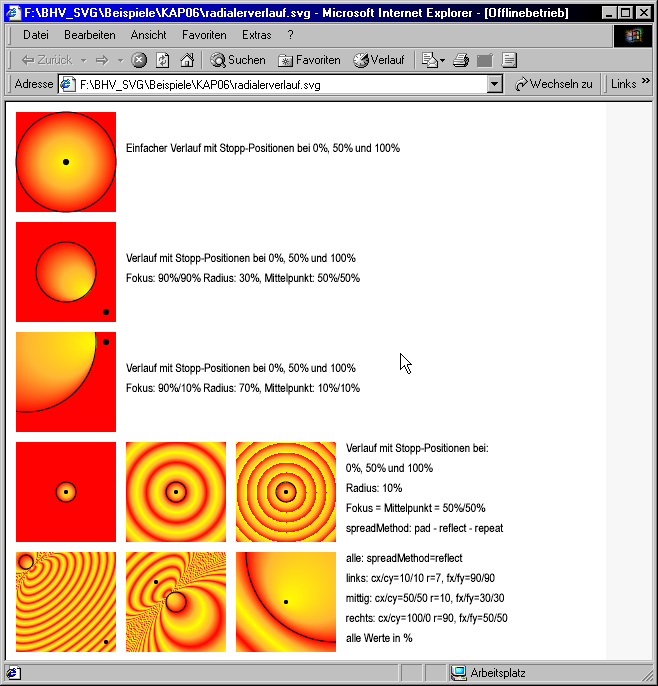
Figure: Different radial gradient variants.
Copyright © verlag moderne industrie GmbH 2001
You may print the online version for your private use.
Otherwise, this chapter from “Das Einsteigerseminar SVG — Webgrafiken mit XML” is subject to the same conditions as the bound edition. The work, including all its parts, is protected by copyright. All rights reserved, including reproduction, translation, microfilming, and storage and processing in electronic systems.
verlag moderne industrie GmbH, Justus-von-Liebig-Straße 1, D-86899 Landsberg/Lech, fon ++49 (0) 81 91 / 125 – 0, leserservice(at)mi-verlag.de
back to top