

XML technologies / DITA / Using familiar technologies / CSS and XSL
(Excerpt from “DITA – Der neue Standard für Technische Dokumentation” by Johannes Hentrich)
XML’s introduction also changed the possibilities for further document processing. Technologies were developed that are easier to use than their SGML counterparts, including:
CSS (Casading Stylesheets)
XSLT (XSL Transformations)
XSL-FO (XSL Formatting Objects)
XPath (XML Path Language)
XSLT, XSL-FO and XPath are collectively called XSL (eXtensible Stylesheet Language). XSL derives from DSSSL and uses XML syntax, making these languages easier to learn for those familiar with XML.
The DITA Open Toolkit uses CSS and XSL to transform, format and query DITA XML files. The following sections briefly introduce each language.
CSS
To display a DITA XML document in a browser such as Internet Explorer or Mozilla Firefox, Cascading Stylesheets (CSS) may already be sufficient. CSS is used with HTML or XHTML to format X/HTML elements and design web pages.
CSS is declarative: it only sets attributes interpreted by the browser. It cannot perform calculations like a “real”, imperative programming language.
CSS uses selectors. A selector is associated with an attribute list that the browser uses to format the identified element or class.
The following CSS defines the HTML <h1> element, which marks a first-level heading.
h1 {
font-family: arial, sans-serif;
font-size: 24pt;
font-weight: bold;
}
The selector, here h1, matches the element name. The attribute list follows in braces, assigning values to font-family, font-size and font-weight.
Selectors can also be assigned to XML elements. For the <stepresult> element, marking a step result in task topics, CSS could be defined as follows:
stepresult {
font-family: arial, sans-serif;
font-size: 12pt;
font-weight: bold;
}
The <stepresult> element would then appear in Arial, 12 point, bold in the browser.
Classes assign formatting independently of element names. A class definition starts with a dot and class name, followed by the attribute list.
.wichtiger-hinweis {
font-family: arial, sans-serif;
font-size: 12pt;
font-weight: bold;
color: red;
}
The notation <h1 class="wichtiger-hinweis"> assigns the class, for example, to the <h1> element.
While classes can apply to any elements, IDs identify elements unique within the document, allowing instructions for each individual HTML/XML element. IDs are defined like classes, but with a hash (#) instead of a dot.
#fusszeile {
font-family: arial, sans-serif;
font-size: 8pt;
}
The notation <div id="fusszeile"> could define an HTML document region as a footer.
CSS suits browser formatting of HTML but only partly suits XML documents. It formats elements in document order. XML often contains many more elements than should ultimately appear in output, making that order undesirable. CSS cannot transform XML into other XML containing only the elements needed for formatting. Another language is therefore needed for these transformations: XSLT (eXtensible Stylesheet Language Transformation).
XSLT
XSLT (eXtensible Stylesheet Language Transformation) is a programming language transforming XML documents into other XML documents or fragments. An XSLT processor performs the transformation. The two best-known open source processors are Saxon and Xalan. The full toolkit package (full easy install package distribution) already includes Xalan.
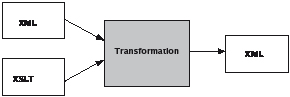
Figure: Transforming XML files with XSLT.
XSLT provides loops, conditional processing and sorting. Instructions go in an XSLT stylesheet, itself a valid XML document. The following stylesheet contains two key transformation elements:
<?xml version="1.0" encoding="UTF-8"?>
<xsl:stylesheet version="1.0" xmlns:xsl="http://www.w3.org/1999/XSL/Transform">
    <xsl:template match="ueberblick">
        <html>
            <title>Ein aus XML generiertes HTMLDokument</title>
            <body>
               <p>
                 <xsl:apply-templates/>
               </p>
            </body>
        </html>
    </xsl:template>
</xsl:stylesheet>
As an XML document, an XSLT stylesheet starts with a typical XML declaration, namely <?xml version=“1.0“ encoding=“UTF-8“?>.
Next comes the root, always either an <xsl:stylesheet> element or an <xsl:transform> element. The processor recognizes the stylesheet by its root. Besides the required version attribute, the root must have the namespace attribute xmlns:xsl with the value "http://www.w3.org/1999/XSL/Transform".
The <xsl:template> element acts as a template and is referred to below as an XSLT template. Its key attribute is the match attribute. The value of the match attribute is an XPath instruction for addressing a particular document part, in the simplest case just an element name. Here, the match attribute’s value is the <ueberblick> element.
When the processor checks the source document against the templates and finds the element specified in the match attribute, it copies the <xsl:template> element’s content to the output document. This example creates an HTML document’s basic structure.
The <xsl:apply-templates/> element makes the processor copy all content inside the element matching the match attribute into the output. This example would yield valid HTML if the <ueberblick> element contained only text.
In DITA, values of the match attribute on the <xsl:template> element are especially important. The value of the match attribute receives the content of the class attribute associated with every DITA element. The class attribute contains not an element name, but a mapping to its parent information structure.
For example, the <ol> element for ordered lists has the class attribute topic/ol . This indicates that the <ol> element is defined in the topic information structure, that is, the generic topic. The <ol> element is specialized in task topics into a <steps> element. The <steps> element’s class attribute again maps the parent structures, so the class attribute for the <steps> element is defined as topic/ol task/steps. The class attribute on the <steps> element also specifies that the <steps> element is equivalent to the <ol> element.
Further specialization, for example from the <steps> element to a <mysteps> element for a mytask topic type, would extend the class attribute to topic/ol task/steps mytask/mysteps. This class attribute specifies that the <mysteps> element is equivalent to the <steps> element, which is in turn equivalent to the <ol> element.
This class attribute naming scheme lets the processor handle unknown elements. If it finds no processing instructions for the <mysteps> element, it uses the equivalent parent element’s instructions. Only the class attribute enables the toolkit to process specialized elements.
DITA stylesheets therefore do not contain <xsl:template> elements like this:
<xsl:template match="p">Instead, they contain <xsl:template> elements whose match attributes use class attribute values as search criteria:
<xsl:template match="*[contains(@class,' topic/p ')]">For more about the class attribute, see “Specialization”.
Another important transformation element is the <xsl:for-each> element, creating a loop. The select attribute specifies the expression for which the loop executes.
The following searches for the <h1> element and generates a link when found. The <xsl:attribut> element creates an href attribute in its parent, here the <a> element. The <xsl:value-of-select> element copies the context node’s values, those belonging to the <h1> element queried in the loop.
<xsl:for-each select="h1">
    <a>
       <xsl:attribute name="href">
          <xsl:value-of select="."/>
       </xsl:attribute>
       <xsl:value-of select="."/>
    </a>
</xsl:for-each>
The <xsl:for-each> element is mainly used to generate tables of contents and other indexes.
The <xsl:if> element and the <xsl:choose> element formulate conditions.
The <xsl:if> element has a required test attribute whose value specifies a pattern test. Unlike many programming languages, XSLT has no else command.
If the pattern in the test attribute is found in the source document, the <xsl:if> element’s content is executed. This example searches for the <copyright> element and replaces it accordingly.
<xsl:if test="copyright">Copyright, Johannes Hentrich, 2008</xsl:if>The <xsl:choose> element has two child elements, <xsl:when> and <xsl:otherwise>. Together they form a switch-case structure like that in other languages. It provides alternatives through the <xsl:when> element and a fallback if none applies through the <xsl:otherwise> element. The <xsl:choose> element may contain any number of <xsl:when> elements and exactly one <xsl:otherwise> element. As with the <xsl:if> element, the <xsl:when> element uses the test attribute to name the condition pattern.
The following example combines the <xsl:for-each> element with the <xsl:choose> element.
<xsl:for-each select="language">
    <xsl:choose>
        <xsl:when test=".='german'">
            <p>First language: german</p>
        </xsl:when>
        <xsl:when test=".='french'">
            <p>Second language: french</p>
        </xsl:when>
        <xsl:otherwise>
            <p>Default language: english</p>
        </xsl:otherwise>
    </xsl:choose>
</xsl:for-each>
The final key transformation element described here is the <xsl:sort> element for sorting. The order attribute defines sort order. The data-type attribute specifies whether numbers or text are sorted. By default, XSLT sorts strings in ascending alphabetical order.
This example sorts book titles in descending alphabetical order:
<xsl:for-each select="buchtitel">
    <xsl:sort order="descending" data-type="text"/>
    <xsl:value-of select="."/><br/>
</xsl:for-each>
XSL-FO
XSL-FO (XSL Formatting Objects) is a page-description language. An XSLT transformation converts XML into an XSL-FO file containing formatting instructions called Formatting Objects (FO). Elements needed for formatting are transformed into an FO tree containing FO elements and attributes. An XSL-FO formatter converts this tree into a final format such as PDF.
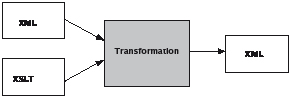
Figure: Transforming XML into an FO tree with Formatting Objects
The full toolkit package (full easy install package distribution) includes Apache FOP 0.20 as its XSL-FO formatter, but its PDF support is inadequate. PDF generation now uses Idiom Technologies’ FO plugin and RenderX from RenderX Inc. as the formatter. Its Personal Edition is free on the website of RenderX Inc. For more on the FO plugin, see DITA Open Toolkit.
XSL-FO automates typesetting and page breaks by dividing pages into regions. An XSL-FO file always has this basic structure:
<?xml version="1.0" encoding="UTF-8" ?>
<fo:root xmlns:fo="http://www.w3.org/1999/XSL/Format">
    <fo:layout-master-set>
        <fo:simple-page-master master-name="A4">
            <fo:region-body/>
        </fo:simple-page-master>
    </fo:layout-master-set>
    <fo:page-sequence master-reference="A4">
        <fo:flow flow-name="xsl-region-body">
            <fo:block>Text, text</fo:block>
        </fo:flow>
    </fo:page-sequence>
</fo:root>
After its XML declaration, an XSL-FO file always starts with the <fo:root> root element, followed by the children <fo:layout-master-set> and <fo:page-sequence>.
The <fo:layout-master-set> element contains page-specific information such as page and margin sizes and header and footer dimensions. The <fo:simple-page-master> element provides the necessary specifications. If no attribute values are defined, as here, formatter defaults apply. The master-name attribute names the layout, here A4, so that the page sequence defined by the <fo:page-sequence> element can call it.
The <fo:region-body> element defines the region containing the flowing content.
The <fo:page-sequence> element specifies the order of page masters defined in the <fo:layout-master-set> element. The page’s actual content is embedded here. The connection to the page master in the <fo:layout-master-set> element is established through the master-reference attribute containing its name, here A4.
The <fo:flow> element specifies where flowing content goes. The actual content must be inside a block element, a <fo:block> element. If the block exceeds the dimensions defined in the <fo:body-region> element, the formatter inserts a break automatically.
The basic example shows only required attributes. In practice, many more specify page size or text position. For example, the <fo:simple-page-master> element can use the following attributes for DIN A4:
<fo:simple-page-master master-name="A4"
    page-height="297mm"
    page-width="210mm"
    margin-left="20mm"
    margin-right="15mm"
    margin-top="20mm"
    margin-bottom="20mm">
In PDF production from DITA XML through the FO plugin, these attributes are grouped in attribute sets, configurable separately from the XSL-FO stylesheet. This elegantly avoids direct stylesheet changes, but the plugin’s sparse documentation makes finding the right set laborious.
XPath
XSL’s third and final component is XPath (XML Path Language), a query language addressing specific parts of XML documents. In DITA, XPath often remains in the background because element class attributes provide sufficient precision. Targeting specific document elements through a stylesheet, however, requires XPath.
XPath views XML as a tree of interconnected nodes. Elements, attributes, comments and processing instructions (processing instructions) are represented as node types.
XPath distinguishes these node types:
Root node: the starting point of the XML document tree, occurring only once.
Element node: represents each XML element. It can have child elements, comments, processing instructions and text nodes, plus an associated set of attribute nodes.
Attribute node: corresponds to XML element attributes and has no children.
Text node: captures all strings that are not XML markup.
Namespace node: several may be associated with an element, arising from namespace declarations using
xmlnsorxmlns:praefix.Processing instruction node: corresponds to processing instructions in XML. The XML declaration
<?xml version=“1.0“?>is not a processing instruction.Comment node: corresponds to comments in XML.
Nodes can have different relationships: dependence on another node or membership of the same level, for example. XPath distinguishes thirteen relationships:
Child node (child): immediate subordinate nodes. In the structure
<p><i>...</i></p>, the<i>element is a child of the<p>element.Parent node (parent): immediate superior nodes. In the structure
<p><i>...</i></p>, the<p>element is the parent of the<i>element.Descendants (descendent): subordinate nodes at any depth. In the structure
<p><i><u>...</u>...</i></p>, both the<i>element and the<u>element are descendants of the<p>element.Ancestor (anchestor): superior nodes at any depth. In the structure
<p><i><u>...</u>...</i></p>, both the<i>element and the<p>element are ancestors of the<u>element.Following nodes (following): nodes following the current node in the document, regardless of hierarchy, excluding its descendants. In the structure
<p><i><u>...</u></i><i><u>...</u></i></p>, from the first <u>element’s perspective, the second<i>element, the second<u>element and its content are following nodes.Preceding nodes (preceding): nodes preceding the current node in the document, regardless of hierarchy, excluding its ancestors. In the structure
<p><i><u>...</u><u>...</u></i>...<i></i></p>, from the second<u>element’s perspective, the first<u>element and its children are preceding nodes.Following siblings (following-sibling): nodes following the current node at the same hierarchical level. In the structure
<p><i><u>...</u><u>...</u></i></p><u>...</u>, from the first<u>element’s perspective, the second<u>element is a following sibling. The third<u>element is not.Preceding siblings (preceding-sibling): nodes following the current node at the same hierarchical level. In the structure
<u>...</u><p><i><u>...</u><u>...</u></i></p>, from the third<u>element’s perspective, the second<u>element is a preceding sibling. The first<u>element is not.Attribute (attribute): an element’s attribute node. Attributes have a special role in the hierarchy, outside child/parent relationships. In the structure
<p class=“bodytext“>,classis an attribute node of the<p>element.Namespace (namesapce): the current element’s namespace node. In the structure
<m:math>...</m:math>, the<m>element’s associated namespace ismath.The current node itself (self): the current node. If, in the structure
<p><i><u>...</u><u>...</u></i></p>, the processor is processing the<i>element, that element is currently the self node.Descendants or the current node itself (descendent-or-self): the current node or its descendants. If, in the structure
<p><i><u>...</u><u>...</u></i></p>, the processor is processing the<i>element, it and the following<u>element are descendant-or-self nodes at that moment.Ancestors or the current node itself (anchestor-or-self): the current node or its ancestors. If, in the structure
<p><i><u>...</u><u>...</u></i></p>, the processor is processing the<i>element, it and the preceding<p>element are ancestor-or-self nodes at that moment.
XPath paths can use a slash (/) or colon (:). A slash uses actual node names, for example p/i/u. A colon includes node relationships in the path, for example p/i/child::u.
A document’s root is addressed with a slash, for example in
<xsl:template match="/"> Document nodes can be addressed in a stylesheet as follows:
<xsl:template match="/p/i/u"> or
<xsl:template match="/p/i/child::u"> XPath also supports positions and conditions to address individual elements. You can use XPath functions such as boolean(), contains(), position() or starts-with().
Toolkit stylesheets address elements through the class attribute, addressing a class of elements rather than one specific element. They use the contains() function, for example in
<xsl:template match="*[contains(@class,' topic/p task/steps ')]">This is sufficient in practice. More detailed XPath addressing is needed, for example, to sort particular elements for an output medium, often requiring deep changes to the toolkit’s stylesheets.
Copyright © 2008 XLcontent Verlag
You may print the online version for your private use.
Otherwise, this chapter from “DITA - Der neue Standard für Technische Dokumentation” is subject to the same conditions as the bound edition. The work, including all its parts, is protected by copyright. All rights reserved, including reproduction, translation, microfilming, and storage and processing in electronic systems.
XLcontent Verlag, Pflegerstraße 40, 81247 München