

XML technologies / CSS / Advanced websites with CSS / Using fonts with CSS / The shorthand font property
(Excerpt from “CSS − Advanced websites with Cascading Stylesheets” by Rachel Andrew & Dan Shafer)
The property font combines all font properties in a single CSS style rule. As with other shorthand properties, values are separated by spaces. Lists of alternatives, such as those for font-family, use commas. For example, a somewhat more complex rule using font looks like this:
h3 {
  font: bolder small-caps 22pt Arial, "Lucida Console", sans-serif;
}
Font size and font family are simply listed consecutively and should appear in exactly that order at the end of the declaration. The CSS rule above produces the result in the following figure.
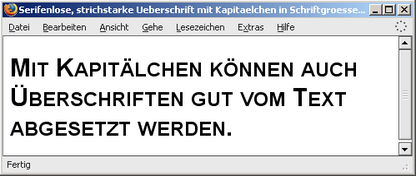
Figure: Bold, sans-serif heading in small caps at 22 points.
Besides combining font properties, font offers extra features, including setting the line height (line-height). Simply add a slash after the font size, followed by a valid value. We will explore line-height in more detail in The line-height property. Here is just a brief example:
p {
  font: small-caps 12pt/2em Arial, "Lucida Console", sans-serif;
}
This rule tells the browser to display paragraphs p in 12-point sans-serif small caps and also double the line height. The next two figures show the effect.
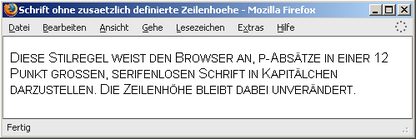
Figure: Text without an explicitly defined line height.
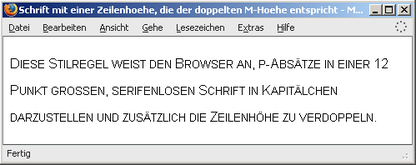
Figure: Text with a line height of two ems.
As with colors, CSS2 font properties can refer to the user’s operating system defaults. These constants are useful when developing interfaces that should match users’ expectations for their browser and operating system. They use the browser’s or operating system’s font settings to determine font appearance. The corresponding values are assigned to the shorthand property font because each represents a particular combination of font properties. Seven values are available:
captioniconmenumessage-boxsmall-captionstatus-bar
Before using these values, consult CSS property reference to see which browsers support them. Some CSS implementations are incomplete here too.
Copyright © 2006 of the German translation, dpunkt.verlag GmbH
You may print the online version for your private use.
Otherwise, this chapter from “CSS − Anspruchsvolle Websites mit Cascading Stylesheets” is subject to the same conditions as the bound edition: the work, including all its parts, is protected by copyright. All rights reserved, including reproduction, translation, microfilming, and storage and processing in electronic systems.
dpunkt.verlag GmbH, Ringstraße 19, 69115 Heidelberg
back to top