Technologies XML / XSL-FO / Référence / Extensions XSL d’Antenna House Formatter / Propriétés / float-y
(Extrait de « XSL-FO ― Die Referenz » de Manuel Montero Pineda & Steffen Herkert, 2016, dpunkt.verlag)
A | B | C | D | E | F | G | H | I | J | K | L | M | N | O | P | Q | R | S | T | U | V | W | X | Y | Z
Catégorie Propriétés d’extension des flottants >> axf:float-x / CSS -ah-float-x
Définit l’alignement vertical du flottant (ou horizontal si writing-mode est vertical).
Valeur : | none | before | after | top | bottom | left | right | center | inside | outside |
Valeur initiale : | none |
S’applique à : | fo:float / éléments flottants |
Hérité : | no |
Pourcentages : | N/A |
Les valeurs ont les significations suivantes.
none | Aucun flottement vertical (ou horizontal si writing-mode est vertical). |
before | Flotte du côté avant. Identique à top avec writing-mode horizontal de gauche à droite. |
after | Flotte du côté après. Identique à bottom avec writing-mode horizontal de gauche à droite. |
top | Flotte en haut. Réservé à l’écriture horizontale ; ne peut pas être spécifié en écriture verticale. |
bottom | Flotte en bas. Réservé à l’écriture horizontale ; ne peut pas être spécifié en écriture verticale. |
left | Flotte à gauche. Réservé à l’écriture verticale ; ne peut pas être spécifié en écriture horizontale. |
right | Flotte à droite. Réservé à l’écriture verticale ; ne peut pas être spécifié en écriture horizontale. |
center | Flotte au centre verticalement (ou horizontalement si writing-mode est vertical). |
inside | Flotte vers l’intérieur (à gauche sur une page droite, à droite sur une page gauche). Réservé à l’écriture verticale ; ne peut pas être spécifié en écriture horizontale. |
outside | Flotte vers l’extérieur (à droite sur une page droite, à gauche sur une page gauche). Réservé à l’écriture verticale ; ne peut pas être spécifié en écriture horizontale. |
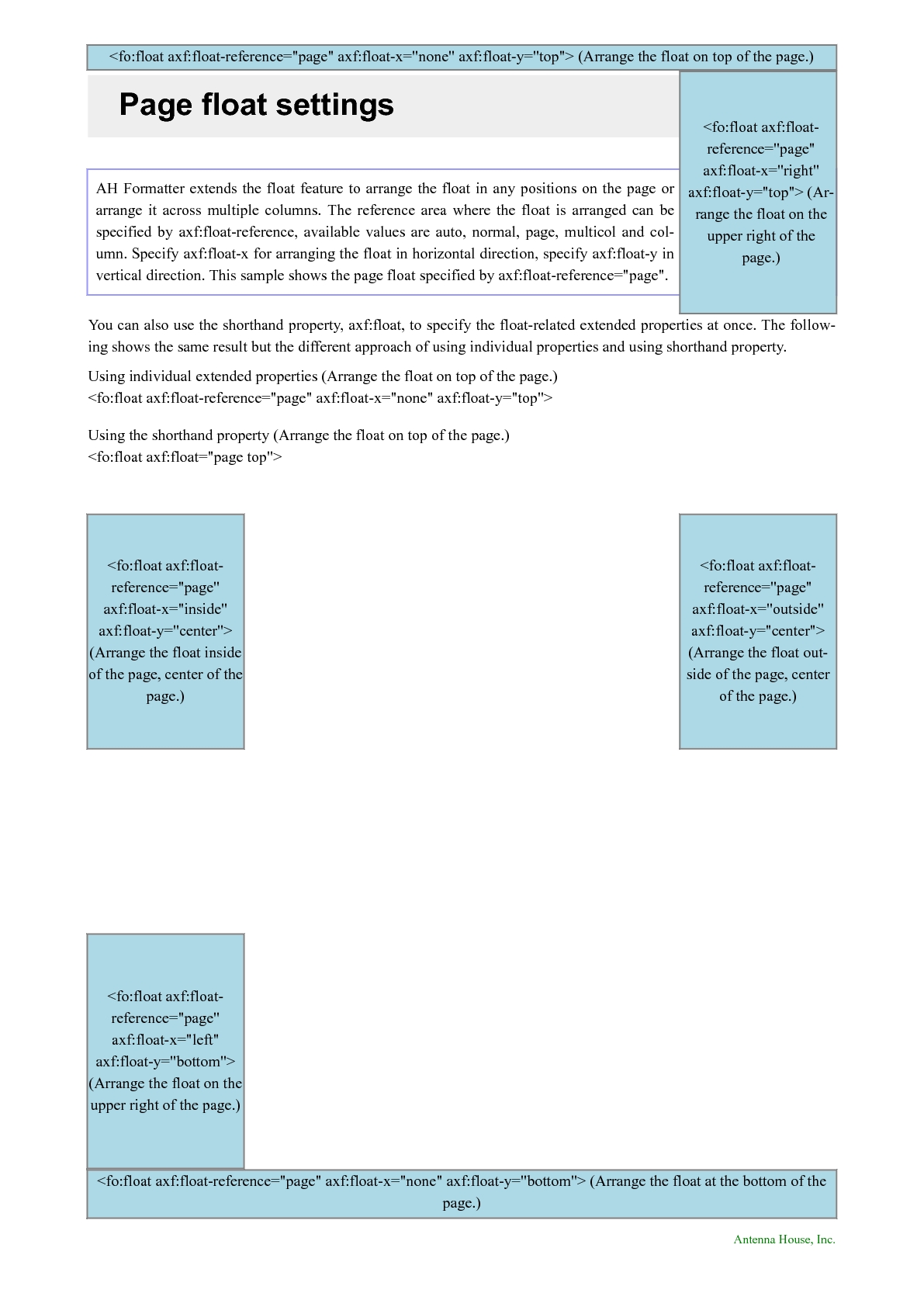
Exemple XSL-FO :
<fo:root xml:lang="en" xmlns:fo="http://www.w3.org/1999/XSL/Format" xmlns:cpfo="http://www.compart.net/xmlns/cpfo" xmlns:svg="http://www.w3.org/2000/svg" xmlns:axf="http://www.antennahouse.com/names/XSL/Extensions">
<axf:document-info name="document-title" value="Page float settings"/>
<axf:document-info name="author" value="Antenna House, Inc."/>
<fo:layout-master-set>
<fo:simple-page-master page-height="297mm" page-width="210mm" margin-top="10mm" margin-left="20mm" margin-right="20mm" margin-bottom="10mm" master-name="PageMaster1">
<fo:region-after extent="7mm"/>
<fo:region-body margin-top="0mm" margin-left="0mm" margin-right="0mm" margin-bottom="10mm"/>
</fo:simple-page-master>
</fo:layout-master-set>
<fo:page-sequence master-reference="PageMaster1">
<fo:static-content flow-name="xsl-region-after">
<fo:block font-size="0.8em" text-align="right" color="green">
<fo:basic-link external-destination="http://www.antennahouse.com/">
Antenna House, Inc.
</fo:basic-link>
</fo:block>
</fo:static-content>
<fo:flow flow-name="xsl-region-body" font-family="serif" font-size="1em" line-height="1.4" axf:hyphenate-hyphenated-word="false" hyphenate="true">
<fo:block span="all" font-family="sans-serif" font-size="2em" font-weight="bold" line-height="2" space-before="1em" space-after="1em" space-before.conditionality="retain" space-after.conditionality="retain" background-color="#EEEEEE">
<fo:block start-indent="1em" end-indent="1em">
Page float settings
</fo:block>
</fo:block>
<fo:block span="all" space-before="1em" space-after="1em" space-after.conditionality="retain" text-indent="0em" border="1pt solid #9999FF" start-indent="0.5em" end-indent="0.5em" padding="0.5em" text-align="justify">
AH Formatter extends the float feature to arrange the float in any positions on the page or arrange it across multiple columns. The reference area where the float is arranged can be specified by axf:float-reference, available values are auto, normal, page, multicol and column. Specify axf:float-x for arranging the float in horizontal direction, specify axf:float-y in vertical direction. This sample shows the page float specified by axf:float-reference="page".
</fo:block>
<fo:block text-align="justify" space-after="0.5em">

You can also use the shorthand property, axf:float, to specify the float-related extended properties at once. The following shows the same result but the different approach of using individual properties and using shorthand property.
</fo:block>
<fo:block>
Using individual extended properties (Arrange the float on top of the page.)
</fo:block>
<fo:block space-after="1em">
<fo:float axf:float-reference="page" axf:float-x="none" axf:float-y="top">
</fo:block>
<fo:block>
Using the shorthand property (Arrange the float on top of the page.)
</fo:block>
<fo:block>
<fo:float axf:float="page top">
</fo:block>
<fo:float axf:float-reference="page" axf:float-x="none" axf:float-y="top">
<fo:block-container height="1.5em" background-color="lightblue" text-align="center" border="1pt solid gray">
<fo:block>
<fo:float axf:float-reference="page" axf:float-x="none" axf:float-y="top"> (Arrange the float on top of the page.)
</fo:block>
</fo:block-container>
</fo:float>
<fo:float axf:float-reference="page" axf:float-x="right" axf:float-y="top">
<fo:block-container width="10em" height="15.5em" margin-left="0.3em" background-color="lightblue" text-align="center" display-align="center" border="1pt solid gray">
<fo:block>
<fo:float axf:float-reference="page" axf:float-x="right" axf:float-y="top"> (Arrange the float on the upper right of the page.)
</fo:block>
</fo:block-container>
</fo:float>
<fo:float axf:float-reference="page" axf:float-x="left" axf:float-y="bottom">
<fo:block-container width="10em" height="15em" background-color="lightblue" text-align="center" display-align="center" border="1pt solid gray">
<fo:block>
<fo:float axf:float-reference="page" axf:float-x="left" axf:float-y="bottom"> (Arrange the float on the upper right of the page.)
</fo:block>
</fo:block-container>
</fo:float>
<fo:float axf:float-reference="page" axf:float-x="outside" axf:float-y="center">
<fo:block-container width="10em" height="15em" background-color="lightblue" text-align="center" display-align="center" border="1pt solid gray">
<fo:block>
<fo:float axf:float-reference="page" axf:float-x="outside" axf:float-y="center"> (Arrange the float outside of the page, center of the page.)
</fo:block>
</fo:block-container>
</fo:float>
<fo:float axf:float-reference="page" axf:float-x="inside" axf:float-y="center">
<fo:block-container width="10em" height="15em" background-color="lightblue" text-align="center" display-align="center" border="1pt solid gray">
<fo:block>
<fo:float axf:float-reference="page" axf:float-x="inside" axf:float-y="center"> (Arrange the float inside of the page, center of the page.)
</fo:block>
</fo:block-container>
</fo:float>
<fo:float axf:float-reference="page" axf:float-x="none" axf:float-y="bottom">
<fo:block-container height="3em" background-color="lightblue" text-align="center" border="1pt solid gray">
<fo:block>
<fo:float axf:float-reference="page" axf:float-x="none" axf:float-y="bottom"> (Arrange the float at the bottom of the page.)
</fo:block>
</fo:block-container>
</fo:float>
</fo:flow>
</fo:page-sequence>
</fo:root>Résultat :