XML-Technologien / XSL-FO / Referenz / Antenna House Formatter XSL Extensions / Properties / float-y
(Auszug aus "XSL-FO ― Die Referenz" von Manuel Montero Pineda & Steffen Herkert, 2016, dpunkt.verlag)
A | B | C | D | E | F | G | H | I | J | K | L | M | N | O | P | Q | R | S | T | U | V | W | X | Y | Z
Category Float Extension Properties >> axf:float-x / CSS -ah-float-x
Specifies vertical (or horizontal if writing-mode is vertical) float alignment.
Value: | none | before | after | top | bottom | left | right | center | inside | outside |
Initial: | none |
Applies to: | fo:float / floated elements |
Inherited: | no |
Percentages: | N/A |
Values have the following meanings.
none | Not floated vertically (or horizontally if writing-mode is vertical). |
before | Floated to the before side. Same as top in horizontal left-to-right writing-mode. |
after | Floated to the after side. Same as bottom in horizontal left-to-right writing-mode. |
top | Floated to the top. Used only for horizontal writing. It cannot be specified for vertical writing. |
bottom | Floated to the bottom. Used only for horizontal writing. It cannot be specified for vertical writing. |
left | Floated to the left side. Used only for vertical writing. It cannot be specified for horizontal writing. |
right | Floated to the right side. Used only for vertical writing. It cannot be specified for horizontal writing. |
center | Floated to the center vertically (or horizontally if writing-mode is vertical). |
inside | Floated to the inside (left side on a right page, right side on a left page). Used only for vertical writing. It cannot be specified for horizontal writing. |
outside | Floated to the outside (right side on a right page, left side on a left page). Used only for vertical writing. It cannot be specified for horizontal writing. |
XSL-FO sample:
<fo:root xml:lang="en" xmlns:fo="http://www.w3.org/1999/XSL/Format" xmlns:cpfo="http://www.compart.net/xmlns/cpfo" xmlns:svg="http://www.w3.org/2000/svg" xmlns:axf="http://www.antennahouse.com/names/XSL/Extensions">
<axf:document-info name="document-title" value="Page float settings"/>
<axf:document-info name="author" value="Antenna House, Inc."/>
<fo:layout-master-set>
<fo:simple-page-master page-height="297mm" page-width="210mm" margin-top="10mm" margin-left="20mm" margin-right="20mm" margin-bottom="10mm" master-name="PageMaster1">
<fo:region-after extent="7mm"/>
<fo:region-body margin-top="0mm" margin-left="0mm" margin-right="0mm" margin-bottom="10mm"/>
</fo:simple-page-master>
</fo:layout-master-set>
<fo:page-sequence master-reference="PageMaster1">
<fo:static-content flow-name="xsl-region-after">
<fo:block font-size="0.8em" text-align="right" color="green">
<fo:basic-link external-destination="http://www.antennahouse.com/">
Antenna House, Inc.
</fo:basic-link>
</fo:block>
</fo:static-content>
<fo:flow flow-name="xsl-region-body" font-family="serif" font-size="1em" line-height="1.4" axf:hyphenate-hyphenated-word="false" hyphenate="true">
<fo:block span="all" font-family="sans-serif" font-size="2em" font-weight="bold" line-height="2" space-before="1em" space-after="1em" space-before.conditionality="retain" space-after.conditionality="retain" background-color="#EEEEEE">
<fo:block start-indent="1em" end-indent="1em">
Page float settings
</fo:block>
</fo:block>
<fo:block span="all" space-before="1em" space-after="1em" space-after.conditionality="retain" text-indent="0em" border="1pt solid #9999FF" start-indent="0.5em" end-indent="0.5em" padding="0.5em" text-align="justify">
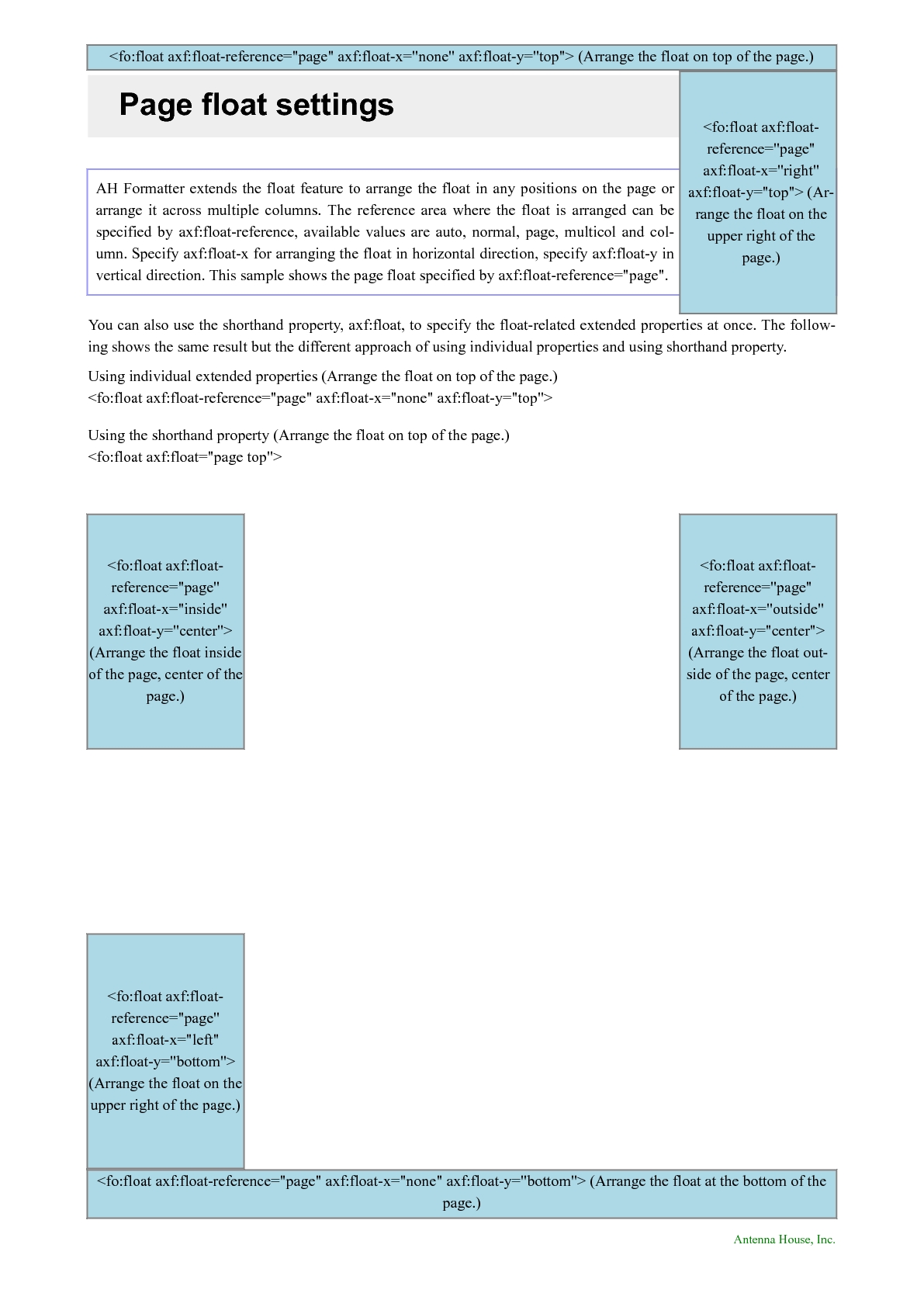
AH Formatter extends the float feature to arrange the float in any positions on the page or arrange it across multiple columns. The reference area where the float is arranged can be specified by axf:float-reference, available values are auto, normal, page, multicol and column. Specify axf:float-x for arranging the float in horizontal direction, specify axf:float-y in vertical direction. This sample shows the page float specified by axf:float-reference="page".
</fo:block>
<fo:block text-align="justify" space-after="0.5em">

You can also use the shorthand property, axf:float, to specify the float-related extended properties at once. The following shows the same result but the different approach of using individual properties and using shorthand property.
</fo:block>
<fo:block>
Using individual extended properties (Arrange the float on top of the page.)
</fo:block>
<fo:block space-after="1em">
<fo:float axf:float-reference="page" axf:float-x="none" axf:float-y="top">
</fo:block>
<fo:block>
Using the shorthand property (Arrange the float on top of the page.)
</fo:block>
<fo:block>
<fo:float axf:float="page top">
</fo:block>
<fo:float axf:float-reference="page" axf:float-x="none" axf:float-y="top">
<fo:block-container height="1.5em" background-color="lightblue" text-align="center" border="1pt solid gray">
<fo:block>
<fo:float axf:float-reference="page" axf:float-x="none" axf:float-y="top"> (Arrange the float on top of the page.)
</fo:block>
</fo:block-container>
</fo:float>
<fo:float axf:float-reference="page" axf:float-x="right" axf:float-y="top">
<fo:block-container width="10em" height="15.5em" margin-left="0.3em" background-color="lightblue" text-align="center" display-align="center" border="1pt solid gray">
<fo:block>
<fo:float axf:float-reference="page" axf:float-x="right" axf:float-y="top"> (Arrange the float on the upper right of the page.)
</fo:block>
</fo:block-container>
</fo:float>
<fo:float axf:float-reference="page" axf:float-x="left" axf:float-y="bottom">
<fo:block-container width="10em" height="15em" background-color="lightblue" text-align="center" display-align="center" border="1pt solid gray">
<fo:block>
<fo:float axf:float-reference="page" axf:float-x="left" axf:float-y="bottom"> (Arrange the float on the upper right of the page.)
</fo:block>
</fo:block-container>
</fo:float>
<fo:float axf:float-reference="page" axf:float-x="outside" axf:float-y="center">
<fo:block-container width="10em" height="15em" background-color="lightblue" text-align="center" display-align="center" border="1pt solid gray">
<fo:block>
<fo:float axf:float-reference="page" axf:float-x="outside" axf:float-y="center"> (Arrange the float outside of the page, center of the page.)
</fo:block>
</fo:block-container>
</fo:float>
<fo:float axf:float-reference="page" axf:float-x="inside" axf:float-y="center">
<fo:block-container width="10em" height="15em" background-color="lightblue" text-align="center" display-align="center" border="1pt solid gray">
<fo:block>
<fo:float axf:float-reference="page" axf:float-x="inside" axf:float-y="center"> (Arrange the float inside of the page, center of the page.)
</fo:block>
</fo:block-container>
</fo:float>
<fo:float axf:float-reference="page" axf:float-x="none" axf:float-y="bottom">
<fo:block-container height="3em" background-color="lightblue" text-align="center" border="1pt solid gray">
<fo:block>
<fo:float axf:float-reference="page" axf:float-x="none" axf:float-y="bottom"> (Arrange the float at the bottom of the page.)
</fo:block>
</fo:block-container>
</fo:float>
</fo:flow>
</fo:page-sequence>
</fo:root>Output: