Tecnologías XML / XSL-FO / Referencia / Extensiones XSL de Antenna House Formatter / Propiedades / float-y
(Extracto de «XSL-FO ― Die Referenz» de Manuel Montero Pineda & Steffen Herkert, 2016, dpunkt.verlag)
A | B | C | D | E | F | G | H | I | J | K | L | M | N | O | P | Q | R | S | T | U | V | W | X | Y | Z
Categoría Propiedades de ampliación de flotantes >> axf:float-x / CSS -ah-float-x
Especifica la alineación vertical del flotante (u horizontal si writing-mode es vertical).
Valor: | none | before | after | top | bottom | left | right | center | inside | outside |
Valor inicial: | none |
Se aplica a: | fo:float / elementos flotantes |
Heredado: | no |
Porcentajes: | N/A |
Los valores tienen los significados siguientes.
none | No flota verticalmente (u horizontalmente si writing-mode es vertical). |
before | Flota en el lado anterior. Igual que top con writing-mode horizontal de izquierda a derecha. |
after | Flota en el lado posterior. Igual que bottom con writing-mode horizontal de izquierda a derecha. |
top | Flota arriba. Solo se utiliza en escritura horizontal; no puede especificarse en escritura vertical. |
bottom | Flota abajo. Solo se utiliza en escritura horizontal; no puede especificarse en escritura vertical. |
left | Flota a la izquierda. Solo se utiliza en escritura vertical; no puede especificarse en escritura horizontal. |
right | Flota a la derecha. Solo se utiliza en escritura vertical; no puede especificarse en escritura horizontal. |
center | Flota en el centro verticalmente (u horizontalmente si writing-mode es vertical). |
inside | Flota hacia el interior (a la izquierda en una página derecha, a la derecha en una página izquierda). Solo se utiliza en escritura vertical; no puede especificarse en escritura horizontal. |
outside | Flota hacia el exterior (a la derecha en una página derecha, a la izquierda en una página izquierda). Solo se utiliza en escritura vertical; no puede especificarse en escritura horizontal. |
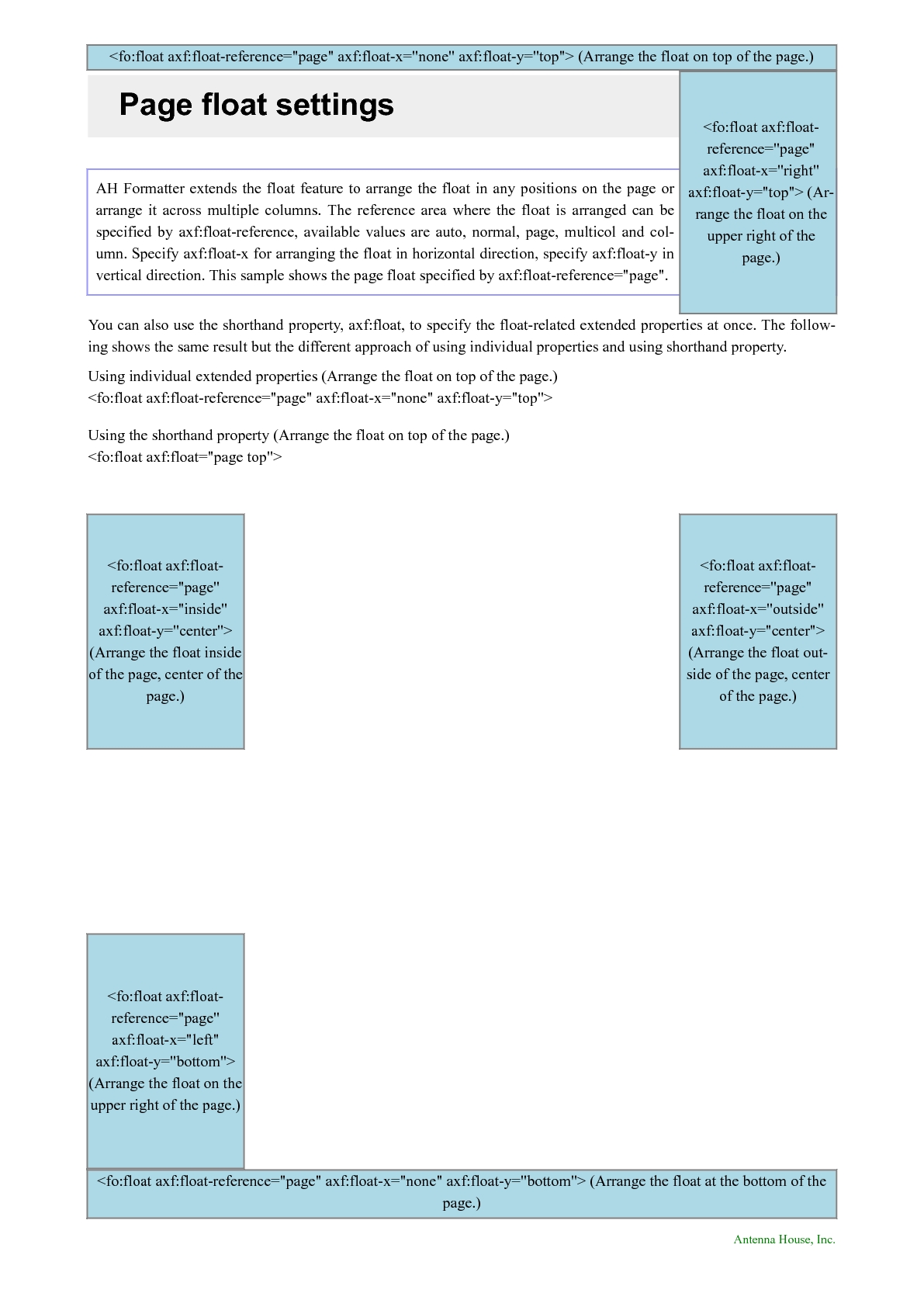
Ejemplo XSL-FO:
<fo:root xml:lang="en" xmlns:fo="http://www.w3.org/1999/XSL/Format" xmlns:cpfo="http://www.compart.net/xmlns/cpfo" xmlns:svg="http://www.w3.org/2000/svg" xmlns:axf="http://www.antennahouse.com/names/XSL/Extensions">
<axf:document-info name="document-title" value="Page float settings"/>
<axf:document-info name="author" value="Antenna House, Inc."/>
<fo:layout-master-set>
<fo:simple-page-master page-height="297mm" page-width="210mm" margin-top="10mm" margin-left="20mm" margin-right="20mm" margin-bottom="10mm" master-name="PageMaster1">
<fo:region-after extent="7mm"/>
<fo:region-body margin-top="0mm" margin-left="0mm" margin-right="0mm" margin-bottom="10mm"/>
</fo:simple-page-master>
</fo:layout-master-set>
<fo:page-sequence master-reference="PageMaster1">
<fo:static-content flow-name="xsl-region-after">
<fo:block font-size="0.8em" text-align="right" color="green">
<fo:basic-link external-destination="http://www.antennahouse.com/">
Antenna House, Inc.
</fo:basic-link>
</fo:block>
</fo:static-content>
<fo:flow flow-name="xsl-region-body" font-family="serif" font-size="1em" line-height="1.4" axf:hyphenate-hyphenated-word="false" hyphenate="true">
<fo:block span="all" font-family="sans-serif" font-size="2em" font-weight="bold" line-height="2" space-before="1em" space-after="1em" space-before.conditionality="retain" space-after.conditionality="retain" background-color="#EEEEEE">
<fo:block start-indent="1em" end-indent="1em">
Page float settings
</fo:block>
</fo:block>
<fo:block span="all" space-before="1em" space-after="1em" space-after.conditionality="retain" text-indent="0em" border="1pt solid #9999FF" start-indent="0.5em" end-indent="0.5em" padding="0.5em" text-align="justify">
AH Formatter extends the float feature to arrange the float in any positions on the page or arrange it across multiple columns. The reference area where the float is arranged can be specified by axf:float-reference, available values are auto, normal, page, multicol and column. Specify axf:float-x for arranging the float in horizontal direction, specify axf:float-y in vertical direction. This sample shows the page float specified by axf:float-reference="page".
</fo:block>
<fo:block text-align="justify" space-after="0.5em">

You can also use the shorthand property, axf:float, to specify the float-related extended properties at once. The following shows the same result but the different approach of using individual properties and using shorthand property.
</fo:block>
<fo:block>
Using individual extended properties (Arrange the float on top of the page.)
</fo:block>
<fo:block space-after="1em">
<fo:float axf:float-reference="page" axf:float-x="none" axf:float-y="top">
</fo:block>
<fo:block>
Using the shorthand property (Arrange the float on top of the page.)
</fo:block>
<fo:block>
<fo:float axf:float="page top">
</fo:block>
<fo:float axf:float-reference="page" axf:float-x="none" axf:float-y="top">
<fo:block-container height="1.5em" background-color="lightblue" text-align="center" border="1pt solid gray">
<fo:block>
<fo:float axf:float-reference="page" axf:float-x="none" axf:float-y="top"> (Arrange the float on top of the page.)
</fo:block>
</fo:block-container>
</fo:float>
<fo:float axf:float-reference="page" axf:float-x="right" axf:float-y="top">
<fo:block-container width="10em" height="15.5em" margin-left="0.3em" background-color="lightblue" text-align="center" display-align="center" border="1pt solid gray">
<fo:block>
<fo:float axf:float-reference="page" axf:float-x="right" axf:float-y="top"> (Arrange the float on the upper right of the page.)
</fo:block>
</fo:block-container>
</fo:float>
<fo:float axf:float-reference="page" axf:float-x="left" axf:float-y="bottom">
<fo:block-container width="10em" height="15em" background-color="lightblue" text-align="center" display-align="center" border="1pt solid gray">
<fo:block>
<fo:float axf:float-reference="page" axf:float-x="left" axf:float-y="bottom"> (Arrange the float on the upper right of the page.)
</fo:block>
</fo:block-container>
</fo:float>
<fo:float axf:float-reference="page" axf:float-x="outside" axf:float-y="center">
<fo:block-container width="10em" height="15em" background-color="lightblue" text-align="center" display-align="center" border="1pt solid gray">
<fo:block>
<fo:float axf:float-reference="page" axf:float-x="outside" axf:float-y="center"> (Arrange the float outside of the page, center of the page.)
</fo:block>
</fo:block-container>
</fo:float>
<fo:float axf:float-reference="page" axf:float-x="inside" axf:float-y="center">
<fo:block-container width="10em" height="15em" background-color="lightblue" text-align="center" display-align="center" border="1pt solid gray">
<fo:block>
<fo:float axf:float-reference="page" axf:float-x="inside" axf:float-y="center"> (Arrange the float inside of the page, center of the page.)
</fo:block>
</fo:block-container>
</fo:float>
<fo:float axf:float-reference="page" axf:float-x="none" axf:float-y="bottom">
<fo:block-container height="3em" background-color="lightblue" text-align="center" border="1pt solid gray">
<fo:block>
<fo:float axf:float-reference="page" axf:float-x="none" axf:float-y="bottom"> (Arrange the float at the bottom of the page.)
</fo:block>
</fo:block-container>
</fo:float>
</fo:flow>
</fo:page-sequence>
</fo:root>Resultado: