Technologies XML / XSL-FO / Référence / Extensions XSL d’Antenna House Formatter / Propriétés / action-type
(Extrait de « XSL-FO ― Die Referenz » de Manuel Montero Pineda & Steffen Herkert, 2016, dpunkt.verlag)
A | B | C | D | E | F | G | H | I | J | K | L | M | N | O | P | Q | R | S | T | U | V | W | X | Y | Z
Catégorie Signets et liens dans la sortie PDF >> Création de liens
Définit l’action du lien externe ou d’une action de formulaire. En CSS, les actions de formulaire ne sont pas valides.
Valeur : | gotor | launch | uri | reset | submit | auto |
Valeur initiale : | auto |
S’applique à : | fo:basic-link, axf:form-field |
Hérité : | no |
Pourcentages : | N/A |
Les valeurs ont les significations suivantes.
gotor | Ouvre la destination du lien comme PDF avec l’action "GoToR". L’URI de destination est considéré comme celui d’un PDF. |
launch | Ouvre la destination du lien comme fichier avec l’action "Launch". |
uri | Ouvre la destination du lien comme URI (World Wide Web) avec l’action "URI". |
reset no-LT | Réinitialise un champ de formulaire comme action de formulaire. Peut être spécifié sur axf:form-field. Ce réglage n’est pas valide en CSS. |
submit no-LT | Envoie un champ de formulaire comme action de formulaire. Peut être spécifié sur axf:form-field. Ce réglage n’est pas valide en CSS. |
auto | Dépend du réglage du système. |
Si la destination du lien n’est pas un fichier local, par exemple avec http:, le type d’action est toujours "URI". Lorsque axf:action-type="auto" est spécifié, le lien externe à adresse relative est transformé en 'Ouvrir le fichier' ou 'Lien World Wide Web' selon la propriété use-launch-for-relative-uri dans les paramètres de sortie PDF. Un lien externe à adresse absolue est toujours transformé en 'Lien World Wide Web'.
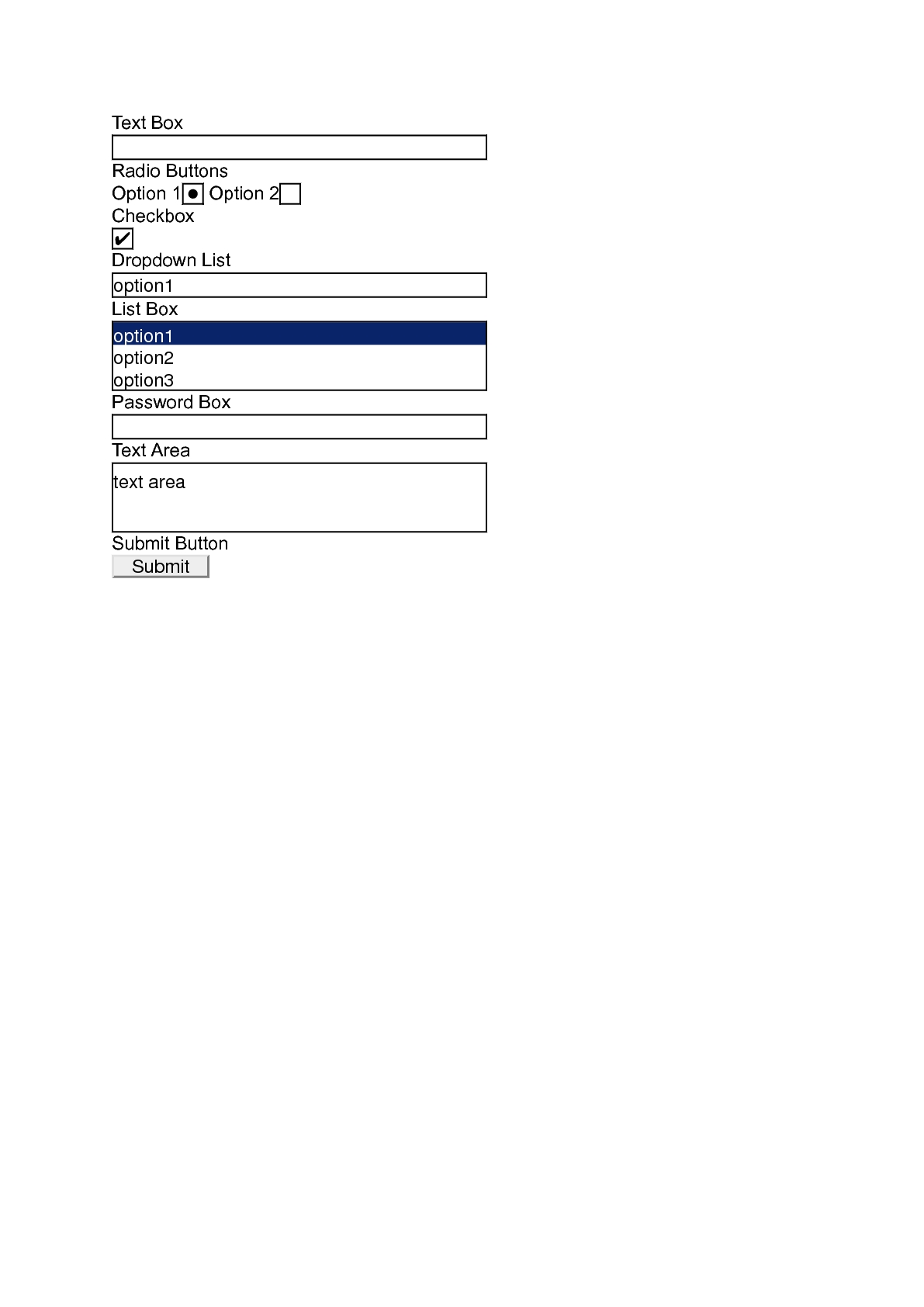
Exemple XSL-FO :
<fo:root hyphenation-push-character-count="1" hyphenation-remain-character-count="1" font-size="12pt" font-family="Arial" xmlns:fo="http://www.w3.org/1999/XSL/Format" xmlns:cpfo="http://www.compart.net/xmlns/cpfo" xmlns:svg="http://www.w3.org/2000/svg" xmlns:axf="http://www.antennahouse.com/names/XSL/Extensions">
<fo:layout-master-set>
<fo:simple-page-master master-name="simple">
<fo:region-body margin="1in"/>
</fo:simple-page-master>
</fo:layout-master-set>
<fo:page-sequence master-reference="simple">
<fo:flow flow-name="xsl-region-body">
<axf:form external-destination="http://some-fake-addess.com" field-submit-method="get">
<fo:block>
<fo:block>
Text Box
</fo:block>
<fo:block>
<axf:form-field field-type="text" color="black" field-name="textfield" width="20em" height="1.2em" border="1pt solid black"/>
</fo:block>
<fo:block>
Radio Buttons
</fo:block>
<fo:block>
Option 1
<axf:form-field border="1pt solid black" field-type="radio" field-checked="true" field-checked-style="circle" field-name="Radio" field-value="Option1" width="1em" height="1em"/>

     Option 2
<axf:form-field border="1pt solid black" field-type="radio" field-checked="false" field-checked-style="circle" field-name="Radio" field-value="Option2" width="1em" height="1em"/>
</fo:block>
<fo:block>
Checkbox
</fo:block>
<axf:form-field border="1pt solid black" field-type="checkbox" field-checked="true" field-checked-style="checkmark" width="1em" height="1em"/>
<fo:block>
Dropdown List
</fo:block>
<axf:form-field field-type="combobox" field-top-index="1" field-editable="false" width="20em" height="1.2em" border="1pt solid black">
<axf:form-field-option field-value="1">
option1
</axf:form-field-option>
<axf:form-field-option field-value="2">
option2
</axf:form-field-option>
<axf:form-field-option field-value="3">
option3
</axf:form-field-option>
</axf:form-field>
<fo:block>
List Box
</fo:block>
<axf:form-field field-type="listbox" field-top-index="1" field-multiple="false" width="20em" height="3.6em" border="1pt solid black">
<axf:form-field-option field-value="1">
option1
</axf:form-field-option>
<axf:form-field-option field-value="2">
option2
</axf:form-field-option>
<axf:form-field-option field-value="3">
option3
</axf:form-field-option>
<axf:form-field-option field-value="4">
option4
</axf:form-field-option>
<axf:form-field-option field-value="5">
option5
</axf:form-field-option>
<axf:form-field-option field-value="6">
option6
</axf:form-field-option>
</axf:form-field>
<fo:block>
Password Box
</fo:block>
<axf:form-field field-type="text" field-default-text="" field-multiline="false" field-scroll="false" field-password="true" field-maxlen="50" width="20em" height="1.2em" border="1pt solid black"/>
<fo:block>
Text Area
</fo:block>
<axf:form-field field-type="text" field-default-text="text area" field-multiline="true" field-scroll="true" field-password="false" field-maxlen="500" width="20em" height="3.6em" border="1pt solid black"/>
<fo:block>
Submit Button
</fo:block>
<axf:form-field field-type="button" field-name="SubmitButton" action-type="submit" field-button-layout="caption" field-button-face="Submit" width="5em" background-color="#eee" border="2px silver outset"/>
</fo:block>
</axf:form>
</fo:flow>
</fo:page-sequence>
</fo:root>Résultat :