

XML technologies / DocBook / Block elements / Graphics / Controlling image size
(Excerpt from "DocBook-XML: Media-neutral and platform-independent publishing" by Thomas Schraitle)
Correctly applying image height and width attribute values and understanding how they interact with other attributes is a frequent source of frustration.
The element imagedata has several attributes controlling how different rectangles interact:
- Viewport area ( viewport area)
This rectangle defines the available area in which the image is placed. Defining a viewport area of 5 cm × 6 cm reserves that space for the image, regardless of other dimensions.
- Content area ( content area)
This rectangle defines the dimensions of the displayed image, independently of its actual size. DocBook provides three mutually exclusive ways to specify the content area: directly, through a scaling factor, or by making it the same size as the viewport area.
- Intrinsic image size ( intrinsic size)
The actual dimensions of the image
If the content area is larger than the viewport area, the result depends on the publishing system. DocBook defines no mechanism for this case. A publishing system may clip the image, allow it to overflow, report an error, or combine these options.
Table: Image attributes
Area | Attributes |
Viewport area |
|
Content area | |
Scaling |
|
Alignment | Horizontal and vertical alignment of the content area within the viewport area; |
The following examples consider only the element imagedata. They require DocBook version 4.2 or later. The image file test.png is assumed to measure 2 cm × 2 cm.
Table: Viewport and content areas of an image (2 cm × 2 cm)
Image | Description |
| If nothing is specified, the content area has the same size as the image. The viewport size depends on the implementation. The value of the attribute |
| Produces an image 4 cm wide. Its height is scaled proportionally (the value of
|
| Produces a content area matching the image dimensions. However, the attribute |
| If a scaling factor is specified, the intrinsic image size is scaled uniformly to fit a content area. The viewport size depends on the implementation. |
| If both viewport and content areas are specified, the image is scaled to the content area, possibly non-uniformly. The content area is displayed within the specified viewport: |

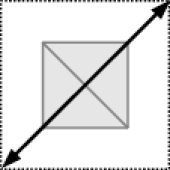
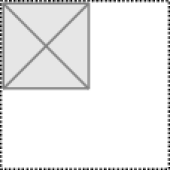
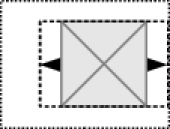
Some presentations are difficult to implement, depending on the target format. (X)HTML often requires compromises, and some attribute combinations may require extension functions from your XSLT processor.
Copyright © 2009 Millin Verlag
You may print the online version for your private use.
Otherwise, this chapter from "DocBook-XML: Medienneutrales und plattformunabhängiges Publizieren" is subject to the same provisions as the printed edition: the work, including all its parts, is protected by copyright. All rights are reserved, including reproduction, translation, microfilming, and storage and processing in electronic systems.
Millin Verlag, Siebengebirgsring 36, 53797 Lohmar, info(at)millin.de
back to top