

Software / antillesXML / Help / Settings
Change settings
Here you can see how to make settings on the parameters of the SAXON processor.
Further links to the SAXON processor:
Calling up the Settings window
Select the Settings entry in the antillesXML menu.
→ The Settings window appears.
Under Saxon Options you can find selectable, thematically grouped parameters for the transformations with the SAXON processor.
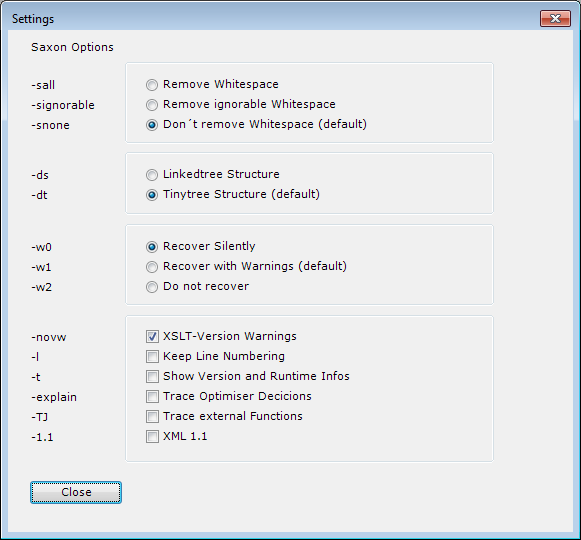
The Saxon Options sections under Settings
Whitespace
Dealing with whitespace

-sallRemove Whitespace
Choose the Remove Whitespace option next to the parameter name
-sall.With this setting all whitepace text nodes from the source document are removed prior to further processing.
This occurs independently of
<xsl:strip-space>declarations in the stylesheetor of
<xml:space>attributes in the source document.
-signorableRemove ignorable Whitespace
Choose the Remove ignorable Whitespace option next to the parameter name
-signorable.With this setting all ignorable whitespace text nodes from the source documents are removed prior to further processing.
This occurs independently of
<xsl:strip-space>declarations in the stylesheetor of
<xml:space>attributes in the source document.
→ Whitespace text nodes regularly are to be ignored in elements which are defined in such a way that they only shall have element contents.
-snoneDon't remove Whitespace (default)
Choose the Don't remove Whitespace (default) option next to the parameter name
-snone.With this setting no whitespace text nodes are removed prior to further processing.
Whitespace text nodes are only removed if this is defined in the stylesheet by
<xsl:strip-space>.Structure
Choosing the tree model
Calling up the implementation of the internal tree model.

Sourceforge: SAXON → Using Stylesheets → Choosing a tree model
-dsLinkedtree Structure
Choose the Linkedtree Structure option next to the parameter name
-ds.With this setting the 'standard tree' model is called up.
This setting is useful under aspects of performance in case nodes have to be processed by XPath several times.
-dtTinytree Structure (default)
Choose the Tinytree Structure (default) option next to the parameter name
-dt.With this setting the 'tiny tree' model is called up.
This model should, in particular, be used for large documents whose tree structures could possibly go beyond the scope of the storage.
Warnings
Dealing with error messages
Concerns the procedure for the dealing with recoverable errors in the stylesheet.

-w0Recover Silently
Choose the Recover Silently option next to the parameter name
-w0.With this setting errors are fixed without outputting a warning message.
-w1Recover with Warnings (default)
Choose the Recover with Warnings (default) option next to the parameter name
-w1.With this setting errors are fixed and an additional warning message is outputted.
-w2Do not recover
Choose the Do not recover option next to the parameter name
-w2.With this setting errors are not fixed, only warning messages are outputted.
Further Options
Various options
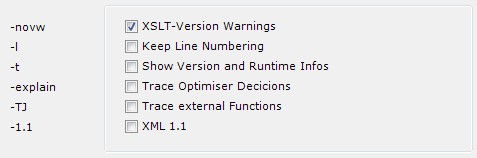
-novwXSLT-Version Warnings
Activate the XSLT-Version Warnings check box next to the parameter name
-novw.With this setting, warning messages are suppressed being outputted if a XSLT 2.0 processor runs stylesheets which require version 1.0.
-lKeep Line Numbering
Activate the Keep Line Numbering check box next to the parameter name
-l.With this setting the line numbering for all source documents is activated.
-tShow Version and Runtime Infos
Activate the Show Version and Runtime Infos check box next to the parameter name
-t.Display of version and runtime information for the default error output.
The output also traces the runtime of files
which are read and written
and of extension modules which are loaded.
-explainTrace Optimizer Decisions
Activate the Trace Optimizer Decisions check box next to the parameter name
-explain.-TJTrace external Functions
Activate the Trace external Functions check box next to the parameter name
-TJ.Activates the tracing for the binding of calls to external Java methods.
Is used for the diagnosis
why Saxon cannot locate certain Java methods,
whether the XQuery or the XSLT compiler has difficulties to locate self-written extension functions.
-1.1XML 1.1
Activate the XML 1.1 check box next to the parameter name
-1.1.This option has to be selected
if source documents using XML 1.1 are to be read
or if result documents are to be serialised as XML 1.1.