

XML technologies / SVG / Using complex graphic elements and formatting / Creating lines, triangles and freehand objects / Creating curves and circles
(Excerpt from “Das Einsteigerseminar SVG — Webgrafiken mit XML” by Helma Spona)
Besides lines and starting positions, other commands can be used in a path’s d attribute. Draw arcs, circles, semicircles or ellipses with the A command.
Note:
Alternatively use Bézier curve commands. A complete list of curve commands appears under Using paths correctly.
The A command has these parameters:
A rx ry x-axis-rotation large-arc-flag sweep-flag x y
It draws an ellipse from the current position to x/y. As with the <ellipse> tag, size and orientation use X and Y radii rx and ry. The parameter x-axis-rotation rotates the ellipse relative to the X axis. Its center is calculated automatically using large-arc-flag and sweep-flag.
Both accept only 0 and 1, corresponding to the Boolean values true and false. A diagram clarifies them. An arc drawn with the A command lies on an imaginary ellipse, but only the portion between start and end is visible. A line joining those points divides the ellipse into two possibly unequal parts. In the figure, the dashed line labeled "Achse" marks this axis. Each side contains an arc joining the endpoints. The parameter large-arc-flag selects the larger or smaller arc.
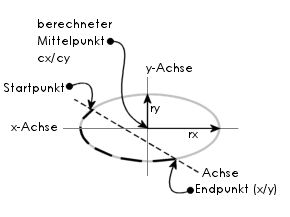
Figure: Drawing an arc with a virtual ellipse.
Note:large-arc means “large arc”. The term flag indicates a switch, here values 0 and 1.
Set large-arc-flag to 0 (=false) for the smaller arc, dashed black in the figure, or 1 (=true) for the larger gray arc. Either arc represents the lower or left part of the axis; the center lies right of or above it. To form a complete ellipse from two pieces, shift the center.
Use the parameter sweep-flag. Reflecting the ellipse across the axis preserves all defining data except its calculated center, which moves below the axis. Large and small arcs then lie on the opposite side. The parameter sweep-flag specifies this reflection, using the values 0 and 1.
The listing draws larger and smaller unreflected arcs, then a complete ellipse in two differently colored and weighted parts. Both axes are paths using the L instruction.
<?xml version="1.0" standalone="no"?>
...
<svg width="500" height="500">
  <path style="stroke:rgb(0,0,0);fill:none;stroke-width:2" d="M100 100 A30 20 0 0 0 90 130"/>
  <path style="stroke:rgb(222,222,222);fill:none;stroke-width:3" d="M100 100 A30 20 0 1 0 90 130"/>
  <path style="stroke:rgb(122,122,122);fill:none;stroke-width:1" d="M102 90 l-17 +60"/>
  <g transform="translate(100,100)">
    <path style="stroke:rgb(0,0,0);fill:none;stroke-width:2" d="M100 100 A30 20 0 1 0 90 130"/>
    <path style="stroke:rgb(222,222,222);fill:none;stroke-width:3" d="M100 100 A30 20 0 0 1 90 130"/>
    <path style="stroke:rgb(128,128,128);fill:none;stroke-width:1" d="M102 90 l-17 +60"/>
  </g>
</svg>
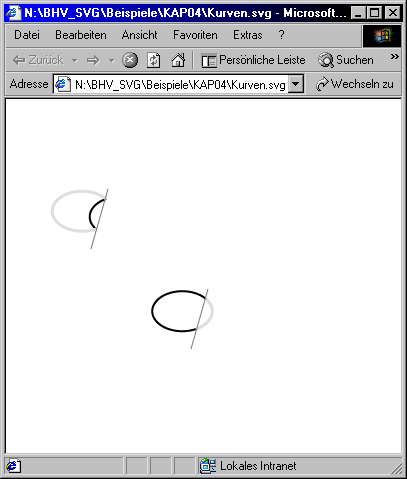
Figure: Paths created with A.
All four <path> tags using the A instruction share the values rx, ry, x, y and the start position. It is 100/100, defined by the M command. The target is 90/130, X radius 30 and Y radius 20. There is no rotation because x-axis-rotation is 0. Only two parameters differ: large-arc-flag and sweep-flag
To rotate curves, set the parameter x-axis-rotation to an angle in degrees, positive or negative. The example uses -35 degrees.
<?xml version="1.0" standalone="no"?>
...
<svg width="500" height="500">
  <path style="stroke:rgb(0,0,0);fill:none;stroke-width:2" d="M100 100 A30 20 -35 1 1 90 130"/>
  <path style="stroke:rgb(122,122,122);fill:none;stroke-width:2" d="M100 100 A30 20 -35 0 0 90 130"/>
  <path style="stroke:rgb(122,122,122);fill:none;stroke-width:1" d="M102 90 l-17 +60"/>
</svg>
Running the code rotates the ellipse and both paths. Gray fill marks the original position in the figure; the listing generates only the arcs and axis.
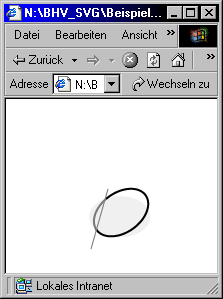
Figure: Rotated ellipse.
Copyright © verlag moderne industrie GmbH 2001
You may print the online version for your private use.
Otherwise, this chapter from “Das Einsteigerseminar SVG — Webgrafiken mit XML” is subject to the same conditions as the bound edition. The work, including all its parts, is protected by copyright. All rights reserved, including reproduction, translation, microfilming, and storage and processing in electronic systems.
verlag moderne industrie GmbH, Justus-von-Liebig-Straße 1, D-86899 Landsberg/Lech, fon ++49 (0) 81 91 / 125 – 0, leserservice(at)mi-verlag.de
back to top