

XML technologies / SVG / Using complex graphic elements and formatting / Creating lines, triangles and freehand objects / Drawing a triangle
(Excerpt from “Das Einsteigerseminar SVG — Webgrafiken mit XML” by Helma Spona)
A triangle needs three lines joining three coordinates. The SVG tag
<path d="M100 100 L150 200 L50 200 L100 100" style="stroke:rgb(255,0,0);fill:none"/>creates an isosceles triangle 100 pixels wide and high, with its upper corner at 100/100. The browser shows:
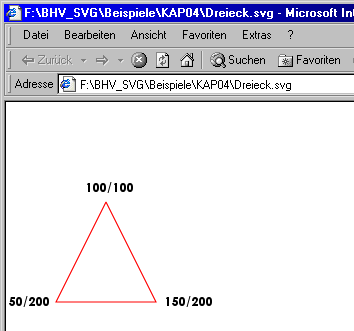
Figure: Triangle with its corner coordinates.
Note:
A visibly stroked path forming at least one angle is automatically filled with the stroke color. To prevent filling, explicitly set fill:none in the style attribute.
The path uses the same instructions as the earlier line. The instruction M100 100 sets the start; the first line’s endpoint 150/200 is set with L150 200. This also starts the next line to 50/200. The third returns to the start, closing the triangle.
Even complex shapes are straightforward when coordinates are known, but may require many coordinates. Moving the path then requires changing all of them.
Note:
Paths can also be grouped and moved with the transform attribute, or use the transform attribute directly in the <path> tag.
Another solution is relative coordinates. Only the start is absolute, set with the M instruction. All others specify positive or negative offsets from the start or previous line’s endpoint.
Note:
WebDraw converts relative paths to absolute ones when switching to layout view. Drag-and-drop positioning makes this harmless, but testing relative paths becomes inconvenient. Use a simple text editor if needed.
This tag creates the same triangle with relative coordinates:
<path d="M100 100 l50 100 l-100 0 l50 -100" style="stroke:rgb(255,0,0);fill:none"/>The start is again set with M100 100, followed by the L instruction, but relative instructions use lowercase letters. Instead of L use l followed by offsets: add 50 pixels to X and 100 to Y, again reaching 150/200 from the start.
Negative values subtract the specified pixels or units. Place the minus directly before the number, with no intervening space. The figure illustrates relative positions.
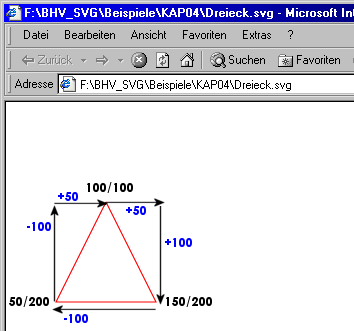
Figure: Drawing a triangle with relative coordinates.
Since only the start positions this relative path absolutely, change it without recalculating other coordinates.
Copyright © verlag moderne industrie GmbH 2001
You may print the online version for your private use.
Otherwise, this chapter from “Das Einsteigerseminar SVG — Webgrafiken mit XML” is subject to the same conditions as the bound edition. The work, including all its parts, is protected by copyright. All rights reserved, including reproduction, translation, microfilming, and storage and processing in electronic systems.
verlag moderne industrie GmbH, Justus-von-Liebig-Straße 1, D-86899 Landsberg/Lech, fon ++49 (0) 81 91 / 125 – 0, leserservice(at)mi-verlag.de
back to top