

XML technologies / CSS / Advanced websites with CSS / Adding some color / Tables with colored rows and borders
(Excerpt from “CSS − Advanced websites with Cascading Stylesheets” by Rachel Andrew & Dan Shafer)
Although this book tries to avoid HTML tables wherever possible, remember that they are also a purely semantic HTML tool. Presenting tabular data is a job you should always leave to HTML.
CSS can, however, make tables more readable and attractive. The following figure shows a very plain HTML table. Few of us would publish such a sparsely styled table, but it is a useful starting point. (Note: this example is somewhat artificial. For historical reasons, browsers give all tables a one-pixel border by default. Here that border has been removed, either with CSS or the obsolete but widely used attribute border set to 0.)
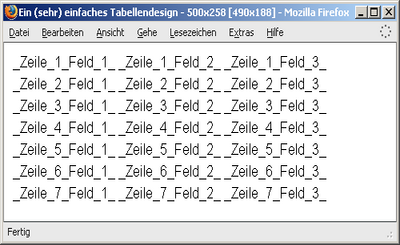
Figure: A very simple table design.
This table is very hard to read: it lacks borders separating the data, and its small cells make entries’ rows and columns difficult to identify. CSS will solve both problems.
Below is the table’s HTML after adding a few simple rules. An external stylesheet might be excessive in this example, although generally considered good design practice.
<!DOCTYPE html PUBLIC "-//W3C//DTD XHTML 1.0 Strict//EN" "http://www.w3.org/TR/xhtml11/DTD/xhtml1-strict.dtd">
<html xmlns="http://www.w3.org/1999/xhtml">
<head>
  <title>Wechselnde Tabellenzeilen mit CSS-Regeln einfaerben</title>
  <meta http-equiv="Content-Type" content="text/html; charset=iso-8859-1" />
  <style type="text/css">
  body {
    background-color: #FFFFFF;
    font-family: helvetica, arial, sans-serif;
  }
  .grau {
    background-color: lightgrey;
  }
  .gelb {
    background-color: yellow;
  }
  table {
    border: 1px solid black;
    border-spacing: 0;
  }
  td {
    border: 1px solid black;
    padding: 4px 6px;
  }
  </style>
</head>
<body>
  <table>
    <tr class="grau">
      <td>_Zeile_1_Feld_1_</td>
      <td>_Zeile_1_Feld_2_</td>
      <td>_Zeile_1_Feld_3_</td>
    </tr>
    <tr class="gelb">
      <td>_Zeile_2_Feld_1_</td>
      <td>_Zeile_2_Feld_2_</td>
      <td>_Zeile_2_Feld_3_</td>
    </tr>
    <tr class="grau">
      <td>_Zeile_3_Feld_1_</td>
      <td>_Zeile_3_Feld_2_</td>
      <td>_Zeile_3_Feld_3_</td>
    </tr>
    <tr class="gelb">
      <td>_Zeile_4_Feld_1_</td>
      <td>_Zeile_4_Feld_2_</td>
      <td>_Zeile_4_Feld_3_</td>
    </tr>
    <tr class="grau">
      <td>_Zeile_5_Feld_1_</td>
      <td>_Zeile_5_Feld_2_</td>
      <td>_Zeile_5_Feld_3_</td>
    </tr>
    <tr class="gelb">
      <td>_Zeile_6_Feld_1_</td>
      <td>_Zeile_6_Feld_2_</td>
      <td>_Zeile_6_Feld_3_</td>
    </tr>
    <tr class="grau">
      <td>_Zeile_7_Feld_1_</td>
      <td>_Zeile_7_Feld_2_</td>
      <td>_Zeile_7_Feld_3_</td>
    </tr>
  </table>
</body>
</html>
The embedded stylesheet contains the classes grau and gelb. The rows tr alternate between these two classes. Two other rules give table and td a one-pixel black border, providing a clear outer table border and dividing lines between cells. The following figure shows the result:
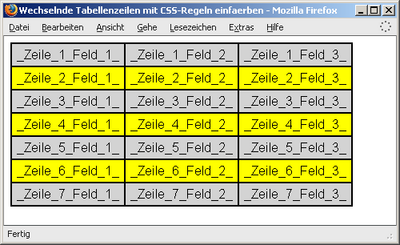
Figure: A readable table with colored rows.
The table is now much more readable. There are further design possibilities, but we already have a more appealing starting point for additional improvements.
Less frequently used HTML table elements, such as heading elements th and thead and column grouping features (colgroup), provide further tools for professional, highly readable data tables. In The table we will develop a complete, complex example.
Copyright © 2006 of the German translation, dpunkt.verlag GmbH
You may print the online version for your private use.
Otherwise, this chapter from “CSS − Anspruchsvolle Websites mit Cascading Stylesheets” is subject to the same conditions as the bound edition: the work, including all its parts, is protected by copyright. All rights reserved, including reproduction, translation, microfilming, and storage and processing in electronic systems.
dpunkt.verlag GmbH, Ringstraße 19, 69115 Heidelberg
back to top