

XML technologies / CSS / Advanced websites with CSS / Adding some color / Eye-catching colored text boxes
(Excerpt from “CSS − Advanced websites with Cascading Stylesheets” by Rachel Andrew & Dan Shafer)
Coloring text, backgrounds and borders looks good and is not particularly complicated. Used correctly, it can greatly improve a page’s usability. We will examine two examples where color does more than decorate a page.
Written documents often need to direct readers’ attention to the most important information. Black-and-white print uses typographic devices such as boxes, different font styles and marginal notes for this purpose.
On a web page, we can combine these typographic techniques with color, without even needing a table-based design. The page shown below in Using color for eye-catching text boxes uses only semantic HTML and CSS.
Below is the HTML for the page in that figure.
<!DOCTYPE html PUBLIC "-//W3C//DTD XHTML 1.0 Strict//EN" "http://www.w3.org/TR/xhtml11/DTD/xhtml1-strict.dtd">
<html xmlns="http://www.w3.org/1999/xhtml">
  <head>
    <title>Einsatz von Farben fuer auffaellige Textkaesten</title>
    <meta http-equiv="Content-Type" content="text/html; charset=iso-8859-1" />
    <link rel="stylesheet" href="froaster.css" type="text/css" media="All" />
  </head>
  <body>
    <h1>Wie man einen Froaster repariert</h1>
    <p>Sie sind also der stolze Besitzer eines neuen Froasters. Und Sie konnten gar nicht erwarten, endlich einen eigenen zu besitzen. Was aber, wenn Ihr Froaster nun einfach aufhört zu funktionieren? Er froastet nicht mehr und liegt nun einfach so auf dem Tisch, mit einem vorwurfsvollen Blick direkt auf Sie gerichtet, der sagt: Du bist Schuld, dass ich mich nicht mehr rühren kann!</p>
    <p>Was sollen Sie tun?</p>
    <p>Reparieren Sie ihn doch einfach!</p>
    <div class="vorsicht">Sie müssen sehr vorsichtig sein, wenn Sie sich einem scheinbar toten Froaster nähern. Diese kleinen Dinger spielen gerne "toter Mann" und können sich ganz plötzlich "wiederbeleben". Pieken Sie den Froaster zunächst mit einem Stock von mindestens zwei Meter Länge in die Seite und stellen Sie sicher, dass er sich wirklich nicht mehr rührt.</div>
    <p>Bevor Sie nun beginnen, Ihren Froaster zu reparieren, empfehlen wir ausdrücklich, zuerst seinen Stecker aus der Steckdose zu ziehen.</p>
    <div class="gefahr">Es kann wirklich passieren, dass Sie bös einen gewischt kriegen, wenn Sie sich nicht genau an unsere Anweisungen halten. Eigentlich ist es ja Ihre Sache, wenn Sie das Zeitliche segnen wollen. Ihr Froaster kann aber nichts dafür und möchte nicht auf einmal ganz allein dastehen. Seien Sie also bitte vorsichtig!</div>
    <p>Okay, nun sind wir bereit und können mit der Reparatur beginnen.</p>
  </body>
</html>
As you can see, our document uses only two style classes, vorsicht and gefahr. Both use class selectors rather than ID selectors so that they can be assigned to any number of elements.
The stylesheet for the two classes is as follows:
.vorsicht {
  text-align: center;
  font-weight: bold;
  background-color: gray;
  color: black;
  margin-left: 20%;
  margin-right: 20%;
  border: 1px solid red;
}
.gefahr {
  text-align: center;
  font-size: 1em;
  font-weight: bold;
  background-color: red;
  color: white;
  margin-left: 20%;
  margin-right: 20%;
  border: 3px solid red;
}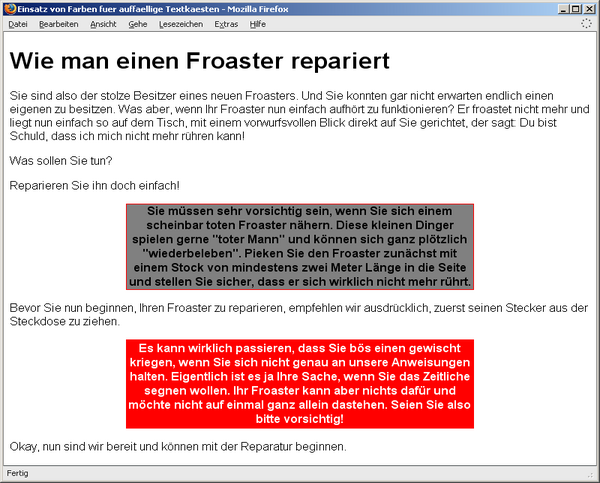
Figure: Using color for eye-catching text boxes.
Both rules combine background and text colors to attract attention, and each also creates a conspicuous position. This example also shows how CSS makes HTML easier to read and maintain than nested tables.
Copyright © 2006 of the German translation, dpunkt.verlag GmbH
You may print the online version for your private use.
Otherwise, this chapter from “CSS − Anspruchsvolle Websites mit Cascading Stylesheets” is subject to the same conditions as the bound edition: the work, including all its parts, is protected by copyright. All rights reserved, including reproduction, translation, microfilming, and storage and processing in electronic systems.
dpunkt.verlag GmbH, Ringstraße 19, 69115 Heidelberg
back to top