

XML technologies / ePUB / ePub für (In)Designer / Book features / Adding a table of contents / Creating a table of contents
(Excerpt from “ePub für (In)Designer — Mit InDesign Schritt für Schritt zum E-Book” by Sascha Heck & Yves Apel)
A proper contents needs manual editing and hyperlinks. You can still generate it with InDesign, then detach its automation, just as when preparing contents for a printed book.
In the menu Layout click Table of Contents. The next dialog contains all settings for automatic generation.
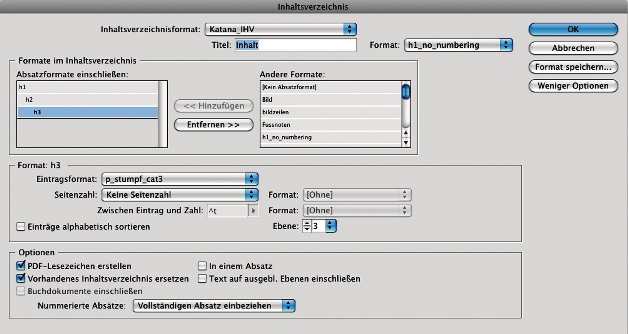
Figure: Automatically generating contents.
The comprehensive dialog builds contents from document paragraph styles. Select styles under Other Styles and click Add. Selecting an entry on the left under Include Paragraph Styles lets you use the section Style to define a paragraph style controlling its appearance. For Page Number select No Page Number: e-book navigation uses links rather than page numbers. Level specifies hierarchy. With the Book panel, also check Include Book Documents. Confirming with OK loads the cursor; click in the text area to place the contents.
The frame is still linked to automatic contents. To detach it because of the bug, select all its text and copy it. Delete the frame and paste anew with Ctrl + V. Formatting remains, but the automatic link is cut: every later change must be manual.
Copyright © dpunkt.verlag GmbH 2012
You may print the online version for your private use.
Otherwise, this chapter from “ePub für (In)Designer” is subject to the same terms as the printed edition: the work and all its parts are protected by copyright. All rights reserved, including reproduction, translation, microfilming, and storage and processing in electronic systems.
dpunkt.verlag GmbH, Wieblinger Weg 17, 69123 Heidelberg, fon 06221-14830, fax 06221-148399, hallo(at)dpunkt.de
back to top