

XML technologies / ePUB / ePub für (In)Designer / Book features / Adding a table of contents / The table-of-contents style bug
(Excerpt from “ePub für (In)Designer — Mit InDesign Schritt für Schritt zum E-Book” by Sascha Heck & Yves Apel)
Familiar InDesign book features suggest automatically generating contents through Layout → Table of Contents. For print this is excellent: page numbers are automatic and contents can be updated when titles change. E-book production, however, has a problem: InDesign allows only one contents style, also used for the e-book. Suppose navigation should include only main chapters with the paragraph style h1 but the book’s contents needs h1, h2 and h3, it will not work. InDesign always uses the style selected in Export Options. Hopefully a later version will fix this. Worse, using the same style for navigation and contents makes InDesign omit the contents page from ePub, creating only navigation.
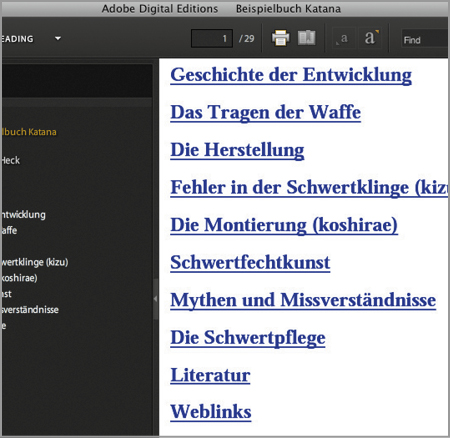
Figure: Even with two styles, InDesign uses one for both navigation and contents. Subchapters are missing; entries are unformatted, too large and without numbering or indentation.
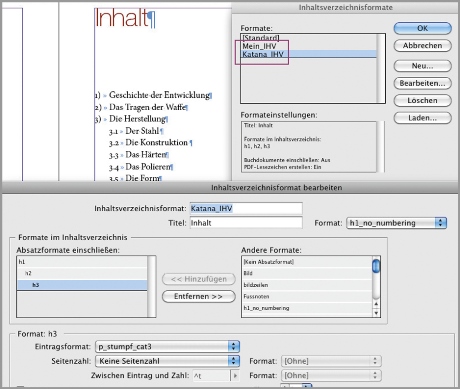
Figure: Beside Mein_IHV for navigation, Katana_IHV was created for contents inside the book. Logical as it seems, this does not work for ePub export.
Copyright © dpunkt.verlag GmbH 2012
You may print the online version for your private use.
Otherwise, this chapter from “ePub für (In)Designer” is subject to the same terms as the printed edition: the work and all its parts are protected by copyright. All rights reserved, including reproduction, translation, microfilming, and storage and processing in electronic systems.
dpunkt.verlag GmbH, Wieblinger Weg 17, 69123 Heidelberg, fon 06221-14830, fax 06221-148399, hallo(at)dpunkt.de
back to top